Policy V2: Read-only
Overview
Policy V2 is the enhanced version of Fenergo’s centralised configuration framework for defining Data, Document, eSignature, and Related Party requirements across the platform. It determines what information is required, when it is required, and for whom, ensuring journeys remain consistent and compliant across Entity Types and Jurisdictions.
In this first iteration, Policy V2 is read-only. Users can view existing policy configurations in the new Policy V2 user interface but cannot create, edit, publish, archive, or manage policies within Policy V2.
Policy V1 continues to drive all runtime behaviour in this release. There is no impact to live journeys, integrations, or policy execution.
What's available
In this first iteration you can
- View Policies and their associated Entity Types
- View how requirements are scoped using Jurisdiction tagging
- View requirement groupings (Data, Document, eSignature, Related Party), where configured
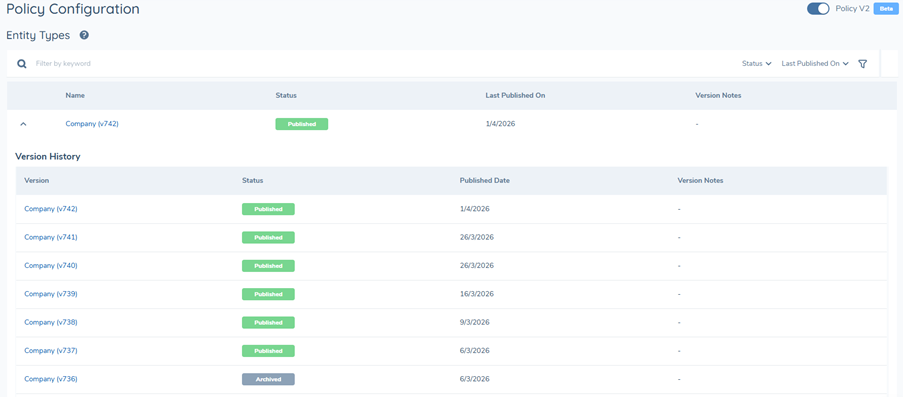
- View Policy version history and lifecycle state (Draft, Published, Archived), where available
- Review configuration structure ahead of the editable release
You cannot
- Create or modify Policies
- Add, update or delete requirements
- Create, rename, delete, or publish Workspaces
- Publish new versions or archive existing versions
All configuration actions must continue to be performed using existing Policy V1 processes.
Policy V1 to Policy V2: Structural Changes
Policy V2 introduces a fundamental change in how policies are structured and maintained.
Policy V1
In Policy V1, policies are created and managed at a Jurisdiction level. Each jurisdiction requires a separate policy.
Policy V2
Now, Policies are defined at the Entity Type level. Jurisdiction-specific behaviour is controlled by applying Jurisdiction tags to individual requirements within the Entity Type policy.
This model:
- Reduces policy duplication
- Centralises configuration by Entity Type
- Maintains jurisdictional control at requirement level
Migration from Policy V1 to Policy V2
Existing Policy V1 configurations have been migrated into the Policy V2 structure so they can be viewed in the new structure.
From a user perspective:
- No action is required
- Policy V1 remains the source of truth for configuration changes
- Policy V2 should be used for visibility and familiarisation only
Migration does not alter the effective behaviour of Published policies.
The migration will happen automatically, and then subsequent migrations will happen each time you publish a policy in V1.
How Migration Works
In Policy V1, policies are structured by Jurisdiction.
In Policy V2, policies are structured by Entity Type.
During migration:
- Jurisdiction-based policies are consolidated into a single policy per Entity Type (for example: Individual, Company, Entity Group, Other).
- Requirements from relevant jurisdictional policies are combined into the corresponding Entity Type policy.
- Jurisdiction-specific behaviour is maintained using Jurisdiction tags on individual requirements.
- Archived versions of jurisdictional policies are also included in the migration.
Version History Migration
Where version history exists in Policy V1, historical versions are reconstructed in Policy V2 to preserve chronological integrity.
For each point in time:
- The earliest valid Published version for each jurisdiction is identified. For that point in time, the applicable versions of the other jurisdictions are also determined.
- These jurisdictional versions are combined to form the corresponding Entity Type version.
- For a jurisdictional policy:
- The latest version is archived → The V2 entity type version is created based on the archived version for the specified jurisdiction and its corresponding jurisdictions at that point in time. That V2 version is then archived. A new version is created using the latest published version for that jurisdiction. This is so inflight journeys can still work off a published version
- There are multiple archived versions in succession → Only the most recent archived version is marked as archived. A new version is then created in V2 using the latest published version for that jurisdiction.
- All versions archived → That jurisdiction is excluded from the merge process.
This ensures that:
- The policy’s version history is retained
- Published behaviour remains consistent
- No unintended configuration changes are introduced
Migration Examples
The examples below demonstrate how jurisdiction-based policies in Policy V1 are consolidated into Entity Type–based policies in Policy V2.
Example 1: The latest jurisdiction is marked as Archived
During the merge from V1 jurisdiction-based policies to the V2 entity type policy, each V2 version is created by combining the latest applicable versions from Global and each jurisdiction. If a jurisdiction’s latest version is archived (as shown for France V3), the merge instead uses the most recent published version (France V2). The resulting merged version is published, while any prior merged version (e.g., V4) is set to archived. This ensures that only valid, published jurisdictional versions are carried forward into the latest V2 entity type policy.

Example 2: Multiple jurisdictions have archived versions
When multiple jurisdictions have archived versions (e.g., Spain V2 and France V3), the V2 entity type policy is built by merging the corresponding jurisdiction versions at each point in time. If any jurisdiction version included in the merge is archived, the resulting merged V2 version is also marked as archived (e.g., V4 and V5). The migration then generates a new version using the most recent published versions for those jurisdictions (Spain V1 and France V2), which becomes the active published version. This approach preserves the full archived history while ensuring that only valid, published policies are used for active and in-progress journeys.

Example 3: Two versions of the jurisdiction are archived in a row
In this example, two consecutive versions for France (V2 and V3) are archived. During migration to V2, these versions are included in the merge to create the entity type policy, but only the most recent merged version is marked as archived. A new version (V5) is then created and published using the latest available published version for France (V1). This approach preserves the archived history while ensuring that active policies remain available for in-progress journeys.
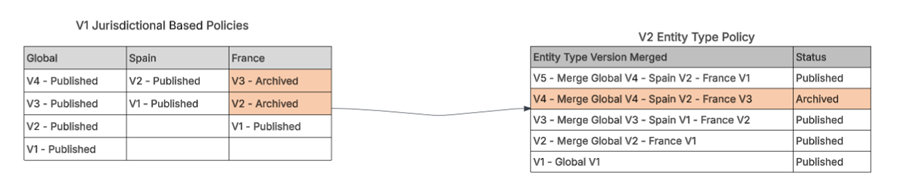
Example 4: Archived version in the middle of version sequence
In this example, an archived version appears in the middle of the version sequence (France V2), while all other versions remain published. During migration to V2, each entity type version is created by merging the corresponding jurisdiction versions at each point in time. The archived version does not impact the overall migration, and all resulting V2 entity type versions are created and retained as published. This ensures a complete version history is preserved while maintaining all policies as active and available for in-progress journeys.

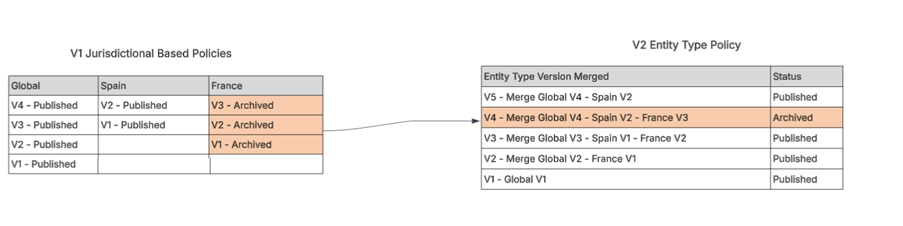
Example 5: All versions of a jurisdiction are archived
In this example, all versions for France are archived. During migration to V2, the latest published merged version excludes France, as there is no active published version available for that jurisdiction. However, earlier merged versions still include France, where it is represented as archived. This approach ensures that historical policy versions are preserved while only active jurisdictions are included in the latest published policy.
Accessing Policy V2
From the Policy domain:
Navigate to the Configuration area.
Enable the Policy V2 toggle.

The Policy V2 interface will load.
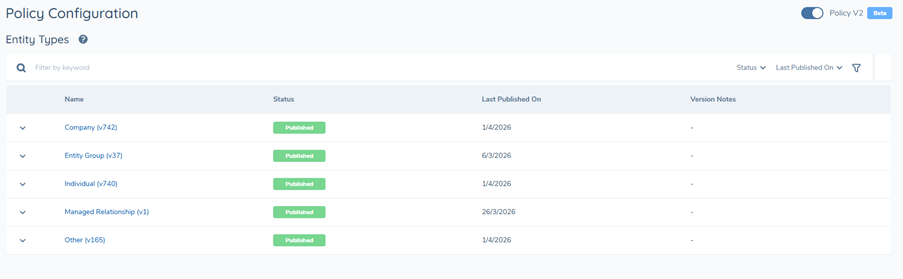
In this release, the V2 UI supports:
- Discovery of migrated configuration
- Review of Entity Type-based policy structure
- Review of Jurisdiction tagging at requirement level
- Review of lifecycle state and version metadata (where available)
Policies, Entity Types and Jurisdictions
Entity Type-Based Policies
In Policy V2, each policy is associated with a single Entity Type (for example: Individual, Company, Entity Group, or Other).
The Entity Type policy defines the base set of requirements that may apply across multiple jurisdictions.
Jurisdiction tagging
Jurisdictions are no longer the primary organising layer for policies. Instead, applicability is controlled by assigning Jurisdiction tags to individual requirements within an Entity Type policy. A single requirement may have one or more jurisdiction tags.
This enables jurisdictional variation without requiring separate policies.
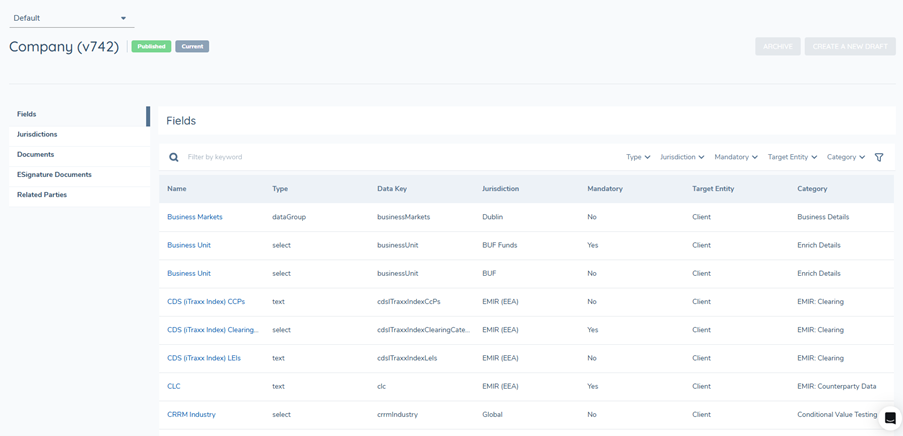
Viewing a Policy
When navigating to a Policy in read-only mode, you can review:
- The Policy’s associated Entity Type
- Requirement groupings (Data, Document, eSignature, Related Party)
- The scope of each requirement (Jurisdiction tags)
- Version number and lifecycle state
- Historical versions (where available)
Workspaces
Workspaces are a core enhancement in Policy V2. They provide isolated environments where users can make configuration changes independently or collaboratively without impacting the currently published version.
In this iteration:
- A Default Workspace may be visible in the UI
- Workspace creation, modification, publishing, and deletion are not available
- No configuration changes can be made within any Workspace
This section is included for awareness ahead of the editable Policy V2 release.
Versioning and Lifecycle (view Only)
Policy V2 introduces full version control. In future releases, publishing from a Workspace will create a new Policy version.
In this release, version information may be visible but is not editable.
Lifecycle Statuses
A Policy version can be in one of the following states:
- Draft – A working version (not editable in this release)
- Published – The active read-only version referenced by other domains
- Archived – A retired read-only version retained for audit and reference
Version History
Where available, users can open previous versions in read-only mode to review configuration and validate historical requirements.
Permissions
Access to Policy V2 is controlled by tenant permissions and role entitlements.
In this iteration:
- Users have view-only access
- Editing, Workspace management, publishing, and archiving capabilities are not enabled
- UI elements related to editing may be hidden or disabled during this read-only iteration of V2
Purpose of this read-only release
This read-only release is intended to:
- Provide early visibility of the migrated Policy V2 structure
- Support familiarisation with Entity Type-based policies
- Introduce Jurisdiction tagging as the new scoping model
- Enable validation of migrated configuration presentation prior to enabling editing capabilities
What's Next
Future iterations will introduce active management of Policy V2 configuration, including:
- Creating and managing Workspaces
- Editing policy requirements within a Workspace
- Jurisidctional tagging
- Publishing new policy versions
- Managing Draft, Published, and Archived lifecycle states
These capabilities will build on the migrated structure introduced in this release.