Overview
Fenergo Transaction Monitoring enables financial institutions to monitor, detect, and act on suspicious transaction activity. It provides a rules-based engine that evaluates transactions against configurable thresholds and patterns, supporting compliance with Anti-Money Laundering (AML) and Counter-Terrorism Financing (CTF) regulations.
This section of the Developer Hub focuses on how to integrate with the Transaction Monitoring platform using the Batch APIs. The batch integration model is designed for high-volume, scheduled ingestion of transaction data followed by scheduled rule execution.
- CLM entity data is now included within the scalable engine implementation. As a result, the CLM Rules Hub feature is no longer required for building business rules.
- Recommended usage pattern: upload all batches first, then trigger a single rule execution that includes multiple rules. Triggering multiple rule executions results in sequential processing — since validations are performed before each rule run, executing multiple runs will lead to increased processing times.
API Integration Architecture
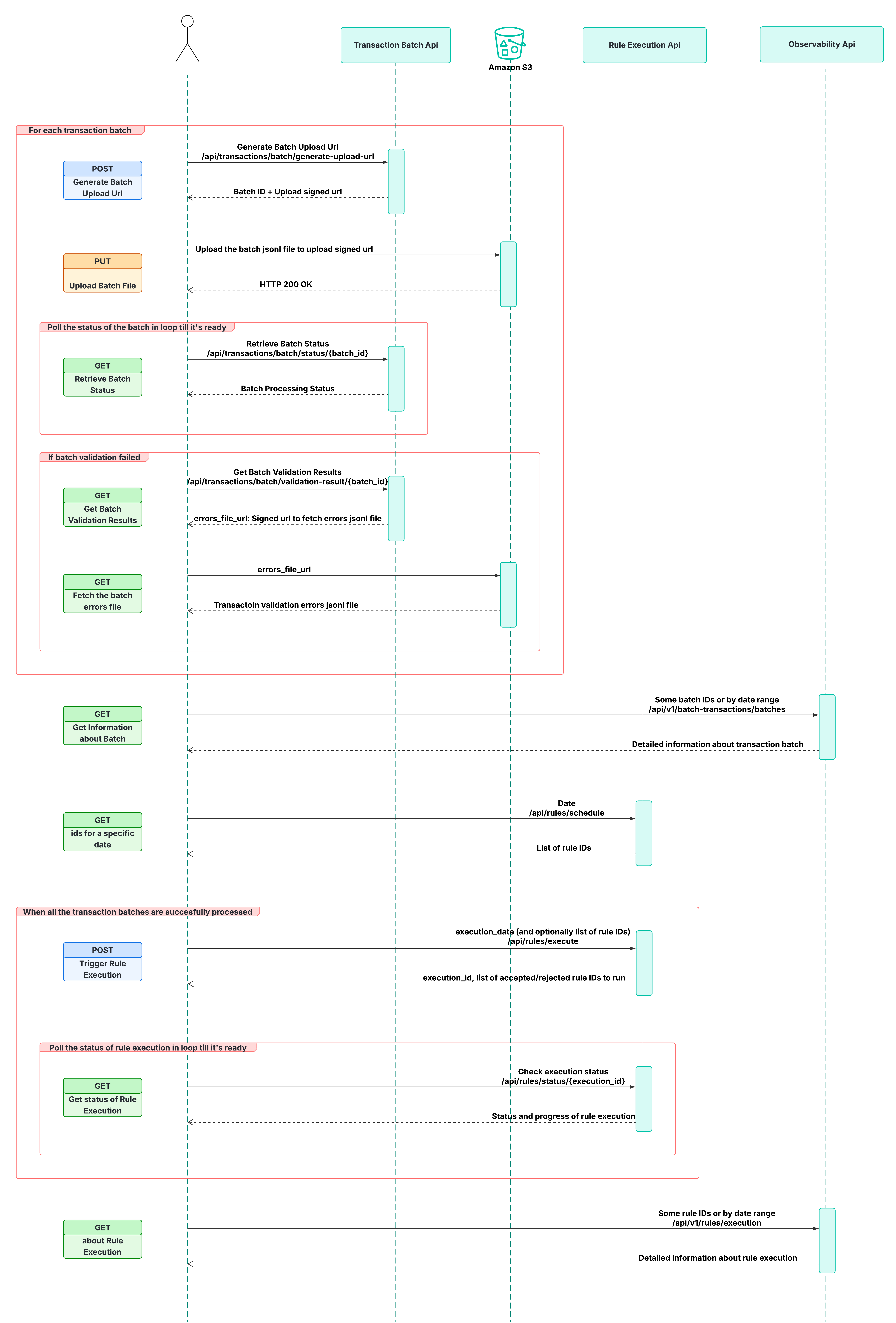
The following diagram illustrates the high-level API integration architecture for Transaction Monitoring batch processing, showing how client systems submit transaction batches, trigger rule execution, and monitor processing status.
Batch Integration Flow
The typical batch integration follows a sequential workflow: authenticate → upload transactions → validate → execute rules → monitor status. Each step is described below.
1. Authentication
Transaction Monitoring APIs use OAuth2 Client Credentials for authentication, which differs slightly from the standard Fenergo CLM authentication flow. A valid access token must be obtained before calling any of the batch endpoints.
- Use the
client_id,client_secret, and tenant scope provided by the Customer Success Team. - Cache the access token for its full lifetime (typically 15 minutes) to avoid throttling.
For full details, refer to the Transaction Monitoring API Authentication guide. Each API also enforces its own per-tenant rate limit, so design your integration to handle 429 responses.
2. Batch Transaction Upload
Client systems upload transaction data in bulk using the Transaction Batch API. This is the primary method for submitting transactions to Transaction Monitoring.
The batch upload workflow consists of three steps:
- Request a pre-signed upload URL — Call the
Generate Batch Upload Urlendpoint to receive a pre-signed S3 URL and a unique batch ID for tracking. - Upload the batch file — Use the pre-signed URL to upload a JSONL file (up to 2 GB) where each line represents a single transaction.
- Check batch status — Poll the
Retrieve Batch Statusendpoint using the batch ID to track processing progress through its lifecycle:VALIDATION_STARTED→PENDING_INGESTION→INITIALIZED→IN_PROGRESS→PROCESSED.
Each entity in a transaction must be either a known CLM entity (identified by by_external_id) or an unknown entity (defined with external_entity_type). These two methods are mutually exclusive per entity. The main entity of the transaction must always be a known, fully onboarded CLM entity.
3. Batch Validation
After upload, the batch undergoes automatic validation before ingestion begins. Validation results can be retrieved via the Get Batch Validation Results endpoint. Key checks include:
- Modification ID uniqueness — All modification IDs must be unique within the batch. Duplicates are rejected.
- Entity validation — Each entity must conform to one of the two allowed formats (known CLM entity or unknown entity with required details).
If validation fails, a downloadable validation report is made available via a pre-signed URL.
4. Rule Execution
Once batch ingestion is complete, scheduled rules can be triggered using the Rule Execution API. This allows clients to execute monitoring rules against the ingested transaction data.
- Execute all scheduled rules — Provide only the
execution_dateto run all live rules scheduled for that date. - Execute specific rules — Provide
execution_datealong withrule_idsto target specific rules. - Re-execute rules — Set the
forceflag totrueto re-run rules that have already executed for a given date.
Rule execution does not occur immediately if transaction or entity ingestion is still in progress. Once ingestion completes, the rules automatically execute based on the submitted request.
5. Monitoring and Observability
After triggering rule execution, clients can monitor progress and export results:
- Use the Rule Execution Status endpoint to track the progress of a specific execution using the
execution_idreturned in the rule execution response. - Use the Observability API to retrieve operational metrics and pipeline health.
Regions and Disaster Recovery
Transaction Monitoring is deployed across multiple AWS regions with in-region multi-AZ disaster recovery. For details on available regions and DR capabilities, see Transaction Monitoring Regions and Disaster Recovery.
Further Reading
- Transaction Batch API — Full specification for batch transaction upload.
- Rule Execution API — Full specification for triggering and monitoring rule execution.
- API Rate Limits — Per-tenant limits for each Transaction Monitoring endpoint.
- Transaction Monitoring Regions and DR — Deployment regions and disaster recovery strategy.