Overview
Integration Flows is Fenergo’s Integration PaaS. It includes a low/no-code design environment fully managed on Fenergo’s SaaS platform, enabling users to build, customize, and deploy integrations directly from within the Fenergo UI.
With simple and intuitive out-of-the-box tooling, Flow Studio empowers users to design, deploy, and maintain integration workflows without the need for external middleware or complex coding. Clients can quickly develop and deploy a complete end-to-end solution faster than ever before!
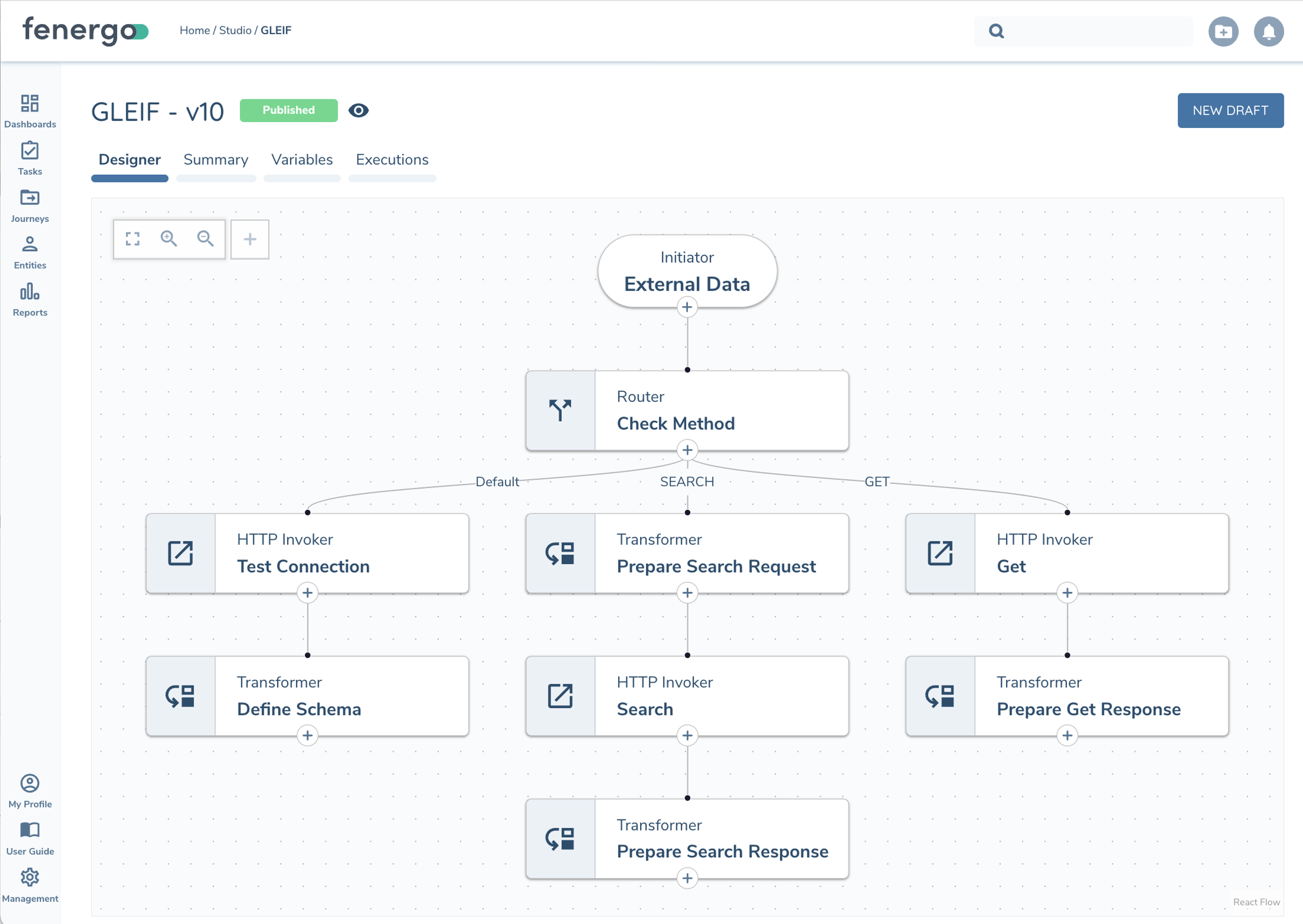
Flow Initiators
Flows can be triggered in multiple ways to solve for various integration use cases.
-
Journey (via new Flow Task) - With the new Integration Flow Task you can design your Journey to include any number of Flows. As a journey task, the Flow can run in parallel to your Business Process or block the process until completed successfully. The task will autocomplete when successful and allows end users to rerun on failure.
-
External Data Adapter - External Data Adapters can be used to review and import data from External systems such as an MDM or Data Provider’s like Orbis. Previously Clients needed to host a middleware to receive Fenergo External Data Requests and map that to their Data Provider. Now that translation can be built directly in Fenergo.
-
Policy Adapters - Policy Adapters provide dynamic content within Journey Task UI such as Field / DataGroup Searching and Custom Validation.
-
External API - Clients can trigger a Flow via our generic HTTP REST endpoint that lets you design your own input into the Flow Execution.
-
Schedule - Flows can be scheduled to run once or repeatedly via the Flow Scheduler.
Flow Tasks
Integration Flows includes pre-built tasks that perform specific actions like extracting data, calling APIs, or routing information. Users can visually design integrations by dragging and connecting these tasks, enabling quick and flexible workflows without coding.
- Supergraph – Extracts data from Fenergo using a prepared query. Datasets are grouped and can be included via toggle. Returns query and distinct Entities/Products.
- Event Ingress – Flows use Event Ingress events to update data and interact with the ongoing Journey
- Transformer - Write your own custom Typescript code to manipulate data. Includes built-in functions to allow for logging details, access Reference Lists, raise custom errors, etc.
- Mapper – An alternative to using the Transformer task to transform data between schemas. Clients can model their schemas and use our Mapping UI to map fields from source to target schema.
- HTTP Invoker – Interact with web APIs (synchronous)
- Router – Evaluates conditions to choose between multiple paths the flow could take next (e.g. If Entity Type is Company do X, Else If Individual do Y, Else do something else)
- and more...
Variable Management
Integration Flows allows you to define and use dynamic values — both locally and gobally across all your flows. This allows for flexible, reusable, and consistent integrations, helping you manage data such as API keys, environment settings, or runtime inputs, with ease and precision.
- Flow - Store reusable values here that can be referenced in multiple places in your Flow
- Global - Store shared values that change between environments here (e.g. BaseUrl in Dev might be
https://dev.host.combut in production the value would behttps://api.host.com) - Tasks - Output from previous tasks
- Execution - Runtime details
- Execution State – Editable via Transformer code, persisted throughout Execution
IntelliSense dropdowns and popups list available variables/datatypes or code completion

Monitoring
Running Flows (Executions) can be monitored through Fenergo's Integration Hub, or integrate with your own monitoring infrastructure via Event Notifications.
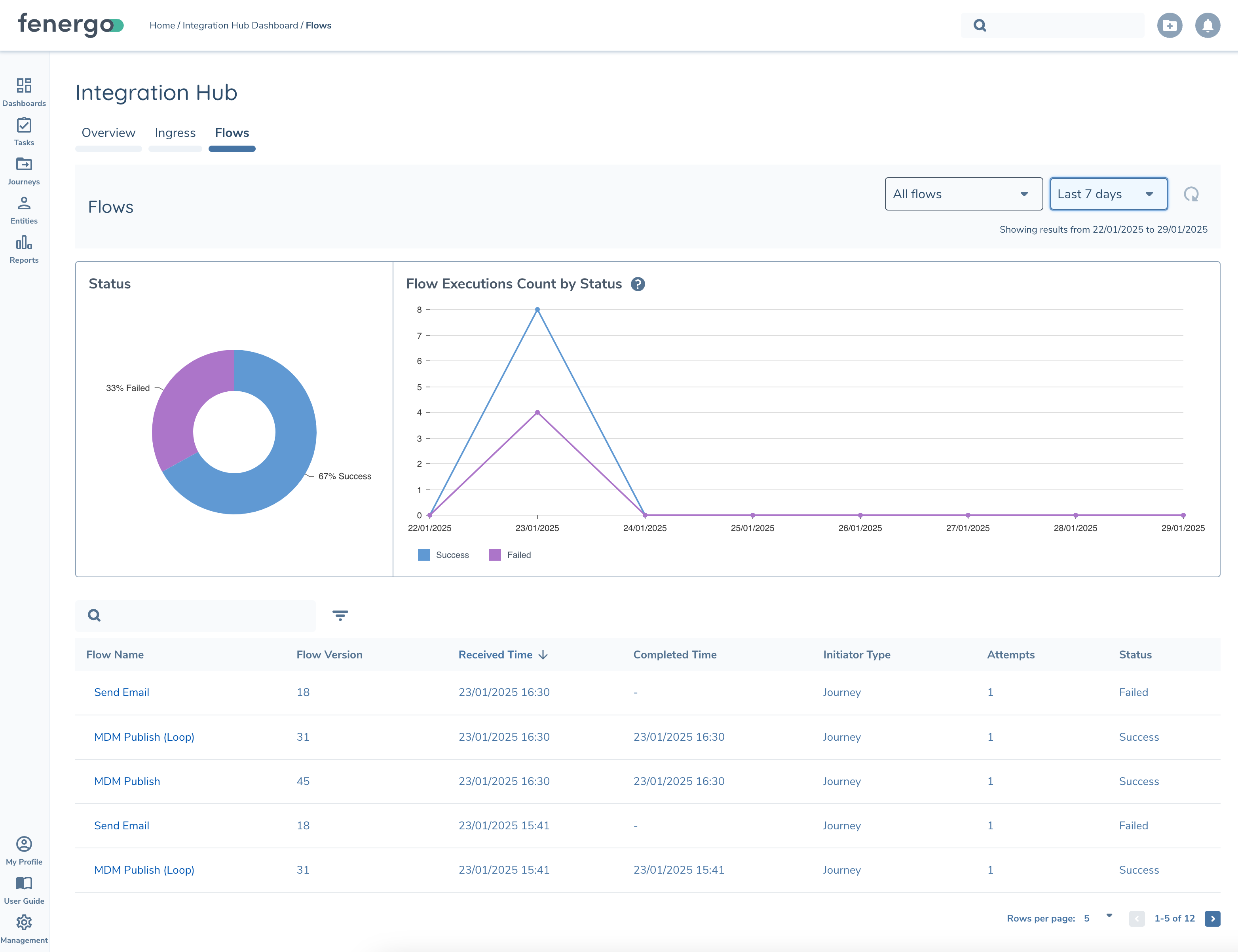
Monitoring Integration Flow Concepts:
- Each time a Flow is triggered it is called an Execution. E.g. when the journey task triggers a flow is one execution
- Flow Executions are visible in Integration Hub or Flow Studio (Execution tab)
- Executions can fail. Some Flow Initiators, like Journey Initiator, are rerunnable. Each time it re-runs is called an Attempt
- The Execution Details page shows:
- List of Execution Attempts and what configuration version was used
- Step logs show the inputs / outputs to each task executed in order. Useful when debugging / designing flows
- Generated logs during the execution runtime