Working with Journeys on the Fenergo SaaS Platform
As discussed previously, the Journey construct on Fenergo's SaaS platform is where clients really get to working with data and ensuring that data is correct and meeting the high bar of regulatory compliance that Financial Institutions must meet.
What Can You Do in a Journey?
Once your Journeys are configured, all the actions required to manage client data should be available. As illustrated below, a user can:
- Access the Legal Entity Profile page.
- Navigate to an open Journey.
- Select an available open task (to which they have permission).
- Interact with the data points.
- Close the task, the Journey moves to the next stage.
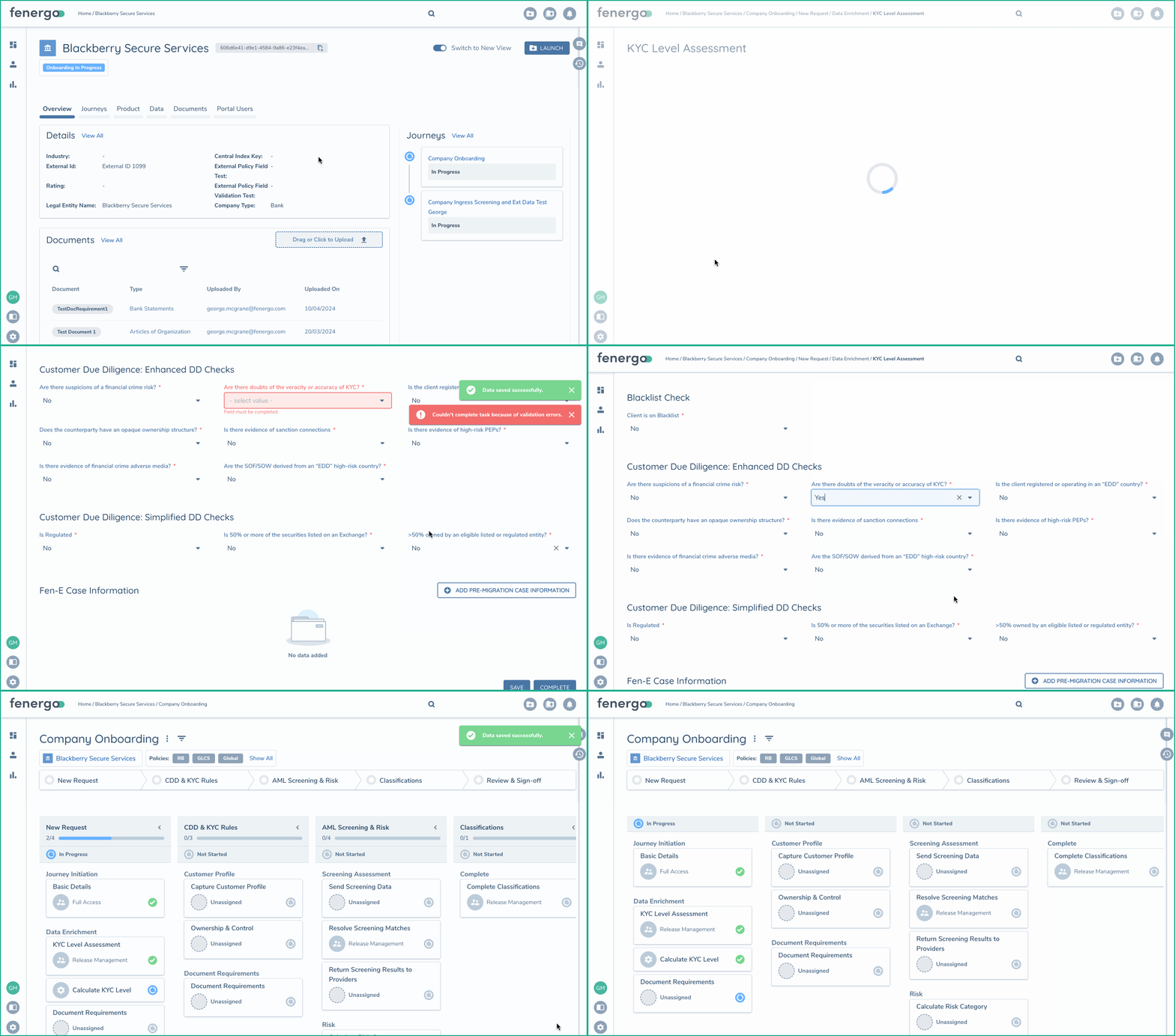
Journeys have some other features which we can cover at a high level here.
Structure Your Business Process however you want
Journeys are arranged from Stages - Processes - Tasks. Each Journey can contain multiple Stages, each Stage can contain multiple Processes and each Process can contain multiple tasks.
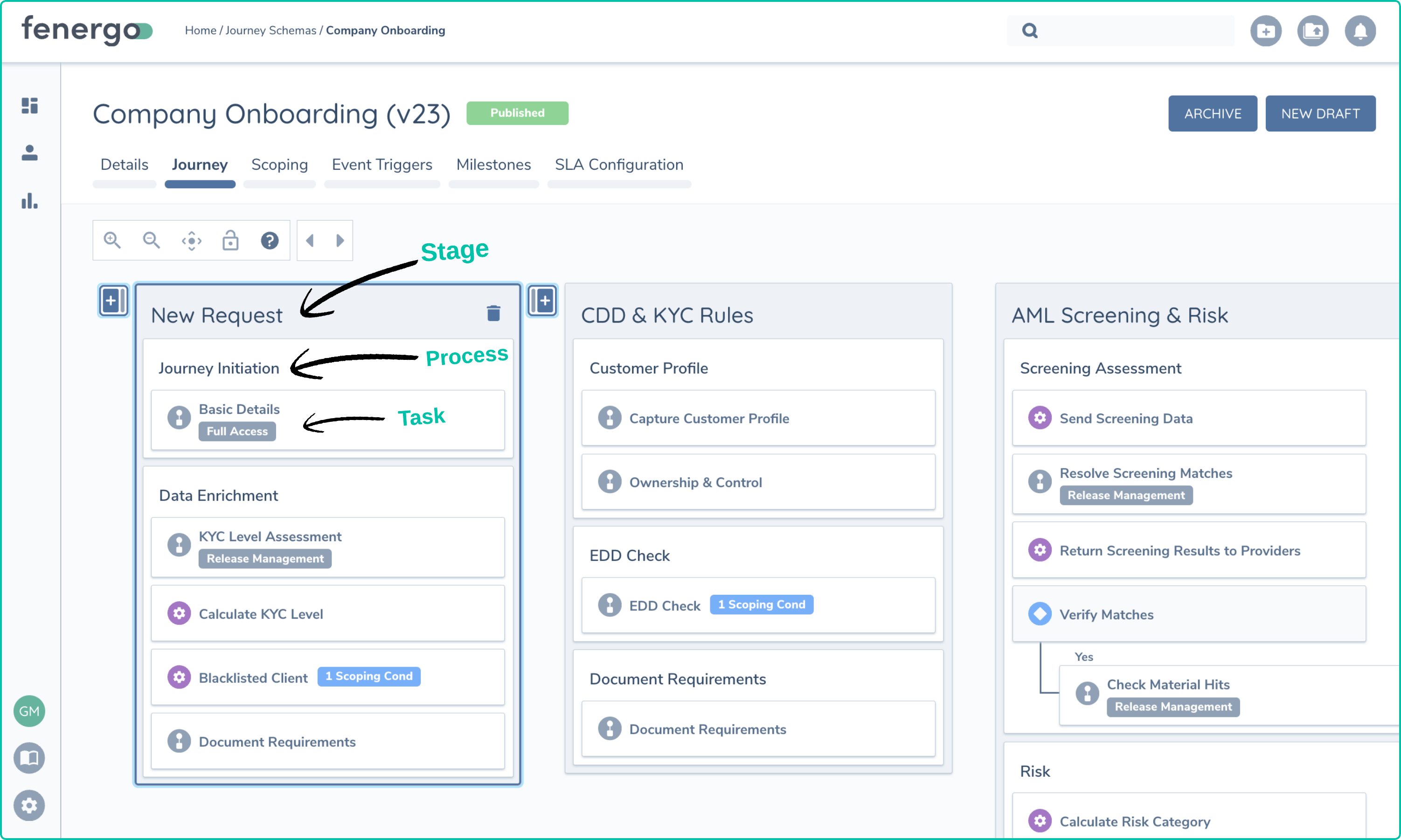
The intuitive UI makes it easy to add new stages, processes and tasks within our Journey Builder to align to your needs.
Various Task Types and Ordering
With workflows, it can be common to assume that steps need to follow a linear path, but this is not the case. Clients can configure Stages, Processes and Tasks to trigger when they are required. Typically different teams and people will complete different parts of the process as per their role or function within the organization. There is no need to strict these activities from operating somewhat independently from one another. Multiple teams can work on multiple parts of a Journey at the same time.
- Assignment to specific teams means that multiple parties can operate on the same Journey at the same time, and provided there has been proper configuration to ensure different teams are updating different data, this can be done without any contention.
- External API clients can update tasks without requiring any user interaction. Just don't assign those task to teams who use the UI and UI users will not be able to interfere with external data updates.
- There are multiple types of tasks available that can align to different activities. These include:
- Data Tasks (For gathering LE Data as per Policy Configuration)
- Document Requirement Tasks (Attaching Documents as a evidence for requirements)
- Risk Tasks ( For calculating and viewing risk outcomes)
- Screening Tasks (Interacting with External Screening Providers and testing the LE Data against know issues)
- External Data Tasks (Sourcing Data from an External Data Authority - or custom integration )
- Related Party Tasks (Creating a hierarchy of LE Structures)
Other Journey Capability
When configuring your Journeys, there are other capabilities that can be used to control and govern the behavior. These are covered in more detail within the documentation but at a high level :
- All Journey, Policy and Risk configuration is portable and can be copied from one tenant to another.
- Tasks can be labeled and given a task key which can greatly aid with integrations interacting with differing tenants.
- Tasks can be configured to be completed in a specified order - not just the order they are displayed in.
- Tasks can be configured as Maker / Checker tasks, ensuring that distinct users complete each task - even if they are on the same team.
- Tasks can be configured to capture very specific parts of a policy. (Based on category)
- Tasks can be explicitly assigned to specific teams and notifications can be sent to those team members when tasks become available.
- Teams can be assigned as having Read Only permission to a specific task, allowing explicit control of who can do what.
- Tasks can be conditionally assigned based on specific data, where an Entity is originated in a specific country for example, those tasks can be assigned to a specific team.
- Tasks can be entirely conditional, only required under very specific conditions.
- Tasks can have SLA assigned to them to track aging and ensure processes are being followed in accordance to committed timescales.
This document is simply an overview of how clients can use the Journey Construct to accurately capture and manage their data. More detailed user and configuration guides are available via the menu items on the left of this page.