Document Deferral
Overview
Document requirements are associated with the journey in context and when deferred document requirements are not actioned before the journey is completed, or the respective tasks conclude before the deferral date expires, those documents remain outstanding. These document deferrals can be collated for entities on journey completion to ensure document collection is fulfilled. By utilising the Review Manager, a review can be scheduled which will automatically trigger a subsequent journey for deferred document collection, based on the earliest deferred document date.
Configuring Document Deferral Review
This process requires specific configuration in order to capture the deferred documents on journey completion.
Prerequisites
- Review Manager: This must be enabled in the tenant in order to configure Deferred Document Requirement reviews.
- Deferred Documents Review Task: This new task must be configured in a journey that will be launched via the Review Manager.
Permissions
- Deferred Document Requirements Review Config Access: This permission allows a user to access the 'Document Requirements' tab in the Review Journey Scheduler for the Review Manager.
- Deferred Document Requirements Review Config Edit: This permission allows the user to edit the toggle and set the 'Review Journey' in the 'Document Requirements' tab in the Review Journey Scheduler for the Review Manager.
Review Manager Configuration
To enable the gathering of deferred documents on journey completion, the functionality needs to be enabled within Review Manager via the Review Journey Scheduling option under the 'Journey' management menu option. Within the 'Document Requirements' tab, the toggle must be enabled and the Review Journey type specified. Care should be taken to ensure multiple journeys for the same purpose are not launched by the configured journey type. Also, should the Review Journey type be changed, this will only affect reviews created from that point forward. Existing reviews will retain the journey type that was configured when the review was created.
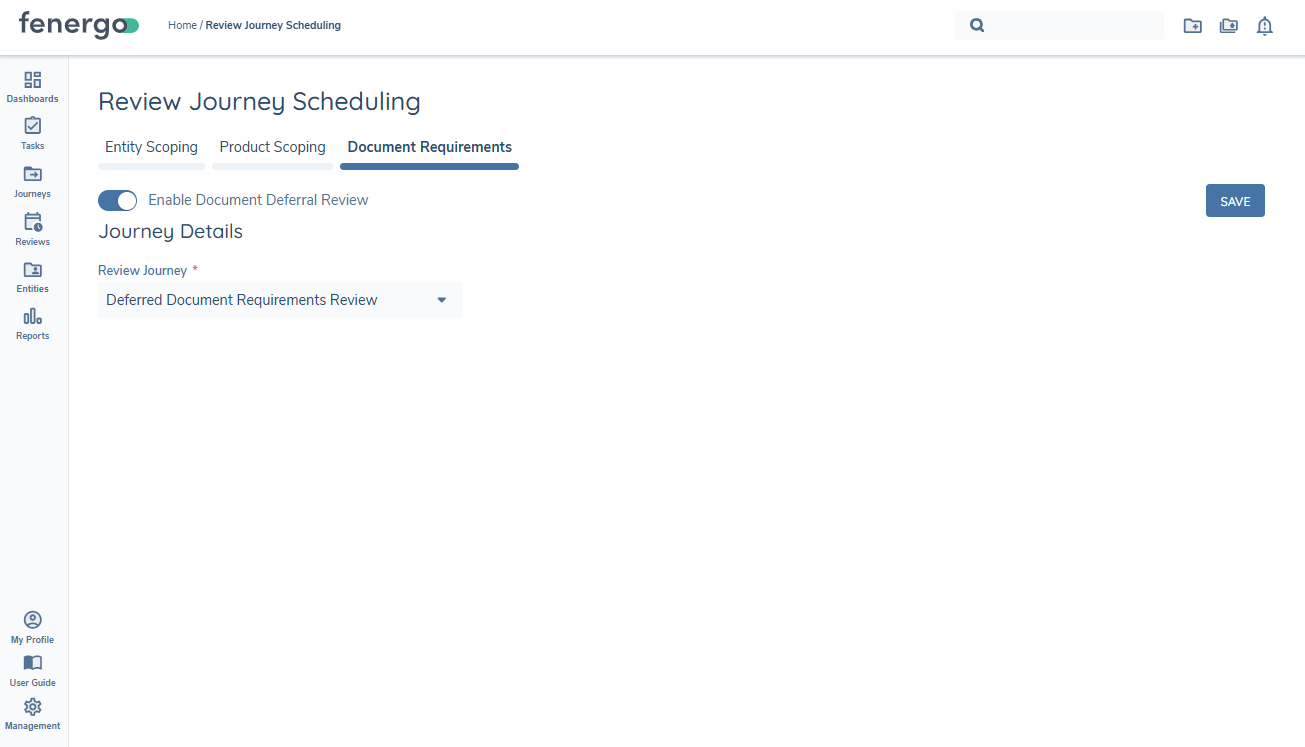
Please see the Review Manager documentation for additional detail on the functionality available in this area.
Journey Configuration
A new task type Deferred Documents Review has been created and this must be configured in the Journey Schema in Journey Builder in order to utilise the functionality. The journey schema must align to the journey type configured within the Review Manager.
This task is designed to work only in this document review scenario and should not be configured in any other journey types. When triggered, the task will surface the entity's deferred documents that exist within the scheduled review.
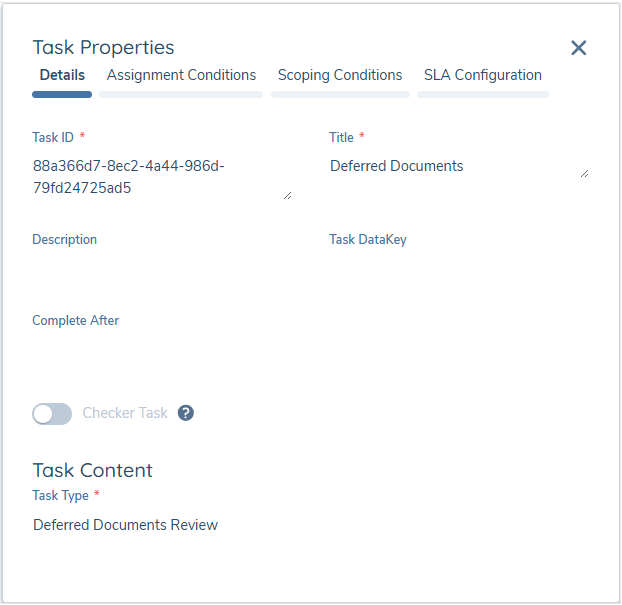
Note: As requirements are being satisfied within the task, in order for document persistence to occur, it is important that the Verify Entity task is configured in the journey to be triggered.
Additional Detail
Document deferrals in the context of a client and a related party are both consolidated into one journey. In order to retain the context, the Deferred Document instances for clients and related parties are stored separately but retain the same structure.
- Document Requirement - each instance of a deferred document
- Document Data Key
- Document Requirement Name
- Defer Until - date selected when deferring the document requirement
- Document Deferral Comment - comment captured when deferring the document requirement
- Journey - details specific to the journey in context
- Journey Id
- Journey Name
- Journey Type
- Entity Name
- Completed Date
- Policy Categories - this will ensure the correct context is applied within the 'Deferred Documents Review' task when triggered
- Jurisdictions - this will ensure the jurisdictions from the originating journey are applied in the triggered 'Deferred Documents Review' task
Document Deferral Review
When a document is deferred for a client within a Document task in a journey, or deferred for a related party in a Related Party task in a journey, the intention is to collect that document at a later date. Should a journey be completed without fulfilling those deferrals, by utilising the Review Manager, it is possible to create a review that will trigger a journey at a later point, based on the deferral dates.
Upon journey completion the system will gather the deferred documents per entity, meaning for the client in journey, and for each related party respectively. The reviews are entity specific and a review within the Review Manager will be created for each entity and will contain one or more documents that have been deferred for that entity.
Only one Document Deferral review will exist per entity, meaning that any deferrals for an entity, be it in the context of the entity as a Client, or in the context of the entity as a Related Party, will be contained within one review.
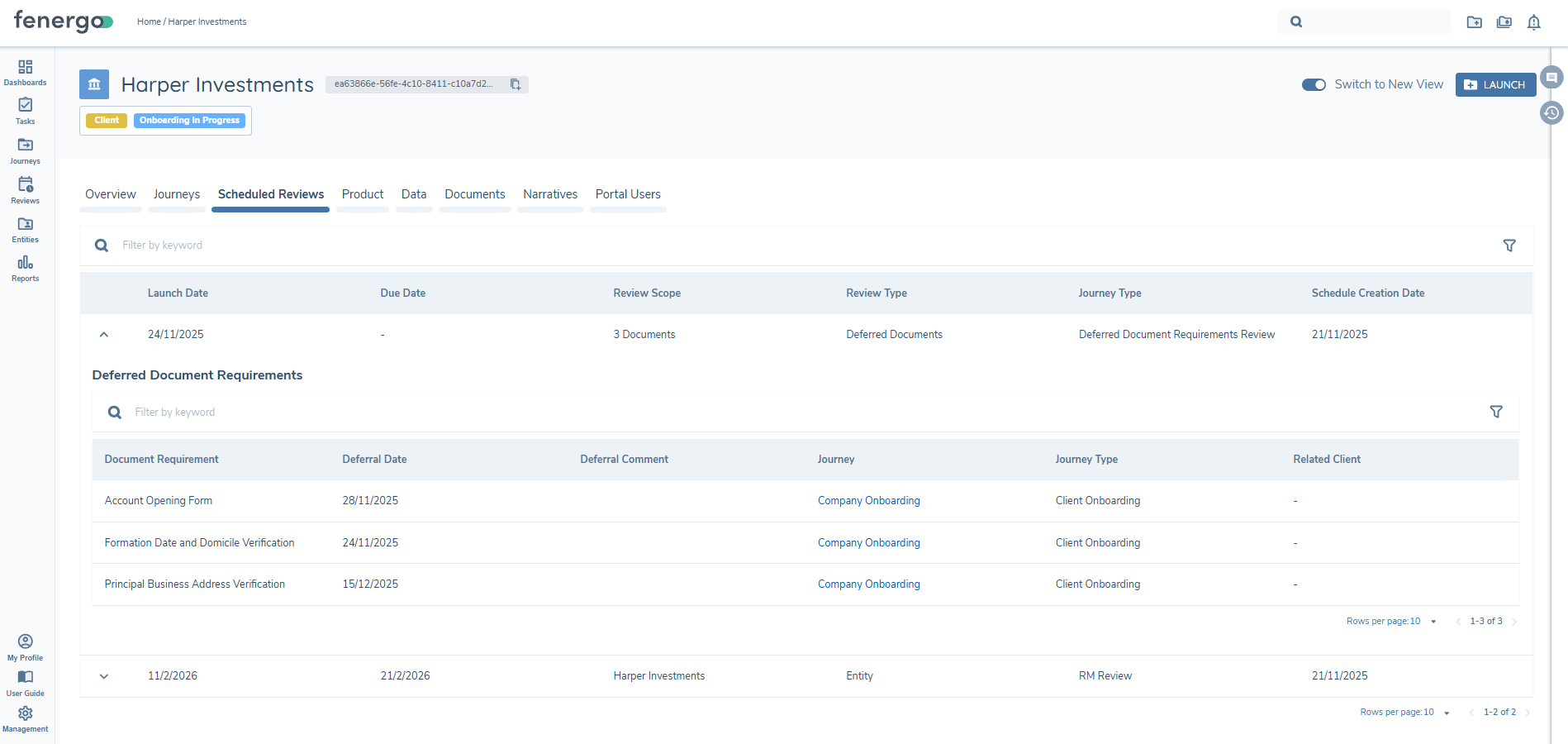
Once the journey where the deferrals occur has been completed, the Document Deferral review will be visible on the 'Scheduled Reviews' tab of the Entity Profile for the entities in scope.
- Review Type - This will display 'Deferred Documents' for this type of review
- Review Scope - This is the count of deferred documents in the scheduled review.
- Launch Date - This will be the earliest date of the deferred documents in scope. On this date the configured journey will be triggered. Note: 'Due Date' does not apply to Document Deferral Reviews.
- Journey Type - This is the configured Journey Type defined in the Review configuration at the time the review was scheduled.
Only one scheduled Deferred Documents review is created per entity and so, only one entry will exist within this tab. The row can be expanded to provide additional detail of those deferred documents that are in scope for the review.
- Document Requirement - The document requirement that was deferred.
- Deferral Date - The date the document was deferred until.
- Deferral Comment - The comment added when deferring the document.
- Journey - This is the journey where the deferral occurred and is a clickable link.
- Journey Type - The journey type associated with the above journey.
- Related Client - If the document deferral occurred where the entity in profile was a Related Party, this field will display the entity to which the journey was associated.
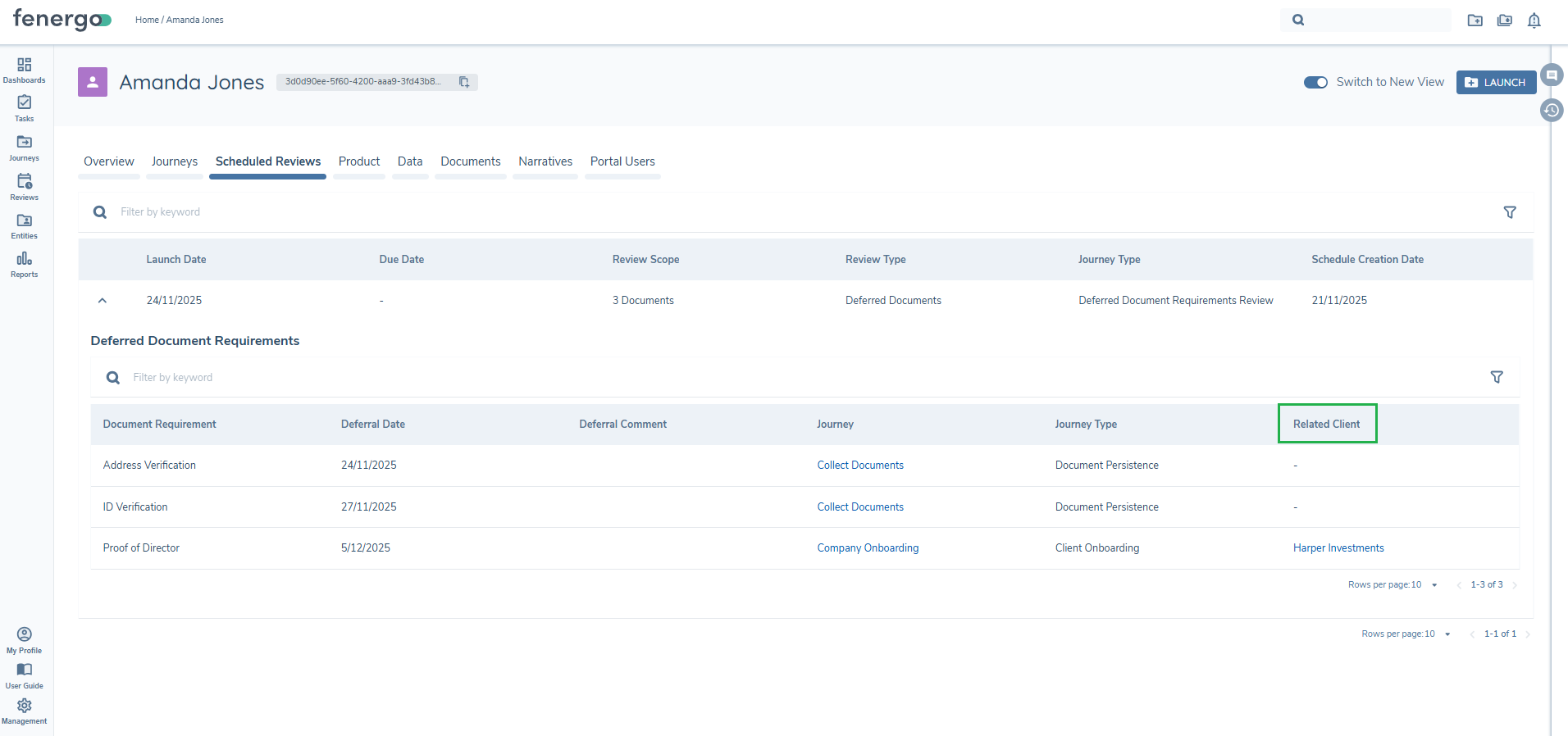
The Document Deferral review is also visible on the 'Scheduled' tab within the Review Manager. Please see the Review Manager documentation for functionality available here.
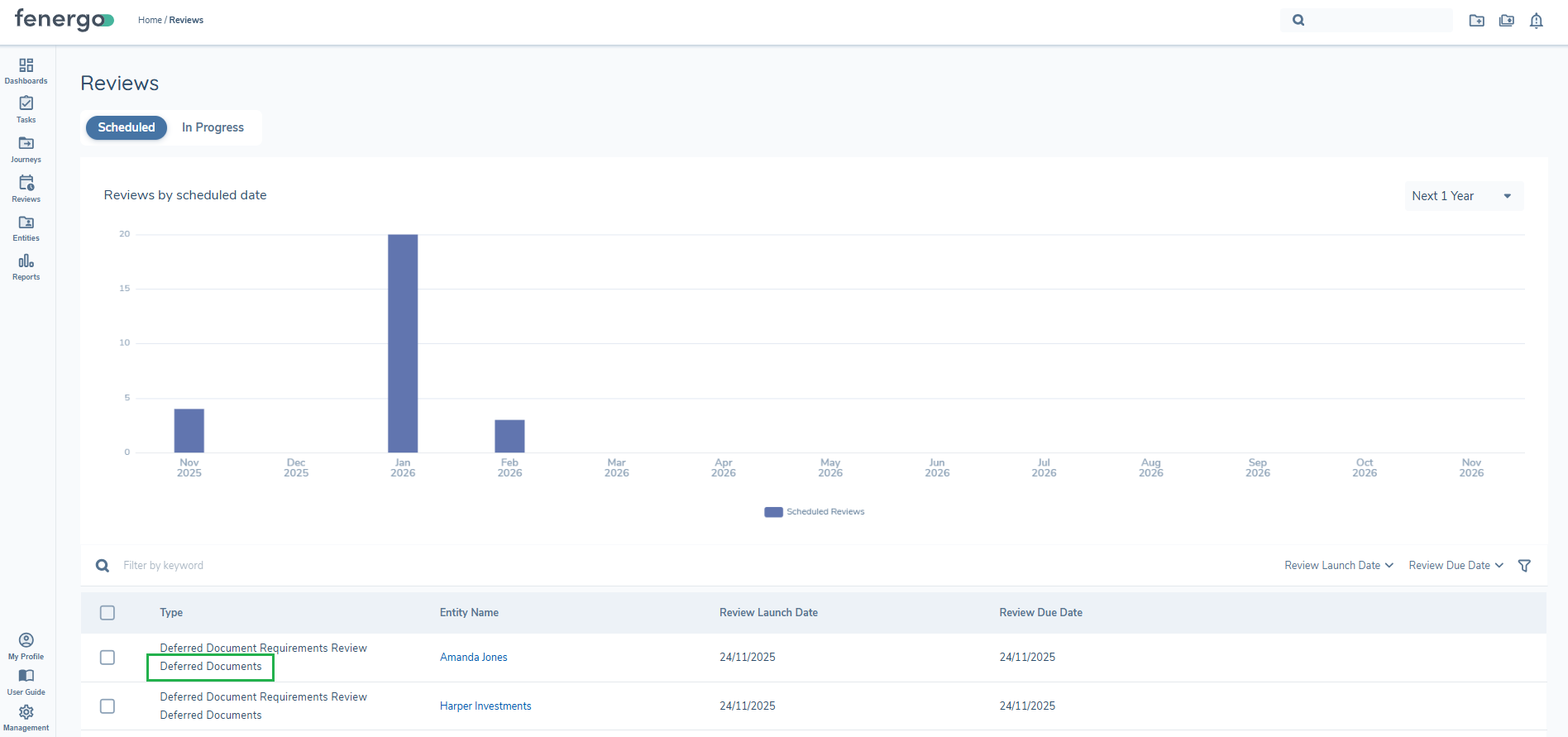
Once the Review Launch Date has been met, the configured journey will be triggered. The review will no longer be visible on the 'Scheduled Reviews' tab of the Entity Profile and the journey will exist on the 'Overview' tab and on the 'Journeys' tab. Similarly, in Review Manager the review will no longer exist on the 'Scheduled' tab and the triggered journey will appear on the 'In Progress' tab.
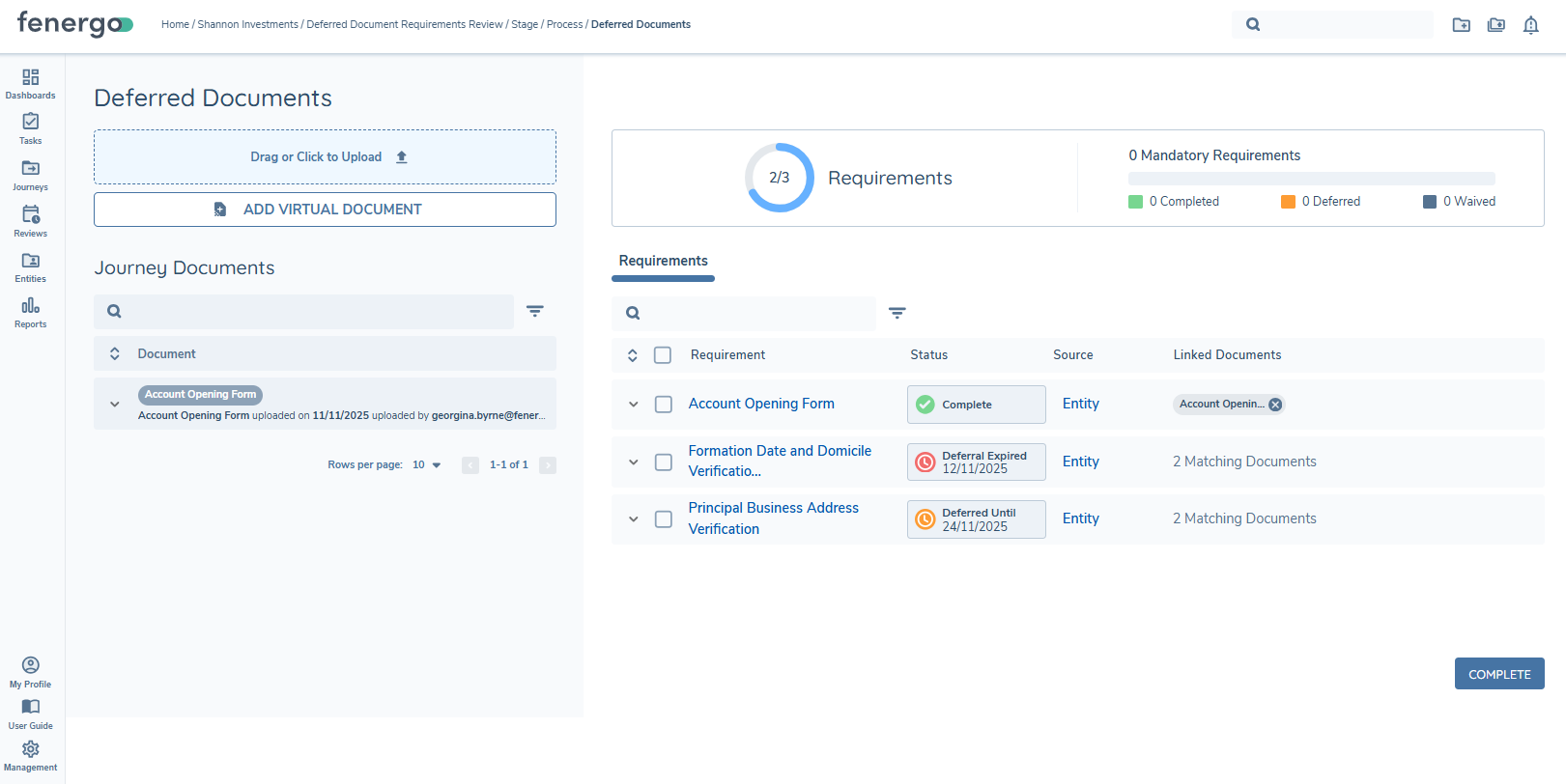
Once the journey is triggered and the 'Deferred Documents Review' task becomes 'In Progress', the contents of the review will be displayed within the task. Regardless of expiry date, all deferred documents for the entity, both in the context of the entity as a Client and the entity as a Related Party, will be displayed to the user.
- Any deferred documents that have expired will display the deferral expired status and the expired date.
- Any deferred documents that have yet to reach their expiry date will retain their deferral date. Users can leave the deferral date as it stands, or can satisfy the deferred requirement if desired.
Persistence
Document persistence will be applied within this task. This means that when a document has been deferred and is included in a Document Review for an entity, should the document be satisfied in a subsequent journey, upon triggering of the deferral journey, the deferred document will still be presented to the user. However, persistence will automatically link the persisted document and the status of the deferred document requirement will be 'Complete'. As persistence has satisfied the deferred document requirement, the user no longer needs to address the deferral. Please see the Document Management Datakeys and Document Persistence User Guide for additional information on persistence.
The functionality within this task aligns to that of the Documents V2 task and users can interact with the Deferred Document requirements as normal. The same actions are available once users have the associated permissions. Users have the ability to satisfy the requirement by uploading a document or virtual document, or the user can chose to waive or defer again.
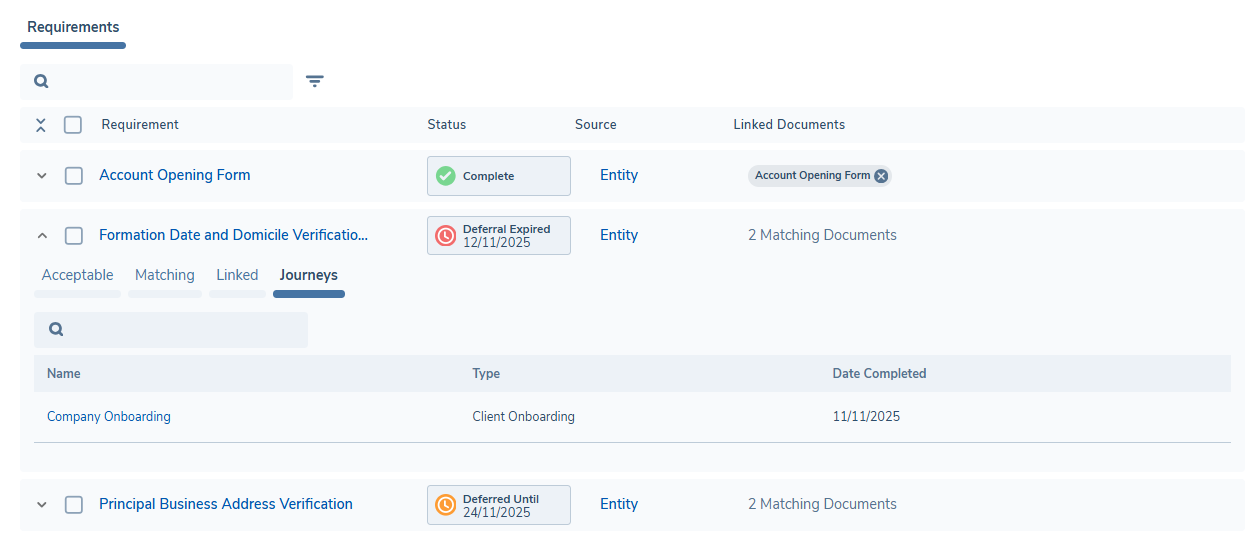
As in the Documents V2 task, the rows are expandable so users can view any matching or linked documents available. An additional 'Journeys' tab has been introduced to the expanded row and this will display the journey(s) where the deferral occurred. The journey 'Name' contains a navigable link to the journey in question. Where the deferral occurred for the entity in the context of a Related Party, an additional 'Related Client' column will display the entity associated with the journey.
While the 'Deferred Documents Review' task has specific functionality, the triggered journey is like other journeys where deferrals occur. Should any document requirements remain deferred, or indeed have been re-deferred, on journey completion the process will begin again, and a new review will be created, or an existing review will be appended to.
Important Points of Note
- One document review per entity is created
- If a document review already exists for an entity, any subsequent document deferrals for that entity will be appended to the existing review
- If a document review has triggered and is in 'Launched'/'In Progress' status, any subsequent deferrals will create a new review object on journey completion
- The document review will trigger a journey based on the earliest review date of the deferred documents for that entity and all deferred documents will be presented to the user
- If the data key is deferred by the same document requirement or another document requirement in subsequent journey, then the earliest review date will be maintained but the review will reflect the details of the latest deferral
- If the data key is deferred multiple times, the scheduled review will list the each journey instance where the deferral occurred but the count on the review line will reflect the data key once.
- Access Layers will be adhered to within the 'Deferred Documents Review' task
- As there is a dependency on the Review Manager, any tenants utilising the existing 'Journey Schedules' for entity reviews will need to plan for a migration to the Review Manager. However it is possible to utilise the Review Manager for Document Deferral ONLY, while the migration plan for entity reviews is put in place. Please reach out to your representative to discuss.