Deleting Data
After an Offboarding event, the system records data retention details for the Jurisdictions that were offboarded. The entity then becomes eligible for Data Deletion in those Jurisdictions.
The Data Protection feature supports three deletion types:
- Full Deletion – permanently removes the entire entity.
- Partial Deletion – removes only specific data and documents based on a Policy.
- Related Party Preservation – in Full or Partial deletions, if the entity has outbound relationships, Client-specific data is deleted but the Related Party record is retained.
Data Deletion Scope
Full Deletion
Removes:
- All DataDeletionProcesses, Entity Data, Audit Data, Journeys, Documents, Comments, Associations, and Products.
- If a product is shared with another entity, only the connection is removed.
- The entity from Search, Reporting, Dashboard, and Screening indexes.
Partial Deletion
Removes:
- The relevant DataDeletionProcess.
- Targeted data, audit records, and documents linked to the specified Jurisdiction (Policy).
- Products marked for deletion.
- Reporting index references related to deleted attributes.
Related Party Preservation
Follows the same deletion rules as above but retains:
- All associations.
- Any data, documents, or audit entries where the datakey corresponds to a “Related Party” requirement.
- Related Party Launchpad journeys.
The entity remains in the system as a Related Party, and the Global Policy is reinstated as In Scope.
This applies when an offboarded Client or orphan entity has outbound associations (e.g. is a Beneficial Owner) at the time of deletion.
Preservation applies only to Jurisdictions stored on the entity record.
All datakeys linked to requirements for “Related Party” in Global or explicitly stored Jurisdictions are preserved - even if also linked to “Client”.
Data or documents retained only via indirect exposure to another Client’s Jurisdictions may still be deleted.
Transaction Monitoring Data Deletion
Where a record of an entity exists in TM, once the Entity is deleted in CLM all associated Transaction Monitoring data is automatically purged as part of the data deletion process. This deletion process includes:
- All alerts where that entity is the main entity.
- All alert documents, notes and comments related to deleted alerts.
- All Whitelisting records where the whitelist is against the main entity.
- All Financial Crime Reports raised against the main entity.
Transaction Removal
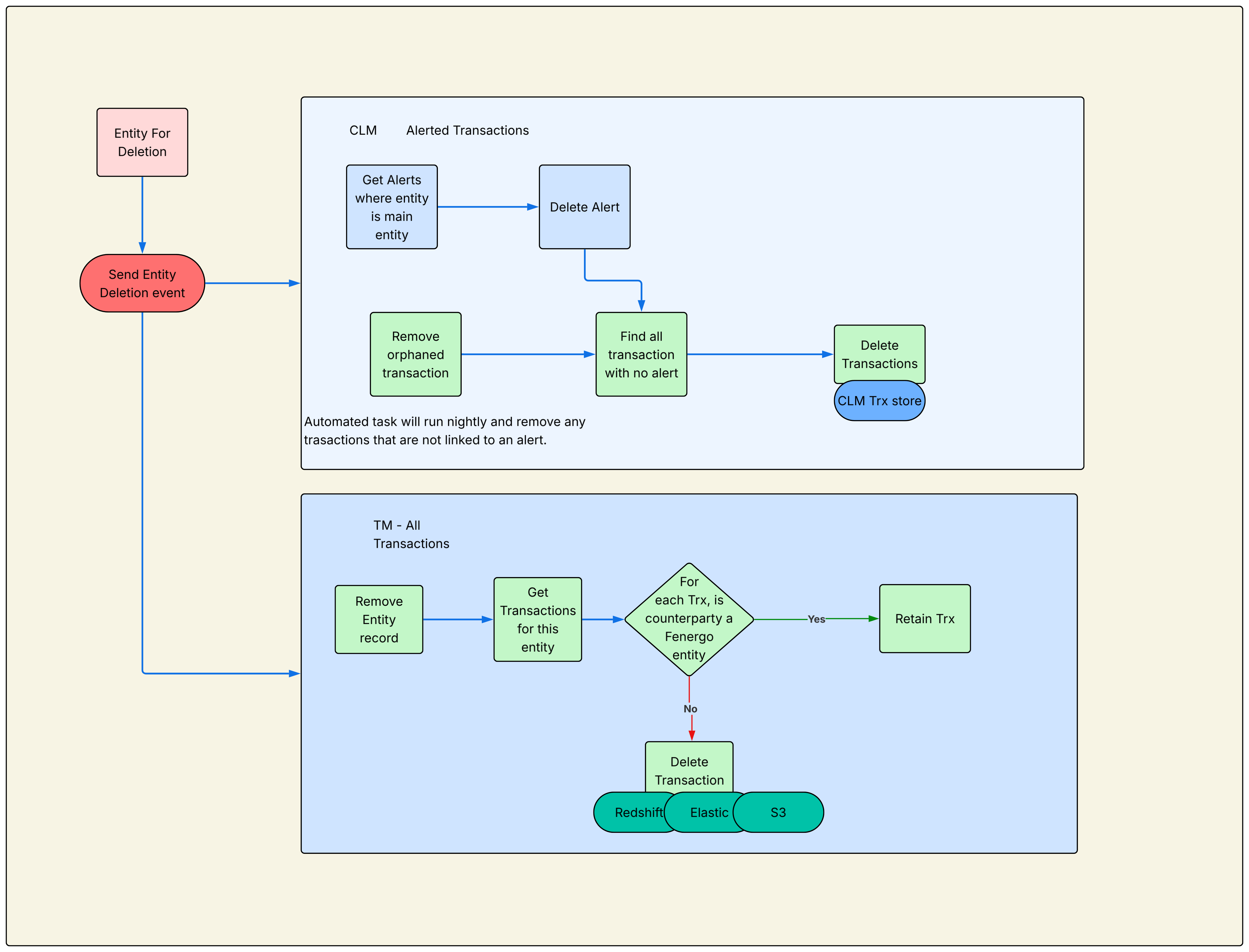
Transactions are stored in different places depending on whether they are included in Alerts, namely "Alerted Transactions" which are stored in CLM, or "All Transactions" which are stored in TM. The deletion of transactions will be managed in the following way:
- Once an entity is deleted, all alerts where that entity is the main entity will be deleted. If the counterparties of the transactions in the alert are unknown, they are deleted from Alerted and All Transactions.
- If the counterparty is an onboarded entity the transaction is retained in both places.
- A periodic housekeeping process clears any orphaned transactions that remain in the Alerted Transaction store without an associated alert.
The full flow can be seen below.
Data Deletion Journeys and Jurisdictions
Jurisdiction Context
When a Policy is offboarded, a DataDeletionProcess is created with key retention information (see Policy Details, Data Retention Dates, and Jurisdictions User Guide).
This process defines retention duration and the deletion date for a specific Policy (e.g. Canada) or globally. Each Data Deletion Journey references one Jurisdiction only.
- Journeys referencing a non-Global Policy perform Partial Deletion.
- Journeys referencing the Global Policy perform Full Deletion.
Entities can have multiple deletion journeys running independently by Jurisdiction.
Triggering a Journey
An automated scheduler runs daily at midnight UTC. When the data retention period (offboarding date + retention duration) has expired, a Data Deletion Journey starts automatically.
If one already exists for that Jurisdiction, a new one is not created. Once the Data Deletion Execution task completes, the corresponding DataDeletionProcess is removed, preventing re-triggering until a new one is created.
Data Deletion Journeys cannot be launched manually from the Entity Profile.
Entities with an active Legal Hold are excluded by the scheduler and no Data Deletion Journey is created, regardless of retention status. Once the Legal Hold expires or is removed, the entity is evaluated again on the next scheduler run.
Parallel Journeys
Multiple Journeys can run in parallel. Each can be completed independently. If a Global (Full) Deletion completes, all Jurisdictional (Partial) Journeys are automatically removed because the entity no longer exists.
Cancelling a Journey
A user may cancel a Data Deletion Journey before the Execution task runs. Cancelling stops that deletion, but the journey can re-trigger when the scheduler next evaluates retention periods.
To prevent re-triggering, remove the DataDeletionProcess by re-onboarding the Policy.
Delete Entity Data API
In exceptional cases, entities can be directly deleted outside of the standard Offboarding process via the Delete entity data api. Deletion via API is final and cannot be reversed.
This endpoint uses separate access scopes and is throttled to prevent bulk deletion. Temporary access can be requested through a Product Manager.
If the target entity has an active Legal Hold, the call is rejected and the entity is not deleted. Deletion is only permitted once the Legal Hold has expired or been removed.
Configuring Data Deletion
Journey Configuration
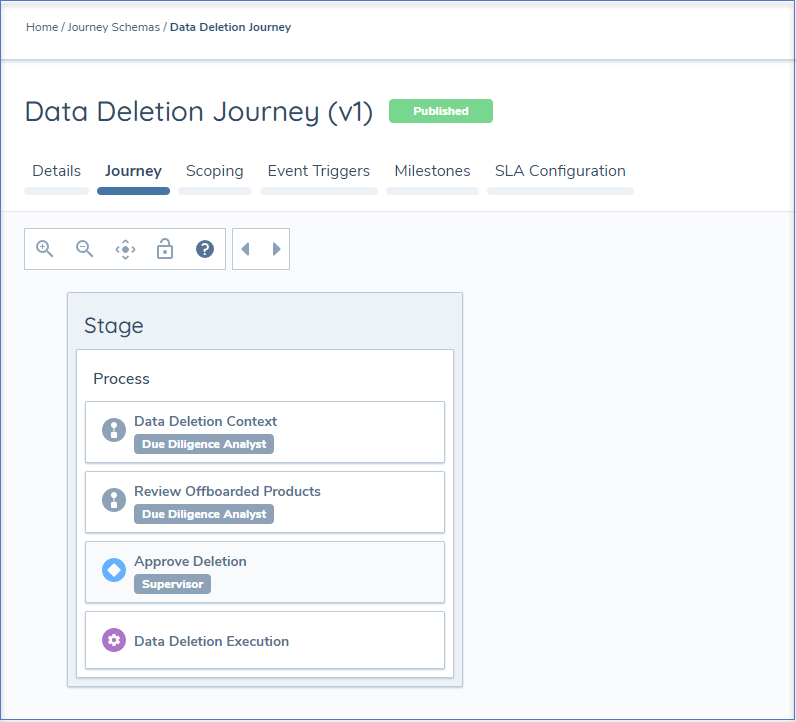
To support automated deletion, configure a Journey with the Journey Type set to Data Deletion.
System tasks include:
- Data Deletion Information Task – Displays policy details, offboarding date, and retention expiry. Auto-completes.
- Review Offboarded Products Task – For Partial Offboarding, lets users mark products for deletion. For Full Offboarding, auto-completes. (Applicable only for clients using the Products Domain.)
- Data Deletion Execution Task – Final task that executes deletion. No verification task is required.
It is recommended to include an Approval Step before execution, as this process is irreversible.