KYC Reliance
In Agency related journeys, the Investment Manager (Agent) is usually the client and the Funds (Underlying Principals) they manage are not typically onboarded with the same level of due diligence. KYC Reliance allows you to determine when it is appropriate to rely on the Investment Manager's own due diligence for the funds they manage, reducing the need to collect extensive information.
KYC Reliance can apply when an Investment Manager operates in a stable market where they are subject to robust regulatory oversight. While each client may have a unique policy, the core pillars for eligibility are usually:
- Investment Manager (Agent)
- Risk Rating: Low
- Country of Incorporation: limited set of countries
- Regulated: Yes
- Regulated by an approved Regulator: Yes
- KYC Reliance Letter (document requirement)
- Fund (Underlying Principal)
- Current or future planned client: No
- Product
- Some product types or booking entities may be excluded
Configuring KYC Reliance
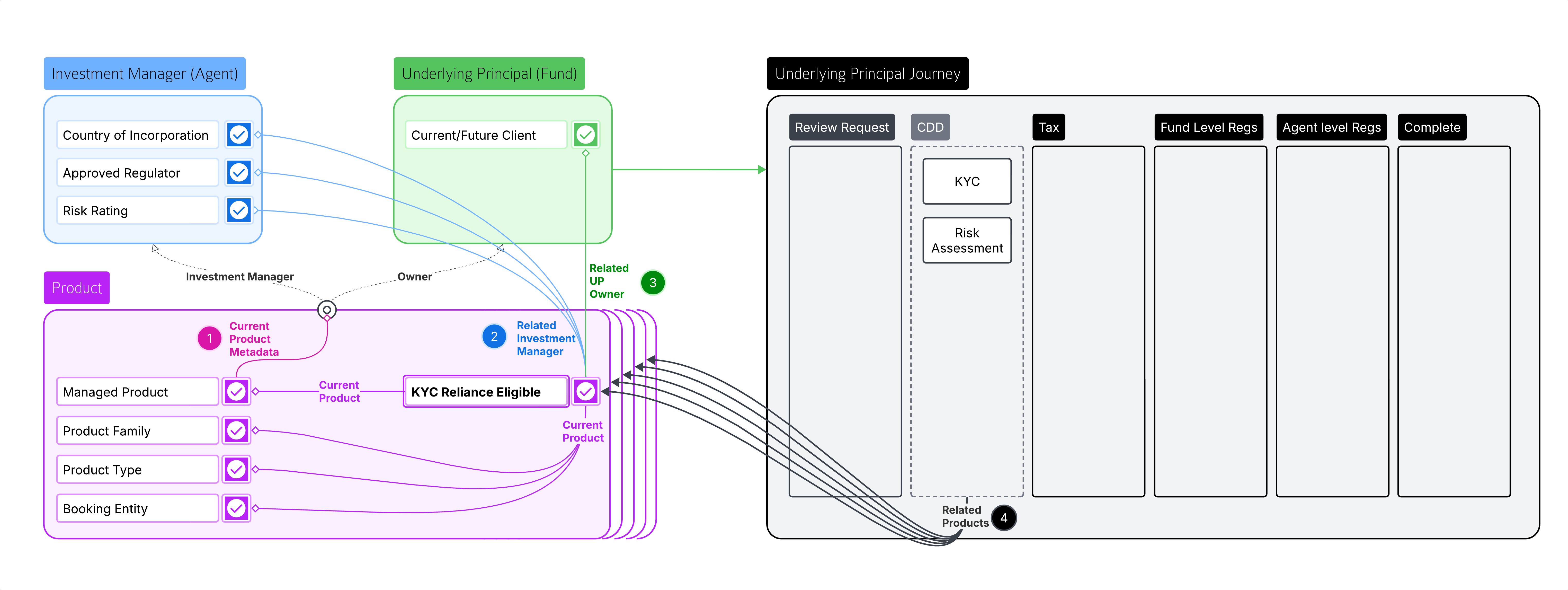
Fenergo’s approach to KYC Reliance is to first determine at the level of each Product if KYC Reliance applies - and this is established relative to the Investement Manager and Owner (UP) of each Agency Product. The application remains broadly configurable to allow our customers to approach this according to their own standards.
To determine if KYC tasks are required in an Underlying Principal journey, we need to establish if there are any products that don’t meet the standard for KYC Reliance. If all are eligible, then the Agent(s) associated with these products can be relied upon and KYC activities are not required. If any products don’t meet the standard, then KYC must be completed for the Underlying Principal.
At Product level, you can configure a data requirement (like “KYC Reliance”) that will only display for Managed Products (Agency) and can be populated with conditional values like “Eligible” or “Ineligible” using logic engine conditions that evaluate the Agent, UP and Product.
-
Is the Product a Managed Product (Agency)? ‘Current Product Metadata’ source is available in Product Requirement Sets, Product Scoping Rules and Data Groups. Using the field ‘IsAgency’ we can assess if the product has any Agency associations and use this to determine if the product is a ‘Managed Product’ (Agency) or not. We can use this to create scoping/trigger conditions for Product Requirement Sets or specific Product data/document requirements so that they only apply for Managed Products – i.e. isAgency = true (toggle enabled).
-
Does the Agent meet the requirements for KYC Reliance? ’Related Investment Manager’ source is used in Product Requirement Sets to evaluate the data of the entity associated with a Product using the Agency ‘Investment Manager’ Product Relationship.
-
Does the Fund meet the Requirements for KYC Reliance? ’Related UP Owner’ source can be used in Product Requirement Sets to evaluate if the Underlying Principal entity that is associated with a Product using an Agency ‘Owner’ Product Relationship.
-
In a Journey Schema for an Underlying Principal, Stages/Processes/Tasks pertaining to KYC Reliance can be conditionally triggered using the ‘Related Products’ source to evaluate if there are any products that are not eligible for KYC Reliance.
Further Considerations
- In Policy, we can configure a ‘chip’ (StatusV2) to display the KYC Eligibility status for an Agent or UP. This can be configured to display on the EPP or the Journey Hub.
- The system can be configured to allow user to manually override a product's system-calculated KYC Reliance status. For example, if the system determines a product is 'Eligible', a user could override this to 'Ineligible' on a discretionary basis.