Behavioural Risk
Overview
Fenergo Behavioural Risk extends entity Risk Assessment to include dynamic risk factors which capture how observed transactional activity compares to an expected activity profile. Expected activity profiles are created at onboarding and can be updated in a periodic or event-driven review. As an entity transacts, Behavioural Risk identifies changes in the entity’s actual behaviour compared to the current understanding of expected activity. Material deviations trigger an update to the entity’s risk rating. A financial institution can then mitigate any increased risk, for example by updating the entity record to reflect a revised understanding of expected behaviour and/or carrying out additional due diligence.
Behavioural Risk is executed as part of the batch ingestion and rule execution pipeline. When a batch of transactions is ingested, rule execution is triggered. As the first step of rule execution, the Behavioural Risk process runs, updating entity risk and recalculating policy-derived fields, before any rules are evaluated. This ordering ensures that rules which reference risk-related fields, such as risk rating, operate on the most current values.
Behavioural Risk is designed to:
- Detect behaviour that falls outside declared expectations.
- Distinguish between acceptable and unacceptable deviations.
- Capture previously undeclared activity, such as unexpected countries.
- Ensure entity risk remains accurate and up to date without manual intervention.
Key Concepts
Expected Activity
Expected Activity is the documented baseline of how an entity is anticipated to behave, defined in terms of transaction types, volumes and geographic interactions. This information is captured as part of the entity’s onboarding journey and stored on the verified entity profile. This data may be updated in subsequent maintenance or review journey.
Actual Activity
Actual Activity represents what the entity is observed to do in practice, based on transaction data processed by the Fenergo risk engine. This information is also stored on the entity profile.
Allowed Deviation
Allowed Deviation defines the tolerance between expected and actual activity. Differences within this tolerance are considered acceptable and do not automatically result in a risk increase. When differences fall outside the allowed deviation, it may result in a change to the entity’s risk rating as defined in the risk model configuration.
Risk Calculation Process Flow
- Entity defines Expected Activity during onboarding.
- Expected Activity is verified and written to the verified entity profile.
- The entity performs transactions.
- Transaction data is captured as actual activity.
- A batch of transactions is ingested. Rule execution is triggered, and the Behavioural Risk process runs as the first step comparing actual activity to expected activity for each entity in the batch.
- Deviations are evaluated for each entity to determine a behaviour evaluation outcome.
- Entity risk and policy-derived calculated fields are updated.
- Rules are then executed, with access to the updated risk rating and calculated field values.
Behaviour Evaluation Outcomes
Actual Activity Within Expected Activity
If actual activity falls within the declared expected activity:
- No action is triggered against the entity.
- No risk recalculation occurs.
- The entity risk rating remains unchanged.
- Actual activity view is updated on the entity profile.
Actual Activity Outside Expected Activity
If actual activity does not align with expected activity:
- The system evaluates the difference.
- If the difference is within the allowed deviation, then the deviation is considered acceptable and no further action is taken and the entity risk rating remains unchanged.
- If the difference is outside of the allowed deviation, then the deviation is considered material, and Risk Assessment is executed to determine if the entity’s risk rating should increase. Updated risk rating is then written o the verified entity profile.
- Actual activiy view is updated on the entity profile.
Undeclared Activity Detection
Behavioural Risk also caters for the scenario where the entity transacts with a country that was not included in their expected activity declaration.
In this scenario:
- Behavioural Risk is run against the unexpected country risk factor.
- The system determines whether the activity introduces additional risk.
- If no risk change is required, no further action is triggered.
- If risk increases, updated risk rating is written to the verified entity profile.
- Actual activity view is updated on the entity profile.
Risk Evaluation and Profile Update
When Behavioural Risk process is executed the complete risk model is applied, not just the behavioural risk factors. The configuration of the risk factors and the thresholds determines whether the overall entity risk changes. If the risk increases, the updated risk score and risk rating are written to the verified entity profile. A journey is automatically launched only when the risk increase crosses the next configured risk threshold. This journey that is launched can be chosen from any configured journey type to allow for full flexibility of risk mitigation actions.
Configuring Behavioural Risk
The Behavioural Risk process is configured in these steps which are explained in detail below.
- Configure Reference Data.
- Configure Policy to capture expected and actual entity profiles.
- Configure Risk Model with factors and weights.
- Configure Behaviour Deviation Thresholds.
Reference Data Configuration
To support Behavioural Risk evaluation, the following reference data lists must be configured.
Country Reference Data
A country reference list must be available that:
- Contains the full list of countries used within the platform.
- Includes a dedicated column storing the ISO Alpha-2 (two-letter) country code.
- The ISO column must be named exactly as ‘ISO Code (Alpha-2)’.
- This column is used by the system to consistently identify countries during behavioural comparisons and risk evaluation.
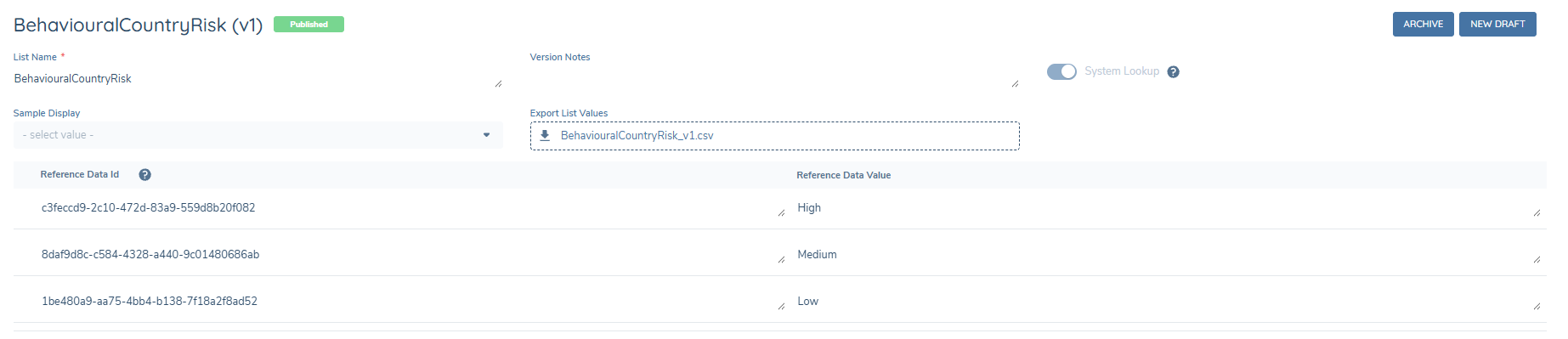
Behavioural Country Risk Reference List
- Reference List Name: BehaviouralCountryRisk.
- This list must contain the risk levels associated with country risk (for example: High, Medium, Low).
- The risk levels defined in this reference list are applied during Behavioural Risk evaluation. They are also displayed when configuring Expected Activity deviation thresholds.
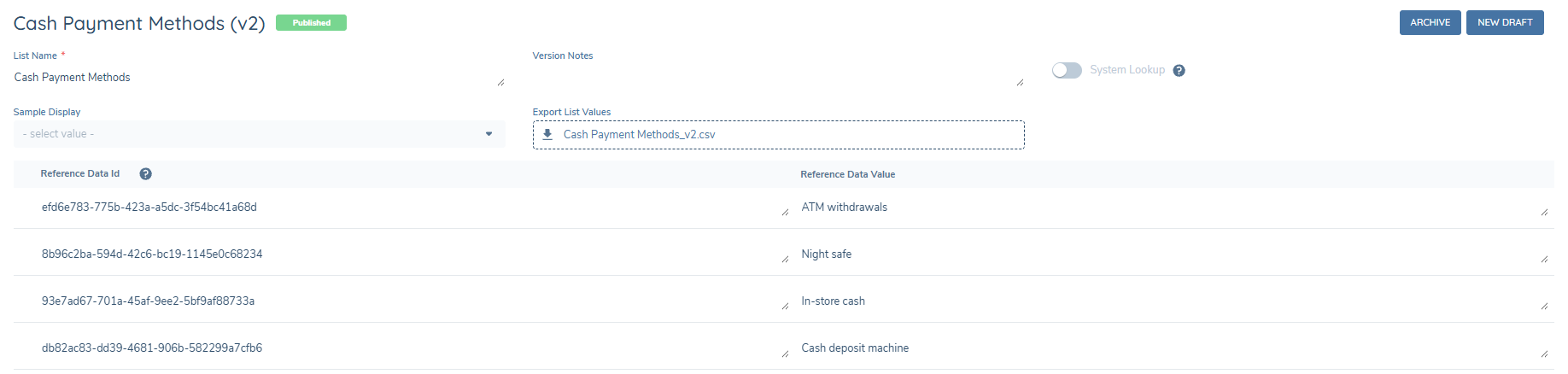
Cash Payment Methods
The payment methods that contribute to the cash incoming and cash outgoing totals can be defined using a reference list ‘Cash Payment Methods’. Any other payment methods will contribute to the total incoming and total outgoing amounts.
Policy Configuration
To enable Behavioural Risk, two policy data groups must be configured: one for the expected activity and the other for the actual activity. These data groups are used by the system to compare declared behaviour against observed behaviour.
Expected Activity Data Group
Current functionality supports an expected activity profile containing parameters for total annual incoming volume across all transaction types, total annual outgoing volume across all transaction types, total annual incoming cash volume, and total annual outgoing cash volume all defined on a per-country basis. The Expected Activity data group must include the following fields, with data keys configured exactly as shown:
- Fenx_ExpectedCountryActivity
- Fenx_ExpectedTotalIncoming
- Fenx_ExpectedTotalOutgoing
- Fenx_ExpectedCashIncoming
- Fenx_ExpectedCashOutgoing
The first field Fenx_ExpectedCountryActivity can be configured as a single or multi-select dropdown with the Country list as the lookup list. If this field is configured to be a multiselect, users can enter multiple countries against the same expected activity amounts. The user may also enter countries individually over multiple entries while using the multiselect or single select field.
These two inputs are equivalent:


All remaining fields must be configured as Number data field types. The data group should look like this
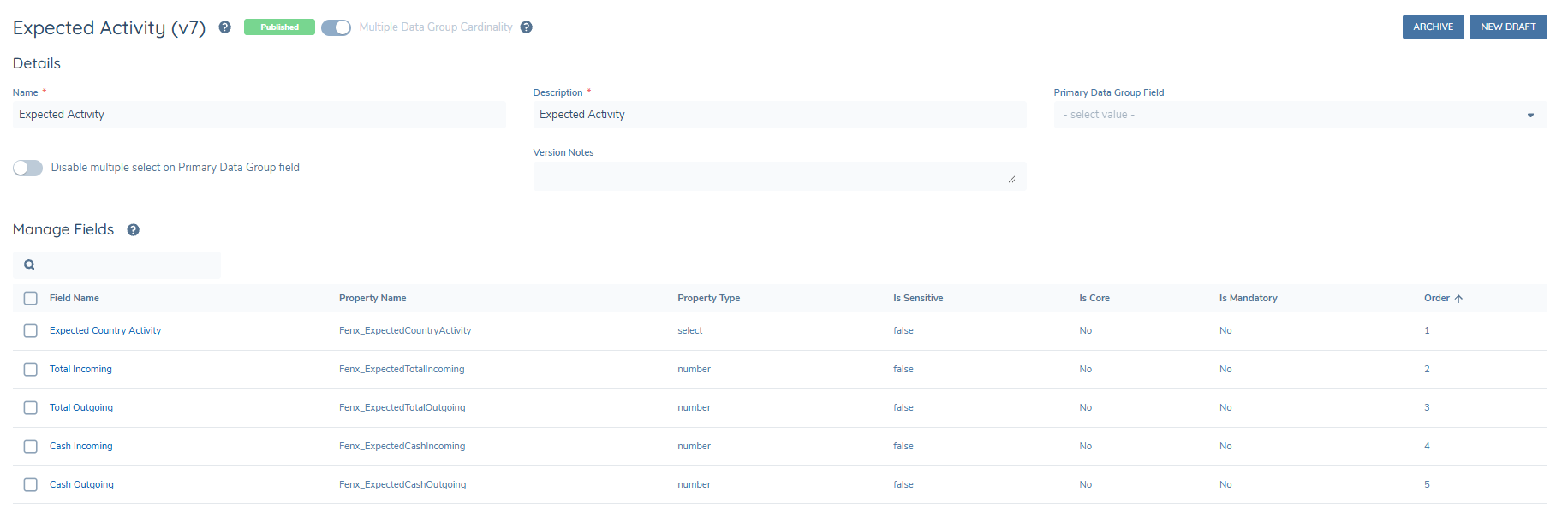
This data group must be configured as a Policy Field with the Database Field Name ‘Fenx_CaptureExpectedActivity’. This data group is expected to be completed as part of onboarding or review journeys.
Actual Activity Data Group
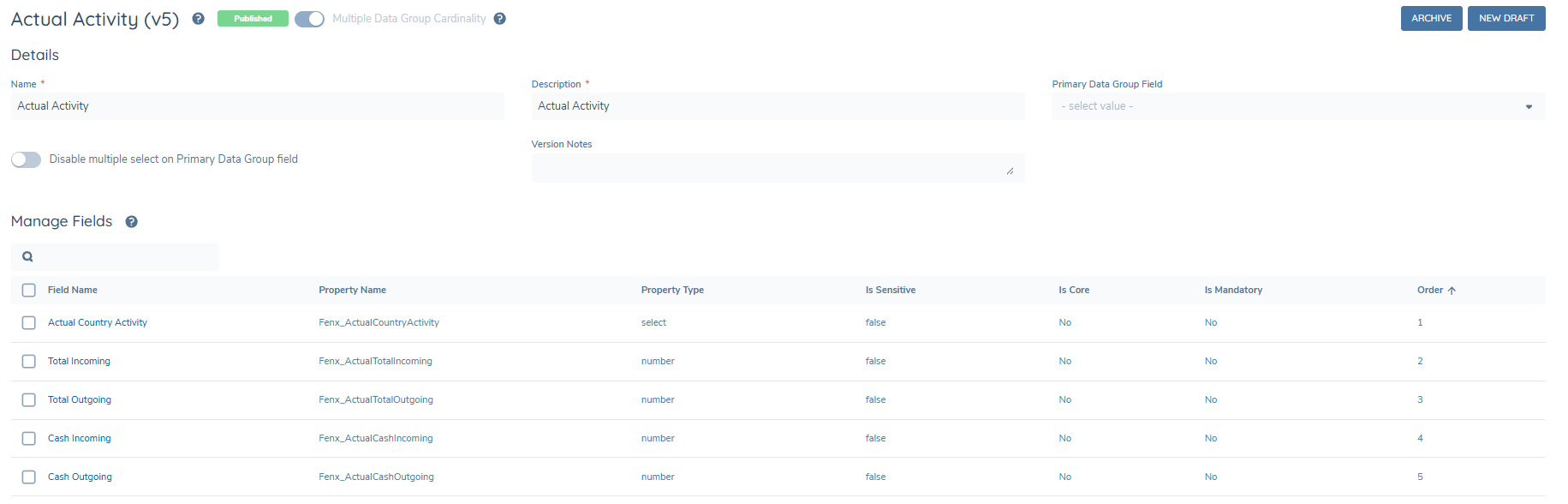
The Actual Activity data group mirrors the Expected Activity structure and must include the following fields, with data keys configured exactly as shown:
- Fenx_ActualCountryActivity
- Fenx_ActualTotalIncoming
- Fenx_ActualTotalOutgoing
- Fenx_ActualCashIncoming
- Fenx_ActualCashOutgoing
Field configuration requirements:
- All fields must be configured as Read-only
- These fields are populated automatically by the system and must not require any user input
This data group must be configured as a Policy Field with the Database Field Name of ‘Fenx_CapturedActualActivity’ and must be configured to be read-only. The Actual Activity data group does not need to be presented in any journey as the system updates the transaction data directly to the verified record of this actual activity data group. The data group should look like this
Risk Rating and Risk Score Data Keys
The policy configuration must also ensure that the following data keys are used for risk evaluation:
- riskRating
- riskScore
These data keys must be configured exactly as shown and used consistently across policy, risk models, and risk evaluation logic. Incorrect casing or alternative data keys will prevent Behavioural Risk from functioning correctly.
Risk Configuration
Behavioural Risk must be configured within the overall entity risk model. A new risk factor group should be created for the dynamic risk factors. The name of the group can be chosen by the user. The following risk factors should be added to the group using the exact casing shown:
- Fenx_TotalActivityIncoming
- Fenx_TotalActivityOutgoing
- Fenx_CashWithdrawalsIncoming
- Fenx_CashWithdrawalsOutgoing
- Fenx_UnexpectedCountries
The first four risk factors should be configured to use the same risk levels as the ‘BehaviouralCountryRisk’ reference list e.g. High, Medium, Low along with the risk scores for these levels. In this way, for example, if an entity sends cash with an amount outside of their expected activity to a High-Risk country, then Fenx_CashWithdrawalsOutgoing is set to High. This will contribute to the risk according to the configuration of thresholds and calculation algorithms.
The last risk factor Fenx_UnexpectedCountries is configured to account for the scenario where an entity transacts with a country that they did not declare in their expected activity. This risk factor must include the full list of countries, their associated risk levels, and thresholds, configured in the same way as standard country-based risk factors.
Configuration users must ensure the overall entity threshold model is configured to determine whether a risk increase of these five additional risk factors crosses a threshold.
Expected Activity Configuration
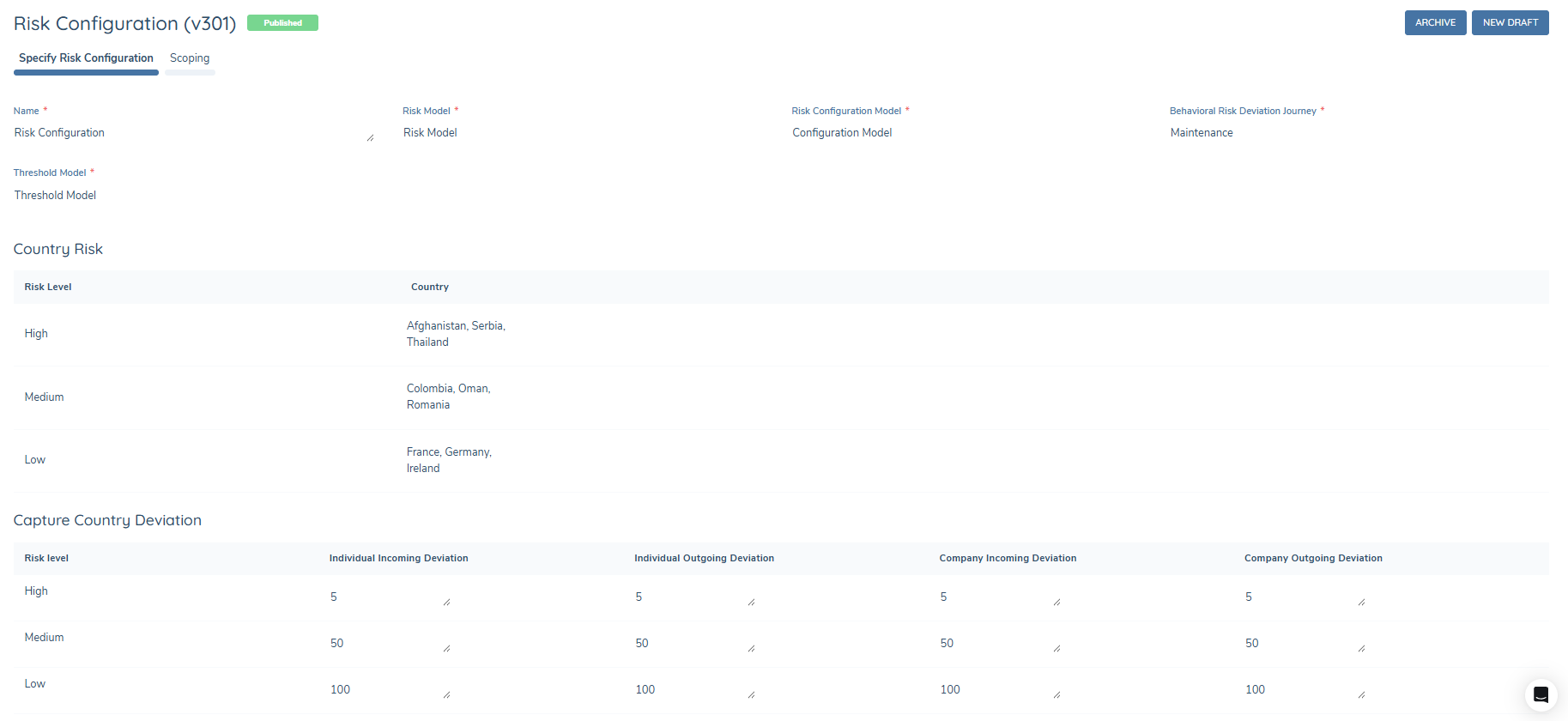
To configure Behavioural Risk deviation handling:
- Navigate to the Transaction Monitoring configuration menu.
- Select Configuration and open a new draft of Risk Configuration.
- Name the Risk Configuration set
- Select the risk models that contain the Behavioural Risk risk factors.
- Select the desired Behavioural Risk Deviation Journey from the list of preconfigured journey types. Any journey type may be chosen here.
- Assign each country to the appropriate risk level.
- Configure the percentage deviation thresholds for each risk level. These thresholds determine whether observed differences between expected and actual activity are considered within or outside allowed deviation.
The configuration should look like this
Each of these configuration sets has accompanying scoping conditions that can be configured in the next tab. These scoping rules can use any conditions that use the source 'Current Entity'. An example configuration is shown below

If an entity does not meet any scoping conditions, the process will not run. If an entity meets multiple scoping conditions, the system will use the first in-scope configuration instance it identifies.
Display on Entity Profile
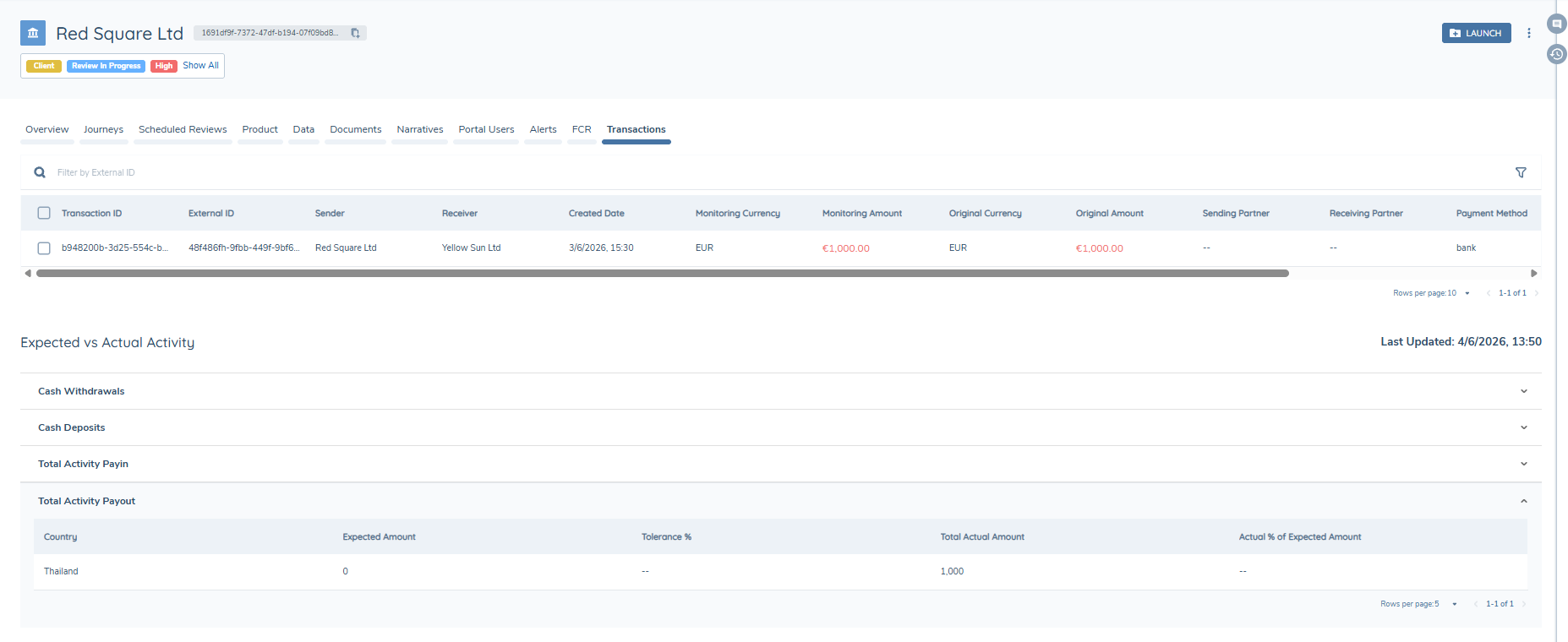
Expected and actual activity are stored as entity data and are displayed as standard data groups on the data tab of the entity profile. The information is also visualised on the Transaction tab of the entity profile so that analysts can quickly understand activity patterns.
Each of the four behavioural categories are displayed: Cash Withdrawals, Cash Deposits, Total Activity Payin and Total Activity Payout. Within these categories there are 5 columns:
- Country: the country declared in the expected or actual activity.
- Expected amount: the amount submitted by the entity as part of their KYC journey that they expect to transact with this specific country over a 12-month rolling period.
- Total Actual Amount: the summed total of the actual transactions of the entity for this country over a 12-month rolling period.
- Tolerance %: the allowed deviation that is configured in the TM Configuration page, displayed as 100% + tolerance %.
- Actual % of Expected Amount: the calculated deviation of the actual amount compared to the expected amount and is calculated as (Actual amount/Expected amount)*100.
Exmaple Use Cases
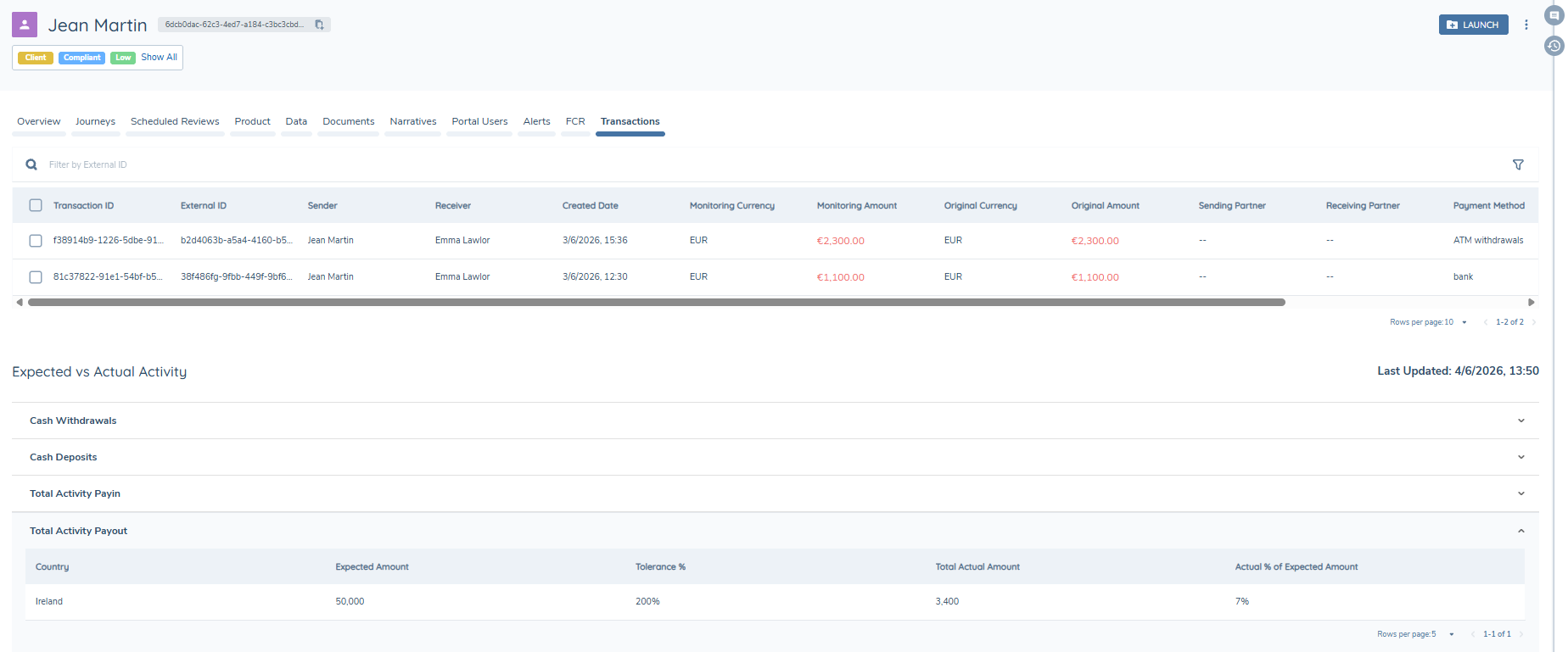
Entity's activity is within their submitted activity
- This entity submitted that they would transact with Ireland and that they would send €50,000 in total to Ireland, €10,000 of which is cash.
- Their actual summed amount of their transactions to Ireland was €3,400.
- Ireland is configured to be a low risk country and the allowed deviation is 100% so the tolerance % is calculated in this case to be 100% +100%.
- The Actual % of Expected Amount is calculated as (3,400/50,000)*100 = 7%.
- Since this percentage is smaller than the tolerance %, there is no need to update the risk for this entity.
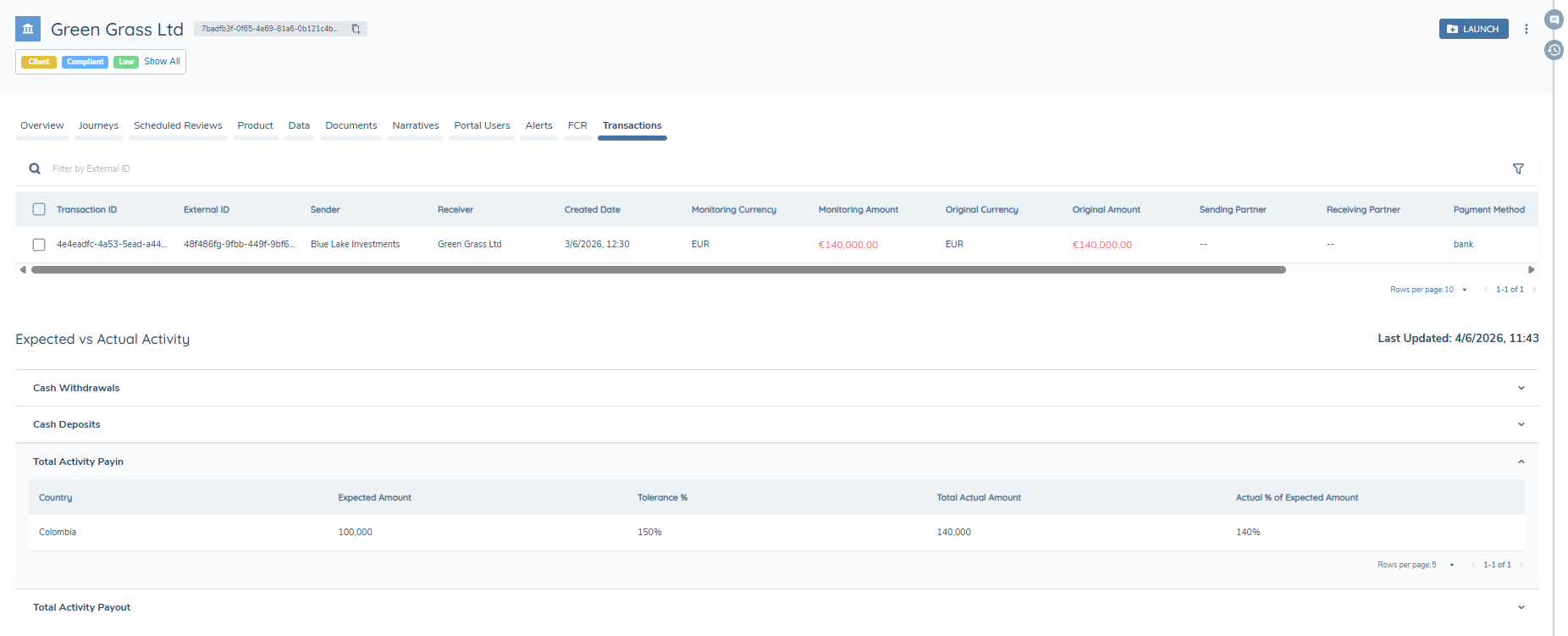
Entity's activity is within the allowed tolerance
- This entity submitted that they would transact with Colombia and that they would receive €100,000.
- Their actual summed amount of their transactions from Colombia was €140,000.
- Colombia is configured to be a medium risk country and the allowed deviation is 50% so the tolerance % is calculated in this case to be 100% +50%.
- The Actual % of Expected Amount is calculated as (140,000/100,000)*100 = 140%.
- The actual amount was larger than the expected amount but since this percentage is smaller than the tolerance %, there is no need to update the risk for this entity.
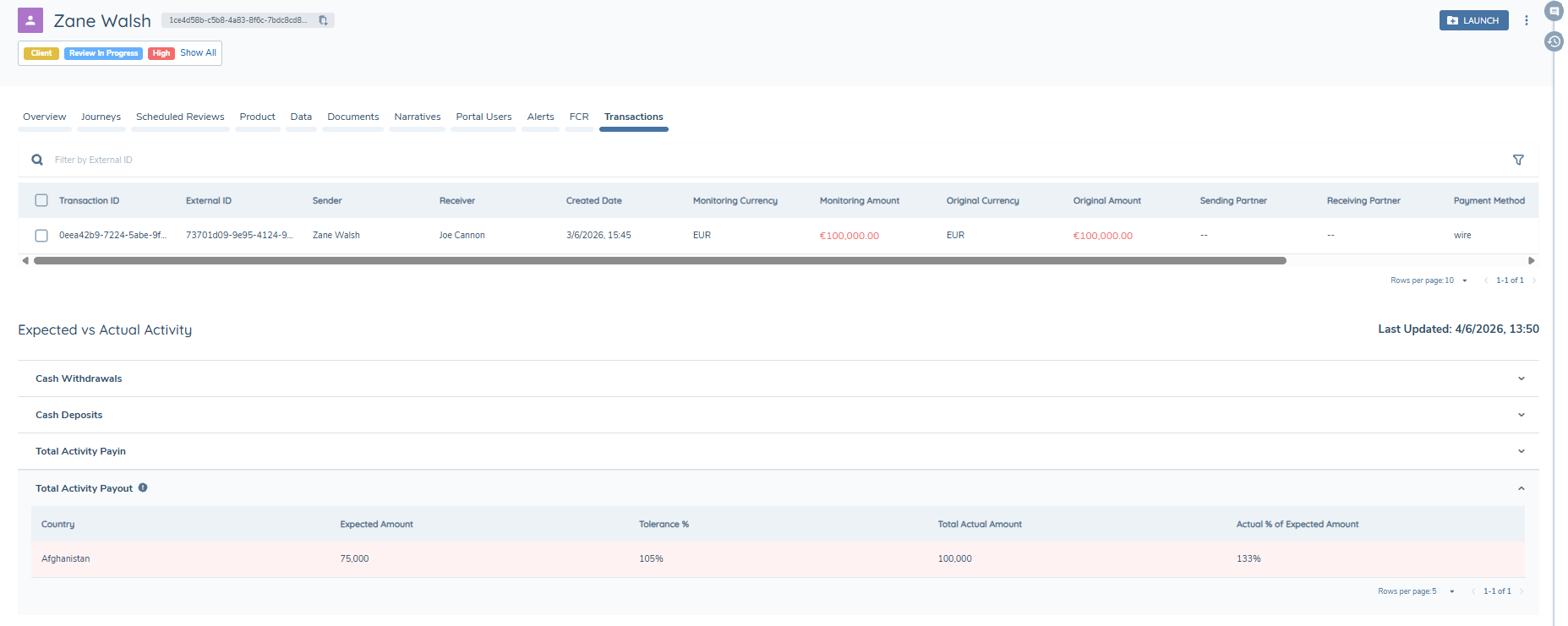
Entity's activity is outside the allowed tolerance
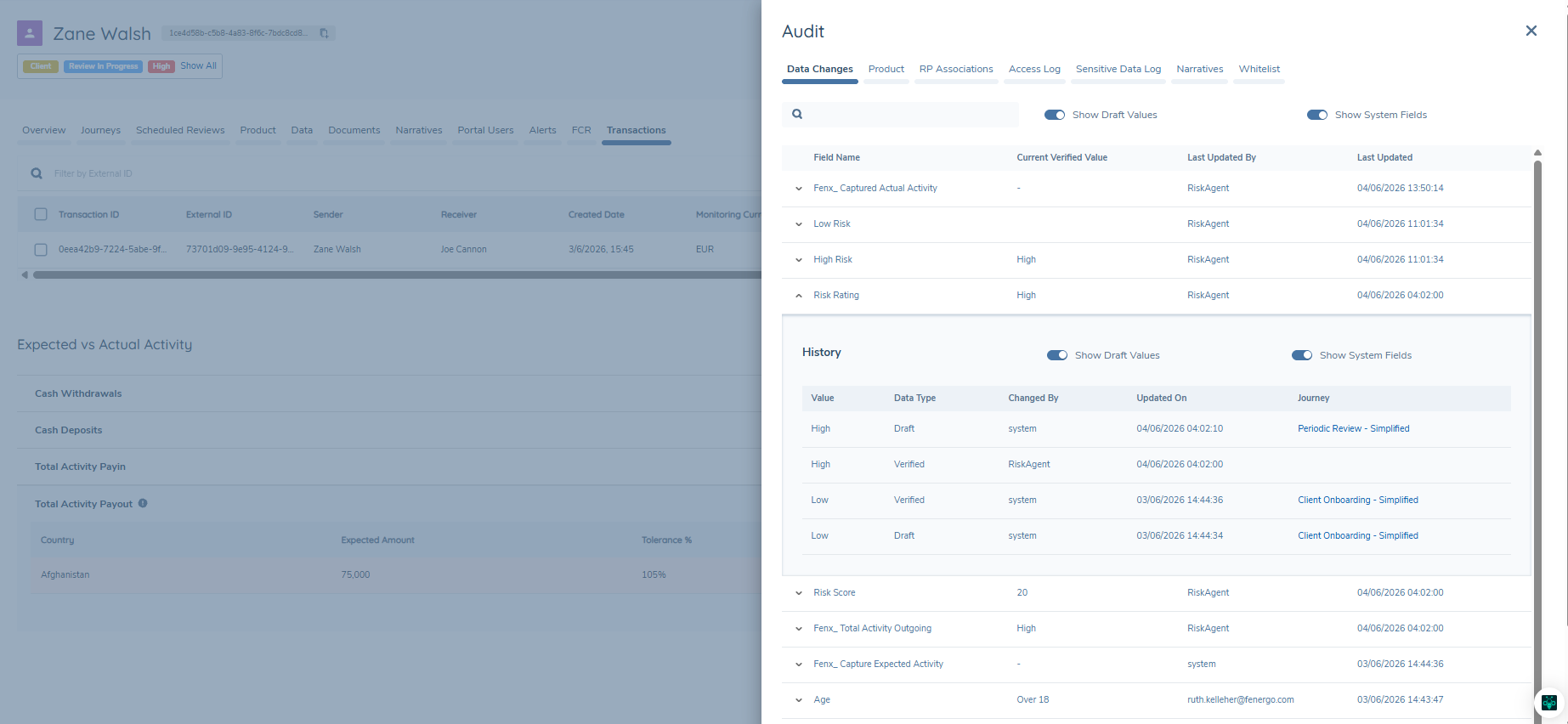
- This entity submitted that they would transact with Afghanistan and that they would send €75,000.
- Their actual summed amount of their transactions to Afghanistan was €100,000.
- Afghanistan is configured to be a high risk country and the allowed deviation is 5% so the tolerance % is calculated in this case to be 100% +5%.
- The Actual % of Expected Amount is calculated as (100,000/75,000)*100 = 133%.
- The actual amount was larger than the expected amount AND this percentage is larger than the tolerance %, then the risk must be updated for this entity.
- This category will have an information icon and the spedici row will also be highlighted in red to inform the analyst that the entity has exceeded their expected activity.
- The system checks the risk configuration for high risk countries and updates the risk accordingly.
- If the risk increases to a higher risk band e.g. low to high then the configured Behavioral Risk Deviation Journey is launched.
Entity transacts with country they did not declare
- This entity submitted that they would transact with Spain and that they would send €80,000.
- Their actual summed amount of their transactions was to Thailand for €1,000.
- Thailand was not declared in their expected activity.
- The system checks the risk configuration for unexpected countries, checks for Thailand and updates the risk accordingly.
- If the risk increases to a higher risk band e.g. low to high then the configured Behavioral Risk Deviation Journey is launched.
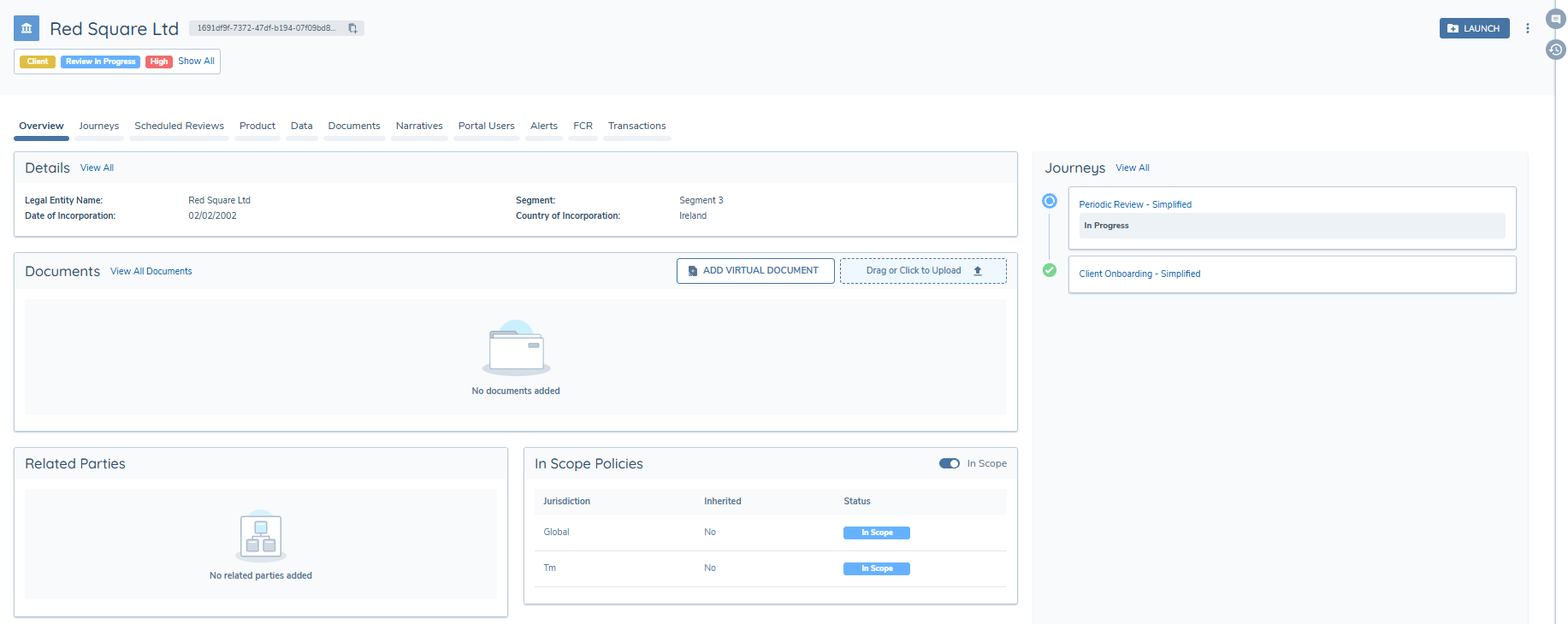
Blanks against the columns correspond to the following behaviour:
- Country blank: no country was declared.
- Expected Amount blank: no expected amount declared.
- Total Actual Amount blank: the entity has not transacted om the last 12 months.
- Tolerance %: the tolerance has not been configured in the TM Risk Configuration.
- Actual % of Expected Amount blank: there is no expected and actual amounts to compare.
Operational Notes and Constraints
- The actual and expected summary data in Entity Profile transactions tab is updated on a scheduled basis, and not throughout the day as the entity transacts.
- The actual and expected summary data in Entity Profile transactions tab is updated when an entity transacts. The submitted expected activity will only appear in this table when:
- The entity makes a transaction.
- The process has executed.
- If a maintenance or periodic review journey is launched to update the expected activity, the old values are used in the risk calculation in that journey. It is only during the nightly calculation that the full comparison is done and the updated expected activity is compared to the actual actvity.
- When the system is evaluating the scoping conditions of the Transaction Monitoring Risk Configuration, if there are no suitable conditions for a particular entity then the Behavioural Risk process will not run against that entity.
- When the system is evaluating the scoping conditions of the Transaction Monitoring Risk Configuration, if there are multiple suitable conditions for a particular entity then this system will apply the first one that is satisfied.
- The journey triggering is conditional on overall risk threshold changes only.
- This process checks an entity’s true transactions and compares them to the expected activity over a 12-month period. If a transaction is more than 12 months old, it will no longer be considered part of the actual activity.
- This process requires transaction batch processing infrastructure to be provisioned.
- The expected activity must be submitted in the same currency as the monitoring currency for the totals to be evaluated correctly.
- The process is triggered by batch ingestion. When a batch of transactions is ingested, rule execution is initiated and the Behavioural Risk process runs as the first step before any rules are evaluated.
Availability: Behavioural Risk is available for customers on eligible platform configurations. If you are interested in enabling this capability, please contact your Customer Success Partner to confirm eligibility and discuss next steps.
Summary
Behavioural Risk ensures that entity risk reflects actual transactional behaviour rather than static declarations. By continuously comparing expected and actual activity, the system detects emerging risk, updates entity risk profiles, and triggers journeys only when meaningful risk changes occur.
Refresh policy-derived logic during behavioural risk re-evaluation
Some policy fields use conditional logic driven by values derived from core customer fields, such as Age from Date of Birth and Length of customer relationship from Onboarding Date. These calculated values may feed directly into risk assessment and may also be used in business rules. Instead of refreshing these values in the context of a journey, these fields can be updated as part of the behavioural risk re-evaluation flow. These fields will be refreshed before any risk processing runs, so the latest values are used by the risk model and downstream rule logic.
What happens during behavioural risk re-evaluation?
Re-evaluation of calculated fields must occur before any Behavioural Risk processing begins, so that updated values are available for the risk assessment and rule execution. The order of operation is as follows:
- The system pulls the full verified entity profile to perform this recalculation, but only these conditional logic policy fields change as a result of this process.
- Once recalculated, the updated calculated field values are written back to the verified entity profile.
- These calculated fields can be viewed in the audit.
- The Behavioural Risk flow is then executed so that the full risk assessment is run, evaluating the newly updated calculated fields alongside the Behavioural Risk specific fields.
- If the risk rating is updated, it is written directly to the verified entity record.
- The Behavioural Risk journey will still be launched if the risk rating increases to the next risk threshold.
Limitations and considerations
- Calculated fields are re-evaluated only when the Behavioural Risk process is triggered, which occurs exclusively when an entity has expected activity verified on their entity profile AND the entity makes a transaction.
- Only the calculated fields are updated through this process – there is no update of other entity data fields.
- If source data is missing or invalid (for example, Date of Birth not provided), derived values may be null or unexpected, depending on how your policy logic handles missing data.
Webhook Events
A webhook event is published for the Behavioural Risk process to support integration and monitoring use cases.
| Event Name | Trigger |
|---|---|
| TM Behavioural Risk | Published on successful completion or failure of the Behavioural Risk process. |
This event can be used to trigger downstream workflows, notify external systems, or monitor the health of the Behavioural Risk pipeline. Both success and failure outcomes are covered by the same event, allowing consumers to handle either scenario.