Working with Related Party Risk
Introduction
The Related Party Risk Assessment task evaluates entities in a client's hierarchy in order to determine a risk score.
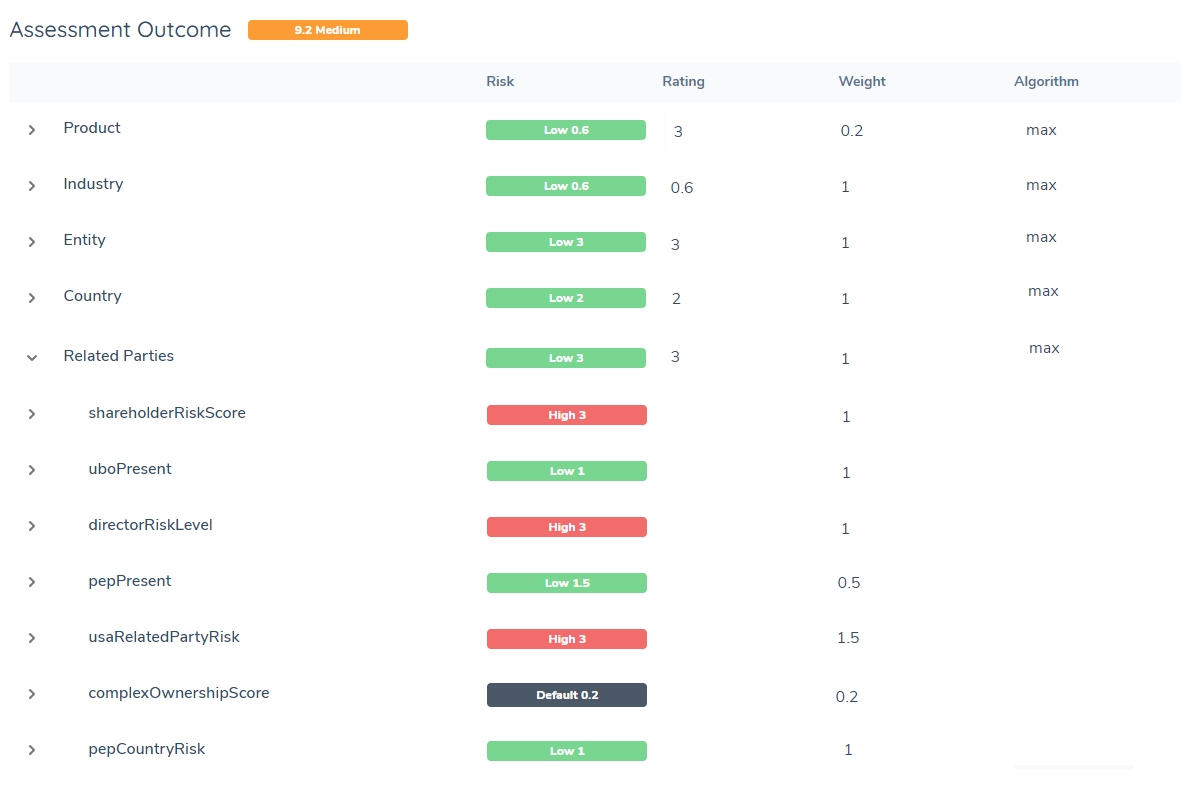
Some risk models require that related party data such as countries, PEP status, or relationship types be used to determine the overall risk of the client. This task allows a user to generate a risk value by selecting and evaluating entities from a hierarchy in a journey. Multiple related party risk values can be generated and used in the final entity risk calculation.
This guide provides instructions on how to configure related party risk. It will cover:
- How to select a group of entities from a hierarchy for evaluation
- How to configure a risk model to calculate a risk score for each of those entities
- How to use the results to calculate overall entity risk
- How to configure the related party risk task in journey builder
- Other ways the related party risk results can be used in a journey
Background
This section gives some context around the design of the related party risk task and what configuration options are possible. For infotmation on the task calculation, go to Task Overview. To start configuration, go to Feature Configuration.
The related party risk task is designed with these considerations in mind:
-
Different entities need different risk models
A related party hierarchy will have many entities of different types, each with their own set of data points. It's possible that not one risk model alone will fit every one of them. For example, nationality risk may be mandatory to evaluate for individuals, but that won't apply to companies (who will have another datakey to represent location - perhaps countryOfIncorporation). The entire hierarchy can't be fed through one risk model that demands that nationality be measured. There needs to be a way to use risk model A on one type of entity, and risk model B on another type so that there is flexibility in what data points are measured for each entity type.
-
Not all entities in the hierarchy need to be evaluated
Some risk models may only dictate that only shareholders or UBOs to be evaluated. Requiring all entities to be evaluated - no matter what relationship type or degrees away from the main client - may be unnecessary for some complex hierarchies with a large number of entities. There needs to be a way to choose entities for evaluation if they meet a certain criteria.
-
Some rules are more weighted more importantly than others when it comes to calculating final risk**
The overall entity risk model may dictate UBO data contributes higher to the final score than shareholders that hold a low percentage of ownership. Being able to generate seperate risk scores that can each be representative of a particular group will allow full control as to how much each of those groups contributes to final risk.
-
One piece of information may override the final result, regardless of the model calculation
The overall risk model may have complex logic with multiple steps and calculations. Howver sometimes there is an ultimate 'override' rule that disregards all these calculations. For example, "If a PEP is found, automatically make the client High Risk". There would be no need to perform a full calculation using multiple points of data now that this override is known. There needs to be a way to design and account for these overrides.
With that, the related party risk task is designed so that users can:
- Choose what group of entities in the hierarchy get evaluated
- Design and choose what risk model is used to evaluate each group
- Choose how all the seperate risk scores from the entities in the group are combined (using min, max, average, or sum)
- Save the final result to any custom datakeys (for example shareholderRiskLevel = "High", or shareholderRiskScore = 10) on the main client entity's data.
- Repeat the risk task multiple times in a journey to account for different groups and risk models, saving each result to new custom datakeys each time (for example the first RP risk task calculated shareholderRisk, the second RP risk task calculates uboLocationRisk, and so on)
- Feed these data points into a final overall entity risk model, like any other data point.
- Use these datakeys to drive any other additional logic; for example if shareholderRisk = High, trigger additional EDD workflow in the journey
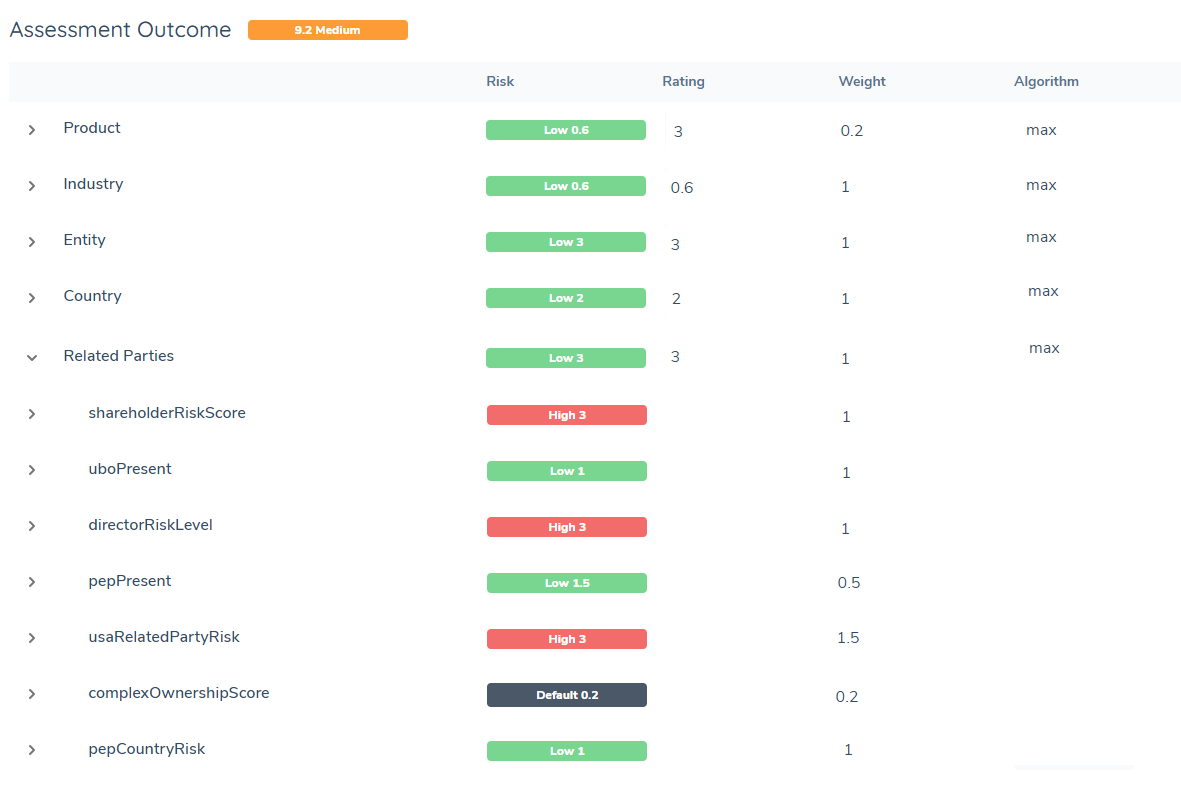
The ultimate function of the related party risk task is to generate datakeys and values like the ones above. Each datakey in the 'Related Parties' example group here is custom and will be unique to each tenant. There can be as little or as many datakeys as needed to calculate final risk as per model requirements. The name of the datakey and what it represents is completely dictated by the user.
Task Overview
This section provides an overview on how the task calculates risk, and how to translate risk requirements into config. For more details on how to configure each step, go to Feature Configuration
Related Party Risk Calculation Steps
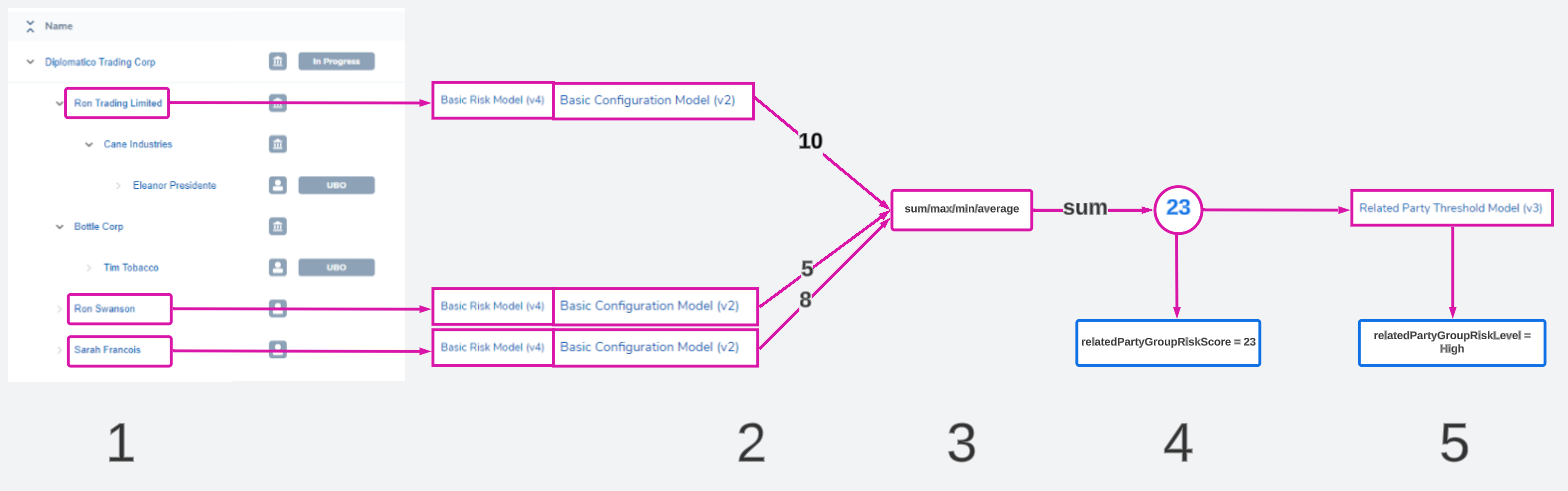
The related party risk task calculates a risk value via the following steps:
-
A group of entities are selected from the hierarchy
These entities are selected using Risk Scoping Rules. Users can configure rules like "Select all shareholders directly related to the client", "Select all entities that have an address in Paris", or "Select all companies". The selected rule evaluates the entire hierarchy and picks any entities that meet the condition.
-
The same risk model is run on each entity one by one
A risk model set usually comprises of:
- A risk model: the risk factors to evaluate
- A configuration collection: the values and scores assigned to every possible input of those factors
- A threshold model: a model that translates a numerical score '23' to a descriptive value like 'High'
This model set works together to evaluate data and output a risk score. For related party risk, we do not use the threshold model at this step in the calculation. Instead, the selected risk model and configuration collection run on each entity and outputs just a numerical result for each related party to represent their risk score.
-
These results are combined into one value
In the previous step, we have produced a list of values - one numeric score for each entity that was evaluated. These need to be combined into one value. Users can configure if that combination is going to be calculated using:
- max: chooses the highest
- min: chooses the lowest
- sum: adds all values together
- avg: calculates the average ([sum of values]/[number of values])
-
A final number is produced
This is the risk score of the entire group. This value is saved to a datakey - and this datakey can be anything, it is fully configurable. In this example diagram, these 3 entities have produced a final combined score of 23. It is saved to a datakey called 'relatedPartyGroupRiskScore'.
-
The number is translated into a descriptive label
Sometimes a number isn't enough of a description, and a label is needed to describe what the risk score actually means. Here a threshold model can be used to translate the number '23' into a word. For example, the threshold model may say that anything between 0-20 is 'Low' and 20.01 and above is 'High'. This label for this example is saved to a datakey called 'relatedPartyGroupRiskLevel'
The 5 steps above summarise a single related party risk task. This task can be configured to appear multiple times in a journey, repeating the same process but combining different entities and risk models each time. Each task will produce additional new datakeys and values to the entity's data (or overwrite old ones if necessary).
Examples and Use Cases
This section explores some practical applications of Related Party Risk in the app.
Calculating Final Entity Risk
After all the related party risk tasks have run, you will have a set of datakeys that represent the risk levels of all relevant related party groups.
To ensure these contribute the the overall risk of the main entity, add these datakeys as risk factors to the overall entity risk model.
Triggering Additional Requirements
The values generated from the related party risk task can be used like any other entity data values. Just as you might have a rule like "If industryCode = Gambling, trigger an additional document requirement task", the risk datakeys like shareholderRiskLevel can be used the same way.
Some use cases include:
- If uboPresent is False, trigger an additional Ownership & Control task that requires at least one shareholder of 50% or more is ID&V compliant.
- If shareholderRisk is High, trigger an additional document requirement for "Proof of shareholder location" in the document requirements task
- If numberOfPEPs > 5, cancel the journey
- If usaDirectorRisk is Medium, trigger a new journey stage that collects additional USA-oriented data requirements for the entity
These rules can be configured via journey builder and policy requirements.
Trigger Additional Workflows in the Journey
- Create a new stage, process, or task in the journey builder
- In the properties > Scoping Conditions Tab, create a rule such as "Current Entity - shareholderRiskLevel - Equals - High"
This will trigger the additional stage/process/task when a particular risk value is set on the entity.
Trigger Additional Requirements
- Create a new requirement in a policy. It could be a data, document, or ownership requirement.
- In the Requirement Details > Trigger Conditions area, create a rule such as "Current Entity - uboRiskLevel - Equals - Medium"
This will trigger the additional requirment when a particular risk value is set on the entity.
Generating Values Besides High, Medium, or Low
The related party risk task does not strictly have to calculate a high, medium, low risk level. Here are some examples on counting or flagging entities using the task.
Use Case: Count the number of PEPs in the hierarchy
A user wants to have a value called numberOfPEPHits. This will represent how many PEPs there are in a hierarchy. To configure this:
-
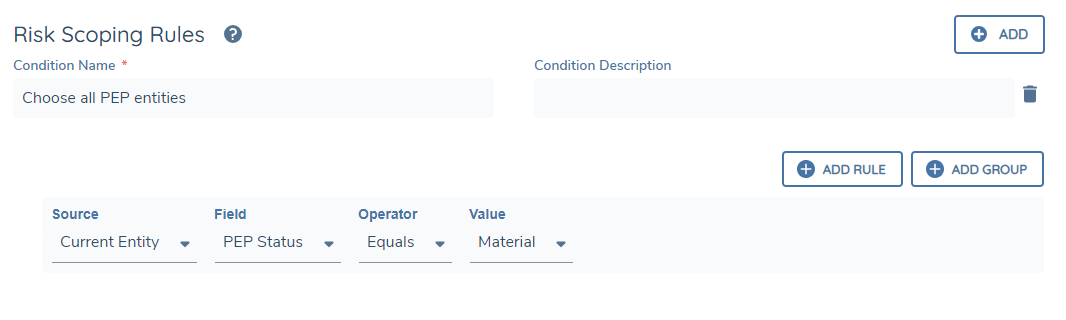
Design a scoping rule that selects any entity in the hierarchy that has a value of "pep = True". This scoping rule will return a list of entities that are labeled as a PEP.
-
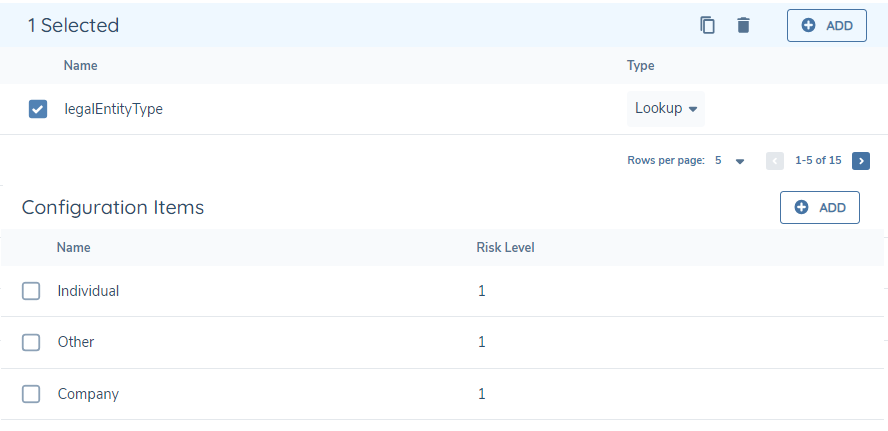
Design a risk model that will always return '1' for a related party risk score. For example, the configuration pictured below will always produce a score of 1 for each entity because all possible inputs are covered:
-
Set the task calculation algorithm to 'sum'. This will effectively count all the entities that were labelled as a PEP by simply adding all the '1' values together. The risk score will equal the number of PEPs.
-
Save this number to a datakey numberOfPEPHits and use accordingly.
Use Case 2: Identify if a PEP exists in the hierarchy
A user wants to have a True/False value called pepRelatedPartyDetected. They do not care how many PEPs there are, just if one exists. This can be calculated using the Overall Threshold Model in the related party risk task. To configure this, do the steps 1 - 4 above but add these steps:
-
Configure a threshold model that sets a value of True to any value over 1

-
Select this threshold model and set the Risk Rating Datakey value to pepRelatedPartyDetected
If any number of PEPs are found, the score will be >= 1 and the pepRelatedPartyDetected will be set to 'True'.
Notes
Related Party Risk UI Enhancement
As of 29th October 2025, a user interface is available to view a breakdown of values used as input for each related party risk factor. All related parties in scope based on the Risk Scoping Rule are evaluated for the aggregated value, however only direct associations and their breakdown will be displayed. This enhancement is available by default and does not require any configuration changes. However, it will not apply retroactively to tasks that were completed on or before this date. To view the breakdown in the new UI, users will need to return to the journey and re-run the Related Party Risk Review task.
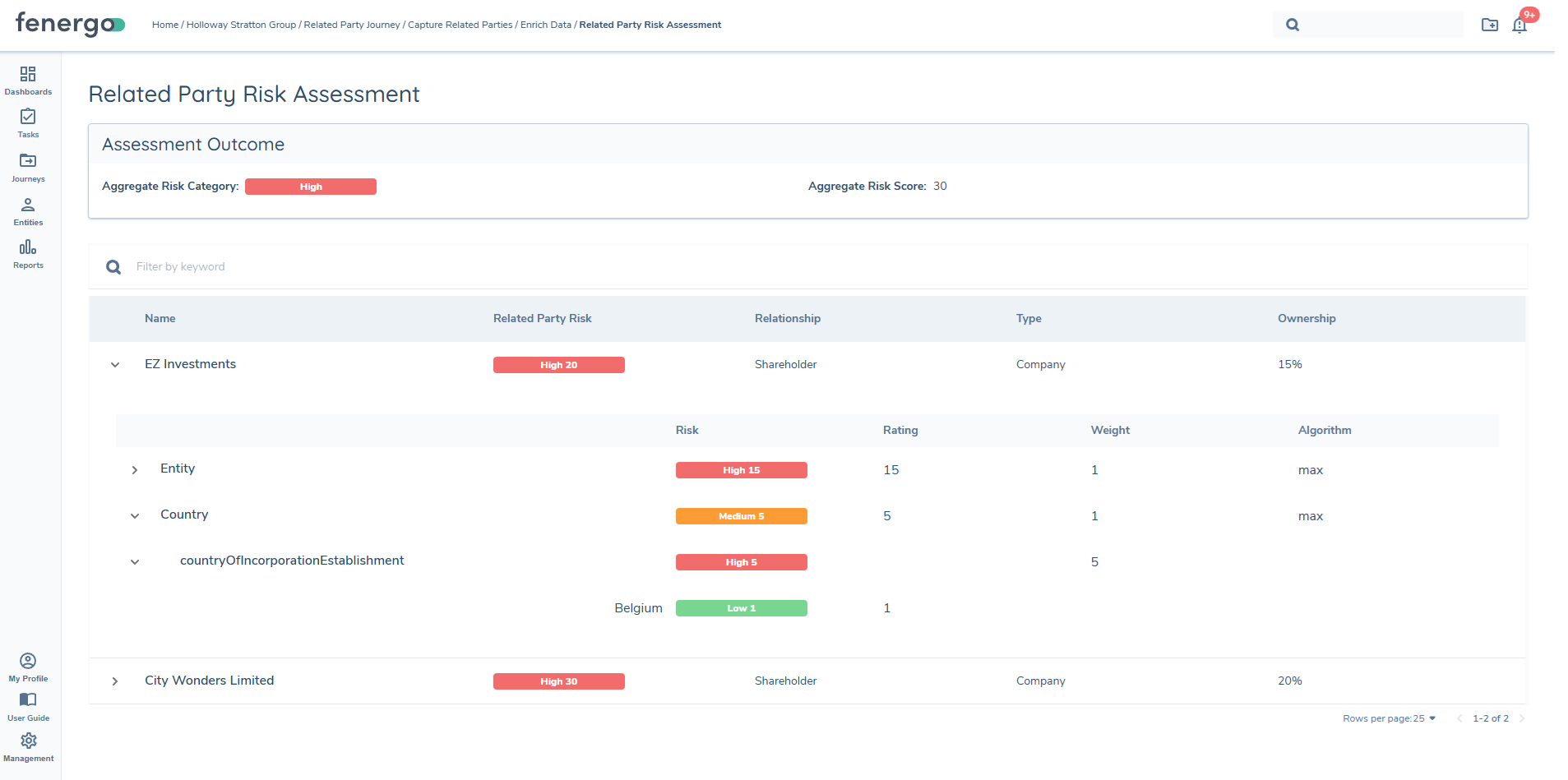
The following features are not included in this release:
- Permissioning which users can view the risk result breakdown