Configuring Related Party Risk
Translating Rules into Related Party Risk Configuration
Users will start with a set of rules from a policy or risk model that dictate how related party data contributes to a client's risk score. In this guide we will use the example of Bank X:
- Related Party Risk accounts for 20% of the overall client risk
- The location of the UBO accounts for 5% of this score
- The highest risk nationality of all shareholders accounts for 5%
- any presence of PEPs in the hierarchy accounts for 10%
In the final risk task, the related party contributions to risk will look like this:
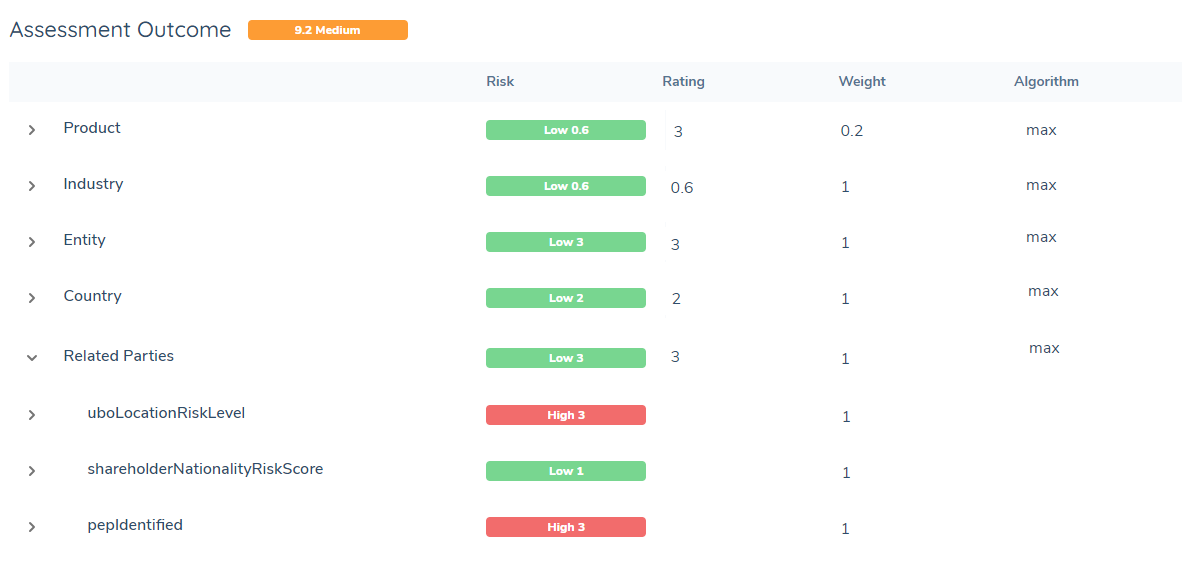
Here we have 3 data points, so we need to configure 3 related party risk tasks. Each rule will be it's own single related party risk task. They will each produce a datapoint:
- uboLocationRiskLevel
- shareholderNationalityRiskScore
- pepIdentified
Before configuring this task, first gather all of the rules that dictate how related party risk is measured. Break down each rule into the configuration steps by asking the following questions:
1. Who needs to be evaluated? Is it all shareholders, or just shareholders directly related to the client? Does the rule dictate that only companies should be looked at and not individuals? Should only related parties that own more than 25% count toward risk? This answer will determine the Risk Scoping Rule for the task.
2. In that group, what data will be measured to calculate risk? Does it mention a single datapoint (like nationality) or does it ask for more datapoints be considered and weighted? This answer will determine the Risk Model and Risk Configuration Collection for the task.
3. How are all the risk results for each related party combined? If the model runs on 10 entities and gets 10 different results, do we want the max, sum, average, or min of those numbers? Some policies dictate that the highest should always be the one chosen, but some more complex calculations may want a different calculation. This answer will determine the Calculation Algorithm for the task.
4. What does that number represent? If the final risk result is '23', what does that mean in simpler terms? Does "23 = High", "1 = Low"? Or perhaps the number represents another category, like a "True", "False" label. This answer will determine what Overall Threshold Model is used in the task.
5. What final datapoints on the main entity's data does this group and calculation represent? How do you want to represent that on the main client's data, and as a factor in the final risk model? It could be uboNationalityRisk, pepIdentified - it should describe the selection and calculation that has happened. This answer will determine the datakey names that are saved to the main entity's data.
Using the example rule "The highest risk nationality of all shareholders accounts for 5% of overall entity risk" above, the answers to these questions are:
- All shareholders will be evaluated. The risk scoping rule should select all shareholders in the hierarchy.
- Nationality is the only datapoint being evaluated. The risk model should only measure nationality risk. The configuration collection should cover all possible inputs for 'nationality' and have the appropriate risk level for each one.
- The highest risk nationality will determine the score. The calculation algorithm should be 'max'.
- The policy/model documentation will describe this mapping in more detail, but for this example we can say we are using a basic threshold model that determines 'Low', 'Medium', or 'High' from a numeric score.
- The number will be saved to shareholderNationalityRiskScore and the level will be saved to shareholderNationalityRiskLevel
The rest of this guide will dive into the configuration effort involved to build and connect each of these elements.
Feature Configuration
To build a full related party risk flow, each rule will need:
-
A risk scoping rule that chooses the group
-
A risk model and configuration collection to evaluate the data of the selected related parties
-
A related party risk task configured in the journey (where a scoping rule, risk model, configuration collection, calculation algorithm, overall threshold model, and datakeys are chosen)
It is important to note that scoping rules and risk models can be reused multiple times. There is no need to create a unique model/rule each time for every related party risk task if the configuraton is exactly the same.
When all rules are accounted for via scoping rules, risk models, and journey tasks, additional configuration is needed for:
-
A final entity risk model & risk task that takes uses all outputted datakeys as risk factors
-
Optionally, any workflow adjustments or policy requirements:
- Journey workflows: for example, "if pepIdentifiedInHierarchy = True, then cancel journey"
- Requirements: for example, "If directorRisk = High, trigger additional document requirements in the document task"
Risk Scoping Rules
The first step in the related party risk process is to select a group of entities for evaluation.
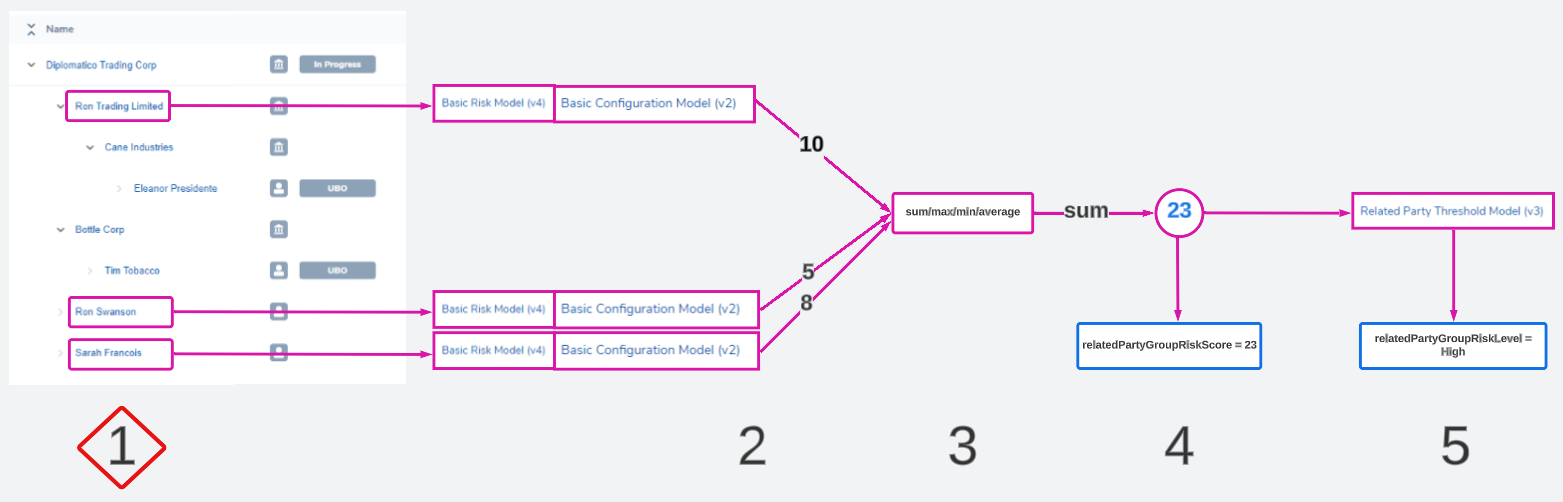
This is automated using Risk Scoping Rules. Instead of having a user manually select entities to assess, a configurator will create rules that choose entities based on their data or role in the hierarchy.
The risk scoping rules area can be found in the Risk section of the management console.
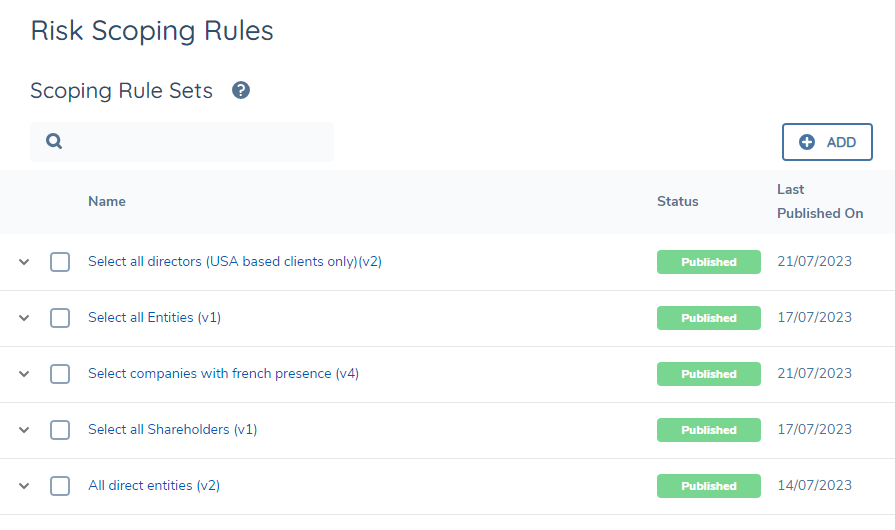
Here users can create and version rules that choose entities from a hierarchy based on
- Related party data (and metadata)
- Their association type
- The main client's data
Rules are designed using a logic engine. They can have multiple conditions that can be combined using and/or statements.
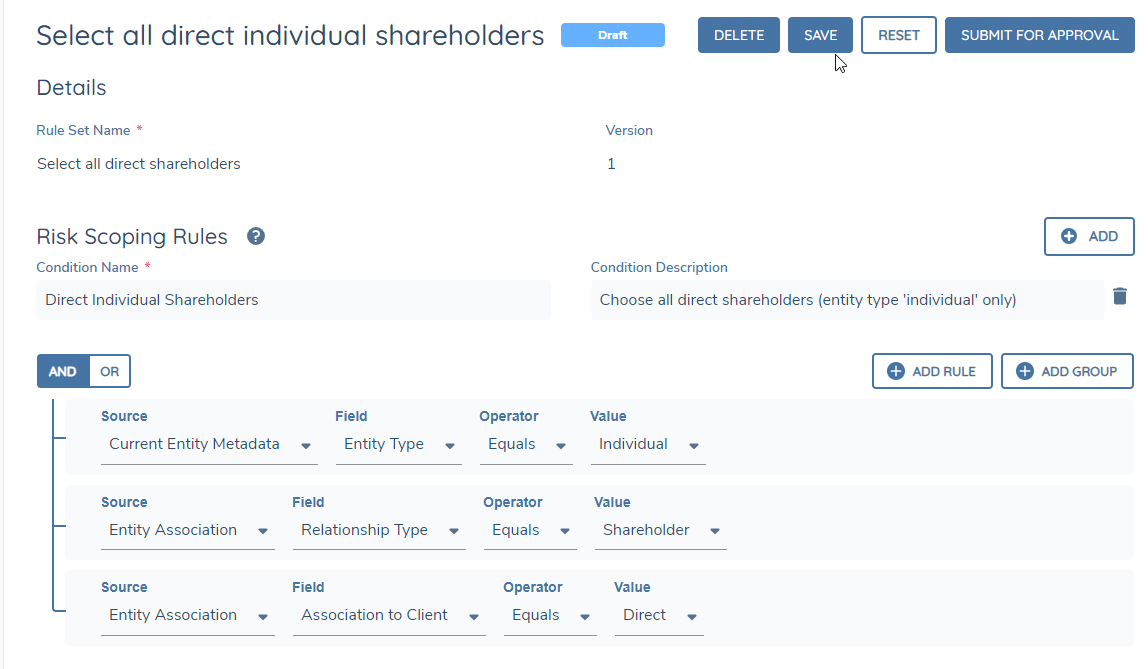
Each related party risk task can only use 1 scoping rule. This means if the risk rule dictates "evaluate all directors and shareholders", the scoping rule must cover both of those groups. There is no opportunity to choose 2 scoping rules for the task (1 for shareholders and 1 for directors). Multiple conditions can be combined in 1 rule by using an 'or' statement:

Users need to have 'Risk Configuration' permissions in order to access and build scoping rules.
If a scoping rule runs on a hierarchy and no entities are selected, the risk score of the group will be 0.
Risk Model Sets
In a related party risk task, all selected entities will be evaluated using the same risk model set.
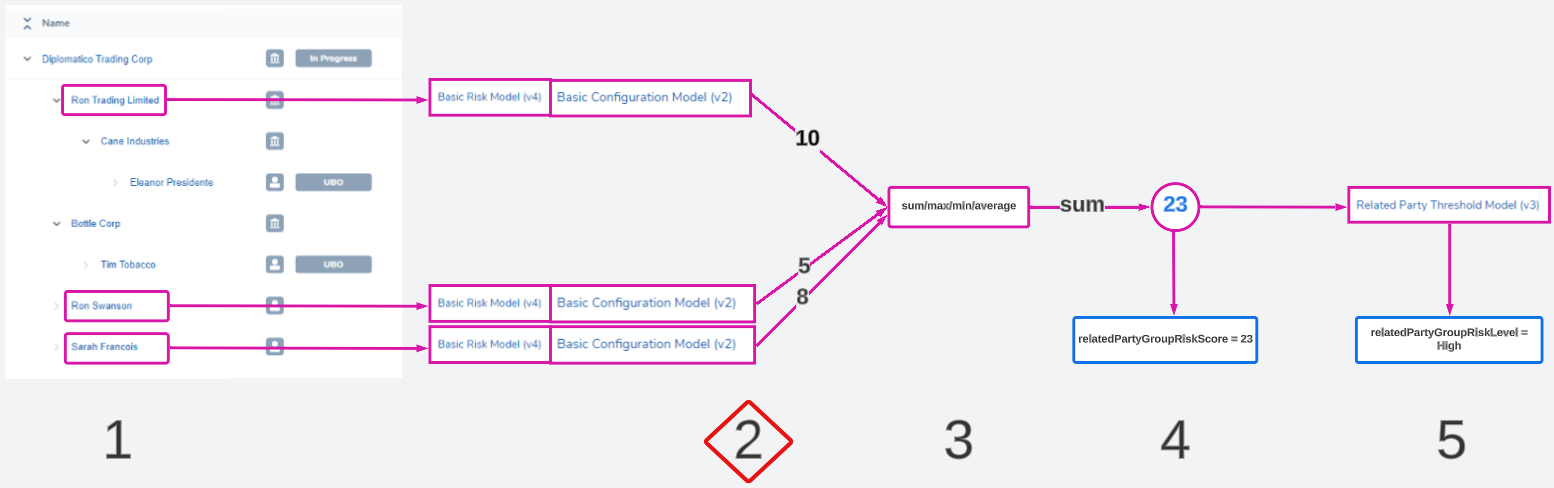
Users will need to configure a risk model that evaluates the correct data of a related party, and create a configuration collection that assigns the appropriate score to each possible input. The goal of this step is to give each chosen related party a numeric score that represents their risk.
A risk model set usually comprises of:
- A risk model: the risk factors to evaluate
- A configuration collection: the values and scores assigned to each possible input of those factors
- A threshold model: a model that translates a numerical score '23' to a descriptive value like 'High'
For related party risk, we do not use the threshold model at this step in the calculation as only the numeric score is needed. Instead, only the selected risk model and configuration collection run on each entity.
It is possible to use an already existing risk model and configuration collection to evaluate risk for each related party. Once all of the risk factors configured in the model exist in the related parties' data, the calculation will work as normal.
If the rule calls for only a small portion of information to be used (or a completely different set of data unique to related parties) users will create a risk model and configuration collection that evaluates only those factors.
A risk model set can be configured in the risk configuration area.
- Create a risk model that dictates what data points will be evaluated - for example nationality, or countryOfIncorporation. Assign weights that dictate how important those data points are to the final risk score.
- Create a configuration collection that dictates the risk level of each potential input. For example if nationality was the risk factor being evaluated, the config collection must have a nationality factor and all possible inputs to that data point. For example, "Ireland: 0", "UK: 1", "USA: 3"
For a comprehensive explanation of risk model configuration, refer to Configuring Risk Functionality.
Journey Builder
The remaining steps of the related party risk process can be configured in the journey builder task.
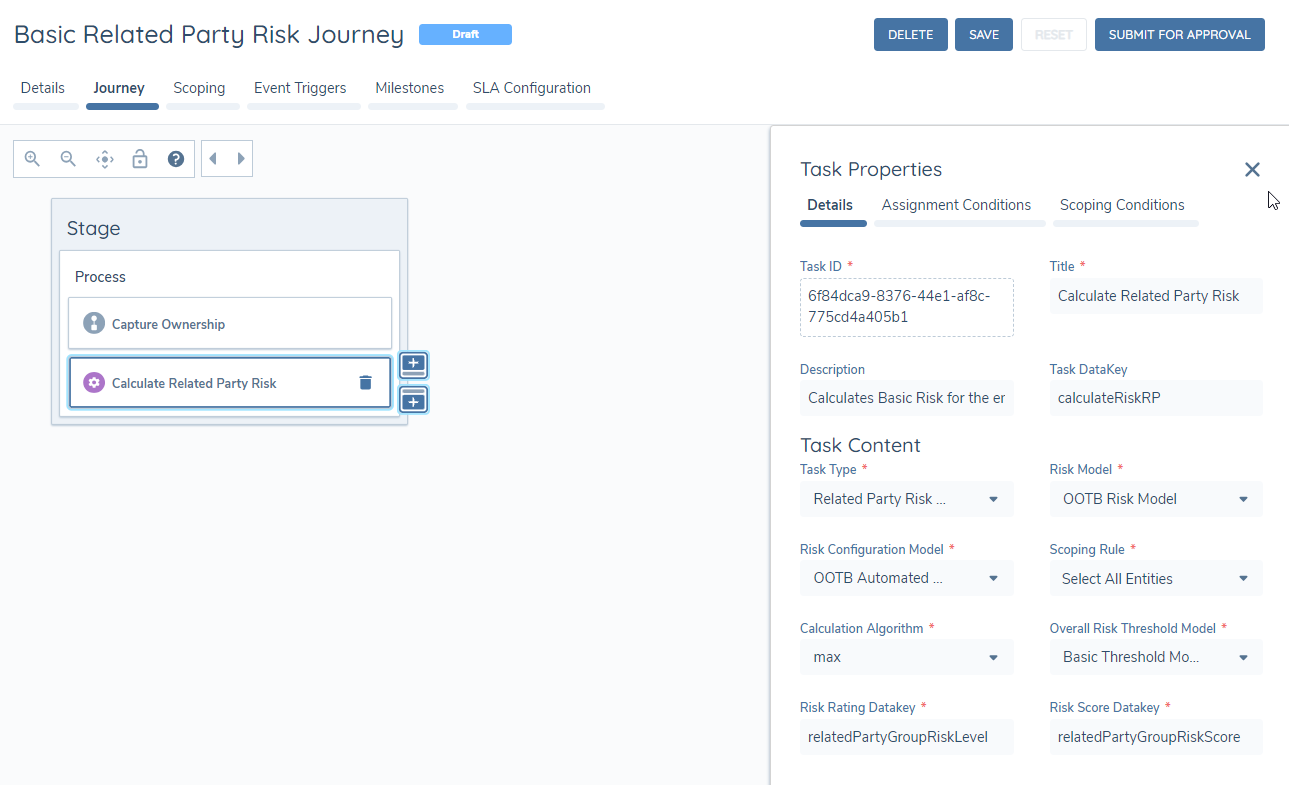
The task type is Related Party Risk Assessment. It is an automated task. Journeys can have as many related party risk tasks as needed - there is no limit. Each task will take a few seconds to calculate, but potentially more if they are evaluating a huge number of related parties.
Like any other task in the journey, these tasks can have scoping conditions that dictate if they run or not based on entity data. For example, there may be multiple related party risk models and the company type of the main entity dictates which model is run. Every model can be configured to appear on the journey but conditions can be placed so that only one runs based on the main client entity company type.
Calculation Algorithm
Users must choose an algorithm that combines all of the risk results from the previous step into one value.
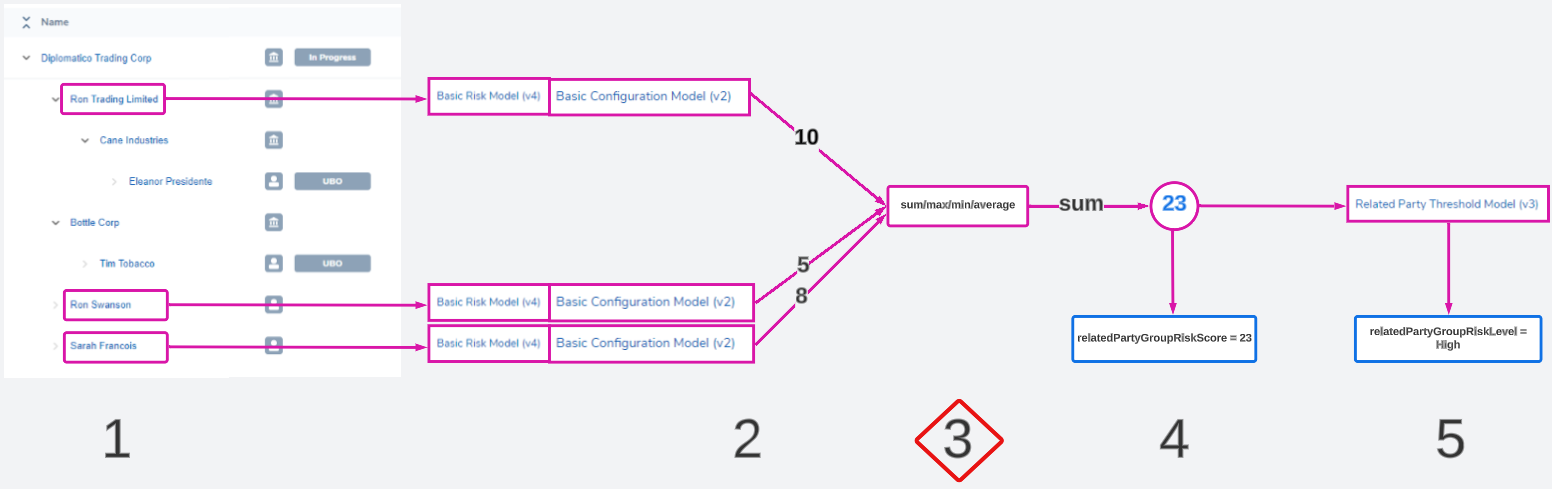
This value will be the ultimate risk score of the group. Only 1 algorithm can be chosen.
- max: chooses the highest
- min: chooses the lowest
- sum: adds all values together
- avg : calculates the average ([sum of values]/[number of values])
Most policies dictate that the max score be taken forward to represent the highest risk of the group. Other algorithms can be used to conduct more complex calculations. Some of these are explored in the Examples and Use Cases section of this guide.
Risk Score Output
The final numeric score will be written to a datakey on the main client entity's data.
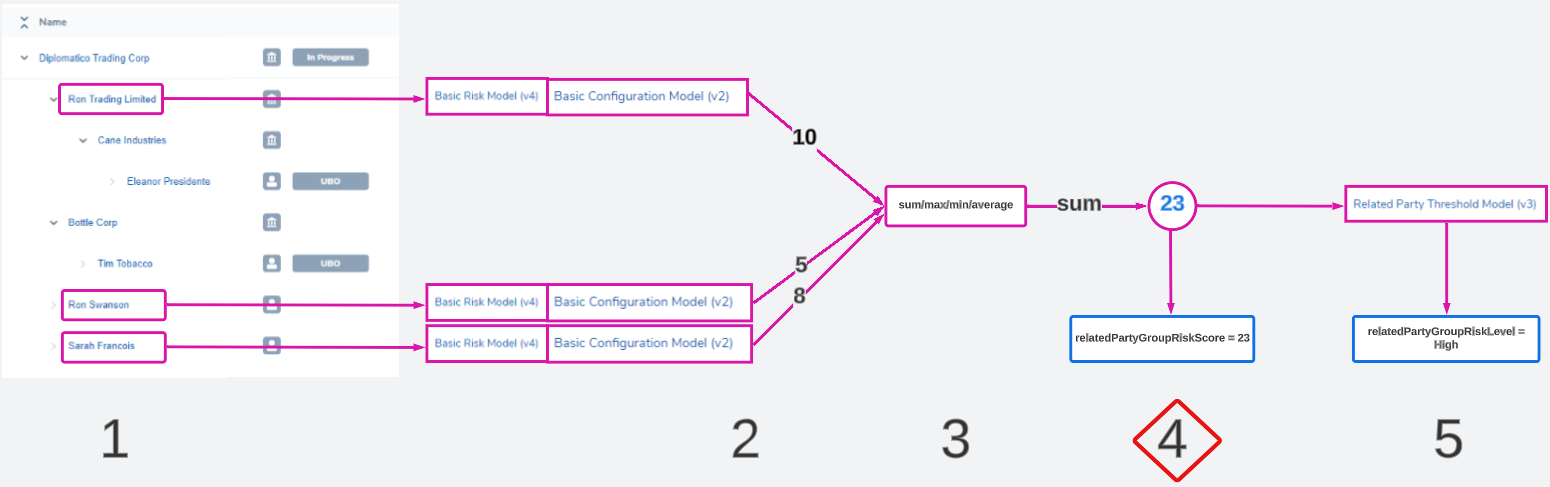
The datakey can be designated in the Risk Score Datakey field. Ensure that this datakey does not already exist for another purpose, as it will be overwritten at this stage if so.
Threshold Model Output (Risk Level)
A numeric score may not be enough to communicate the risk level of the group. The score can be translated into a descriptive word using a threshold model.
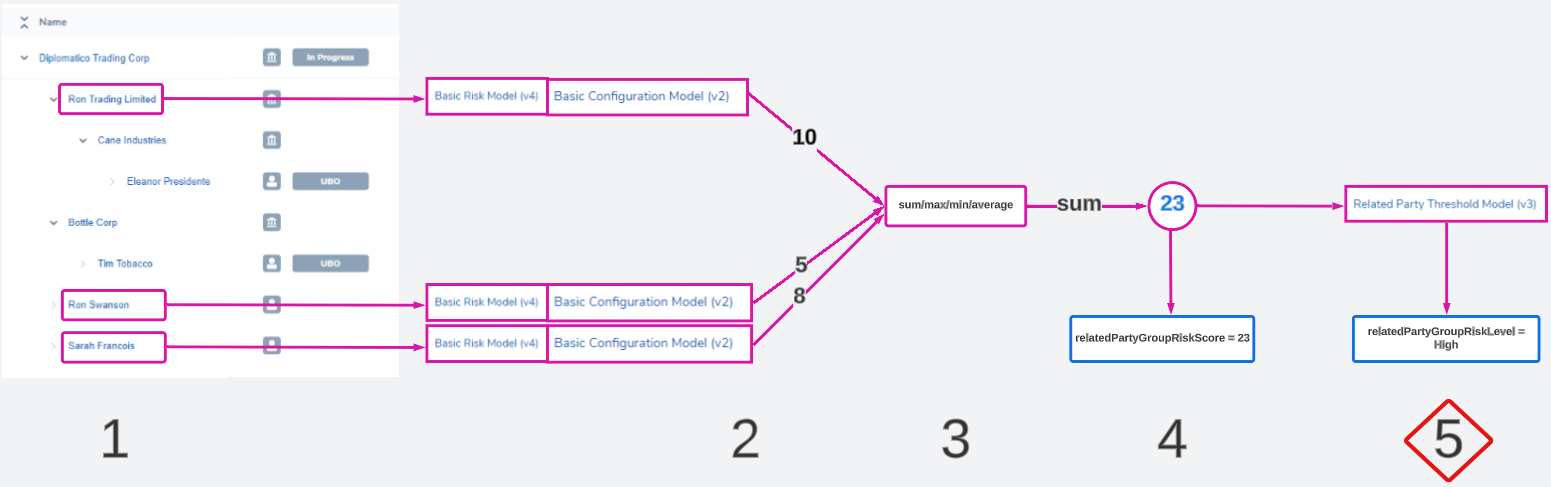
Instead of having a score represent the group, any word like 'High', 'Green', 'Restricted', 'Flagged', 'True', etc can be used to label the group outcome.
In the task configuration, a user must choose a threshold model to perform this translation. The threshold model must account for all possible scores. For example if the risk score is '101', but the threshold model only describes "0 - 50: Low", "50.01 - 100: High", there will be an error.
This label can be saved to any custom datakey in the Risk Rating Datakey field. Ensure that this datakey does not already exist for another purpose, as it will be overwritten at this stage if so.
Having descriptive labels makes it easier to calculate overall entity risk when using these datakeys to calculate final entity risk. For example, if each of these calculations only have 3 outcomes ("Low", "Medium", "High"), then users will only have to plan for these 3 inputs when designing the final overall risk model.