Configuring the Review Journey Scheduling Feature
Important Note
This feature is available now for non-live customers to utilise fully. If any rules have been configured in Journey Schedules, these can be replaced with Entity Scoping rules in Review Journey Scheduling to benefit from greater configurability and transparency.
Customers who are live and currently using Journey Schedules to trigger journeys (such as Periodic Review) should wait for the future release of a migration tool to convert existing rules to Entity Scoping Rules in Review Journey Scheuduling. Because the two features work very differently, using both together will lead to duplicated journeys and potential interuption to existing review cylces.
Any customer using our Product feature can now utilise Review Journey Scheduling to configure rules for Product Reviews.
Feature Overview
Review Journey Scheduling will eventually replace Journey Schedules as a more flexible, scalable and efficient way to launch review journeys. The Journey Schedules feature supports simple configuration to automatically launch journeys, but it's trigger conditions are limited to indexed fields, which reduces its utility.
Review Journey Scheduling enables refined configuration with access to all policy and product requirements. Configured Scoping Rules will determine what 'Reviews' are required for an Entity (and any associated Products) following the completion of each journey and schedule them accordingly. Scheduled Reviews will be visible on an Entity's Profile Page.
The Review Journey Scheduler runs daily, launching journey instances using the specified 'Review Journey' (Journey Type) for Reviews scheduled for the current date.
Permissions
- Review Journey Scheduling Access
- Allows users to view Scoping Rules for Review Journey Scheduling. Note: Product Configuration Access is also required to view 'Product Scoping Rules' tab
- Review Journey Scheduling Edit
- Allows users to create new Scoping Rule instances and save drafts
- Review Journey Scheduling Approve
- Allows users to submit draft scoping rules for approval and approve/reject
- Review Journey Scheduling Archive
- Allows users to archive published Scoping Rule versions
- Review Journey Scheduling Delete
- Allows users to delete whole Scoping Rule instances and draft versions
- Scheduled Review Access / Journey Access
- Allows users to view an entity's Scheduled Reviews on the Entity Profile Page or via Review Query API. Users who already have Journey Access will already be able to view Scheduled Reviews.
- Scheduled Review Edit
- Allows users to create or edit Scheduled Reviews via Review Command API.
- Scheduled Review Delete
- Allows users to Delete a Scheduled Review via Review Command API.
Scoping Rule Configuration
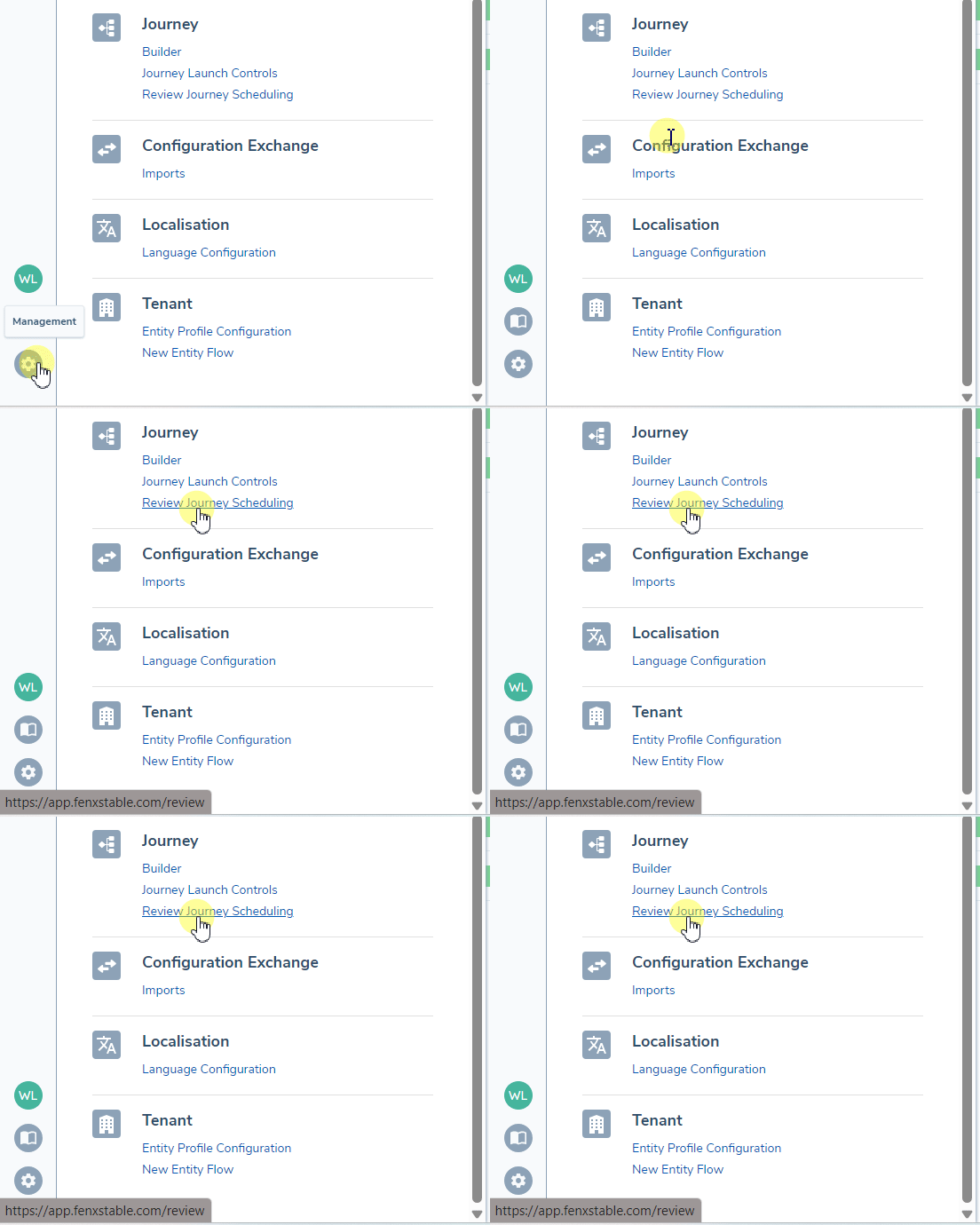
Scoping rules are used to evaluate which 'Reviews' an entity (and associated products) are in-scope for and to provide the review type and attributes to determine the 'launch date' for Scheduling. Navigate to 'Review Journey Scheduling' via the Journey Domain on the left navigation menu.
Entity Review Scoping Rules
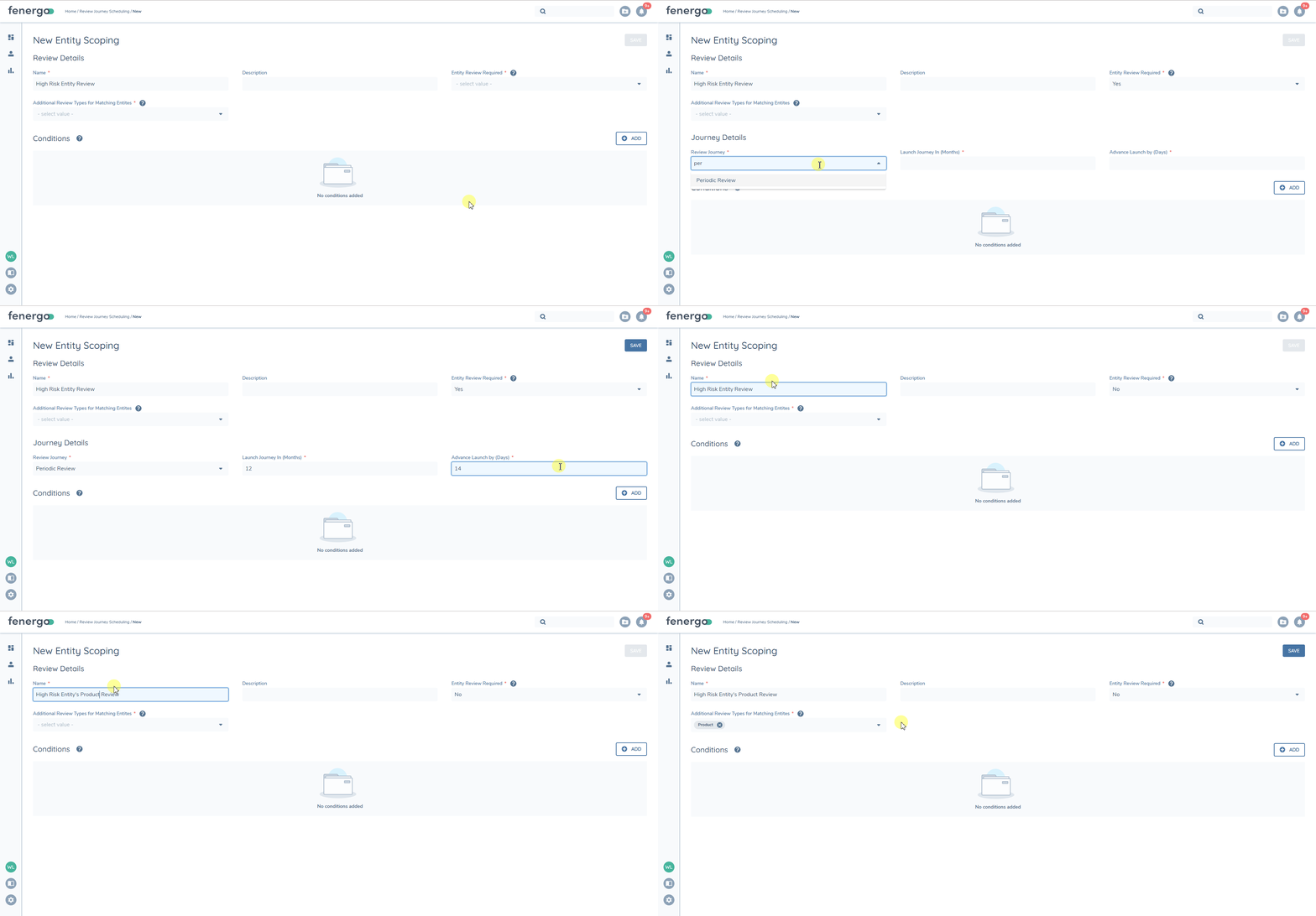
Entity Scoping rules centralise the conditions against which entities will be assessed - an entity must satisfy at least 1 Entity Scoping rule to trigger a Review of ANY type. They not only determine whether a matching entity requires an entity review but also whether the associated products should be evaluated against Product Scoping Rules. This approach minimizes repetition of entity scoping conditions across multiple Product Scoping Rules.
-
Entity Review Required
When Entity Review Required is set to 'Yes', users will provide 'Review Journey' (Journey Type to trigger on the launch date), 'Launch Journey in (Months)' and 'Advance Launch by (days). These combined inputs must result in a future launch date. While many rules can be configured, am Entity can only have 1 scheduled Entity Review per Review Journey (Journey Type). Users may also opt to include 'Product' in 'Additional Review Types for Matching Entities' if the Conditions specified in the rule would be appropriate to potentially schedule separate product reviews for any qualifying products. When Review Scheduling is assessed at journey completion, if multiple Entity Scoping rules with the same journey type are applicable to the entity, the rule with the earliest launch date will be chosen.
-
Entity Review Not Required
If Entity Review Required is set to 'No', then 'Additional Review Types for Matching Entities' becomes mandatory. This means that the rule will provide conditions an entity should meet for its products to be eligible for assessment under Product Scoping rules.
Once published, 'Entity Review Required' and 'Review Journey' fields become read-only in subsequent versions. When Reviews have been scheduled using a given rule, changing these fields would not affect the already scheduled reviews meaning that these changes would be akin to creating a new rule. By disabling the fields, the situation is more transparent.
Product Review Scoping Rules
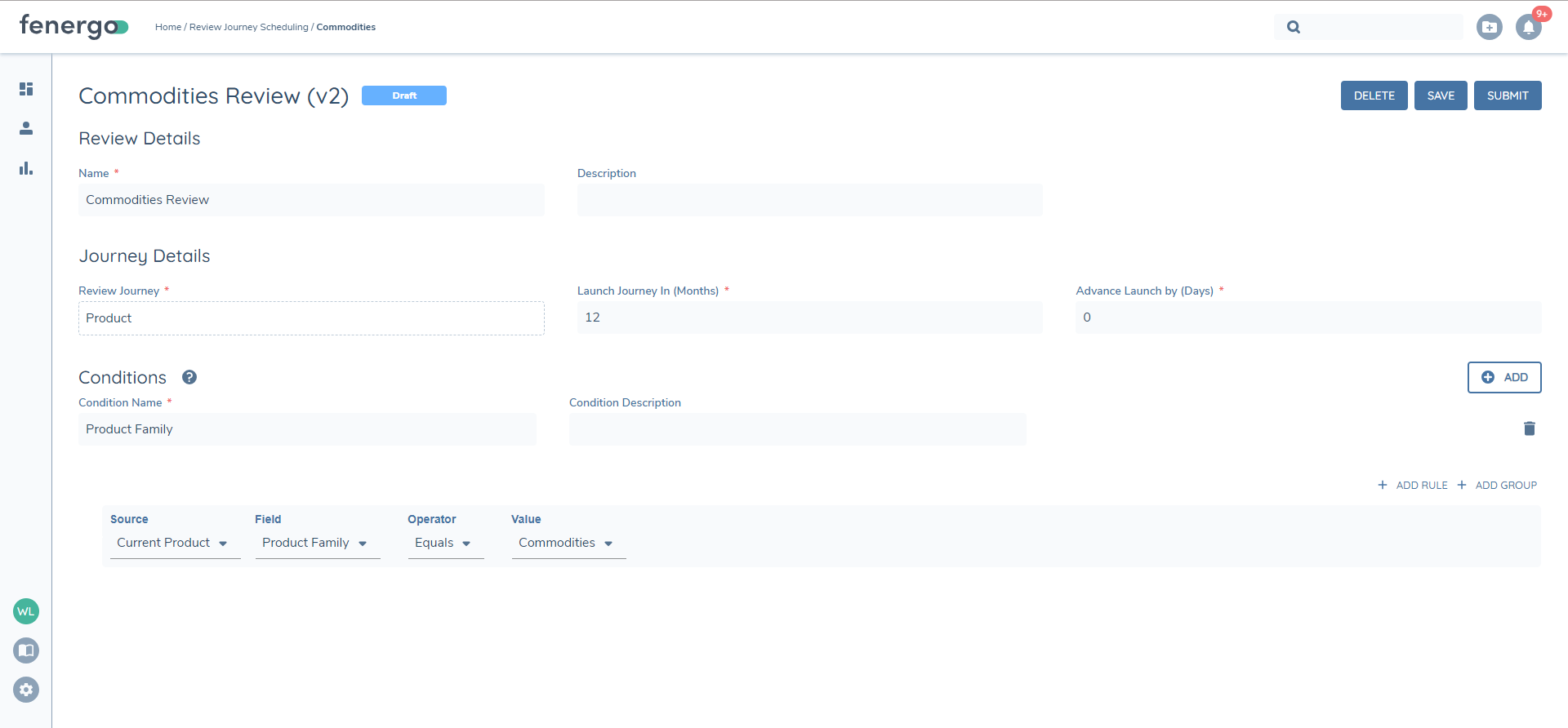
For an entity's products to be assessed, the entity must first meet the conditions of at least 1 Entity Scoping rule that includes 'Product' in the 'Additional Review Types for Matching Entities'. This means that the conditions specified in Product Scoping rules are applied above the Entity Scoping rules that triggered their assessment. This reduces repetition of entity scoping conditions across Product Scoping rules and focuses the conditions within Product Scoping rules on qualifying conditions for Products to be included in the Review.
Users will provide 'Review Journey' (Journey Type to trigger on the launch date), 'Launch Journey in (Months)' and 'Advance Launch by (days). These combined inputs must result in a future launch date. Each qualified Product Scoping Rule will result in one scheduled Review Journey and eligible products will be reviewed together in the resulting Review Journey(s). Products can also be in-scope for multiple Review Journeys when eligible under multiple Product Scoping rules.
As with Entity Scoping rules, once published, 'Review Journey' field becomes read-only in subsequent versions. When Reviews have been scheduled using a given rule, changing this field would not affect the already scheduled reviews meaning that these changes would be akin to creating a new rule. By disabling the field, the situation is more transparent.
Review Scheduling Process
When a journey has completed, the system will assess the entity against all applicable scoping rules configured under 'Review Journey Scheduling'.
Entity Review Scheduling
Entity Scoping Rules can be configured to trigger different Journey Types at desired review intervals. Where customers operate across multiple geographies or segments, we recommend a single entity review where possible. The system will ensure that only one 'pending' Entity Review can be scheduled per 'Review Journey'.
When an entity satisfies the scoping conditions of one or more Entity Scoping rules and currently has no 'pending' Entity Reviews, the system will schedule one per the configured rule. If multiple Entity Scoping rules are applicable with the same 'Review Journey', the system will always select the rule with the earliest launch date.
Once a 'Pending' status Entity Review is already scheduled for a given 'Review Journey' (Journey Type), the system would only update that scheduled review if:
- the entity is fully offboarded (Scheduled Review status will be updated to 'Offboarded')
- the entity has satisfied a scoping rule with the same 'Review Journey' that results in an earlier launch date
- the Review Journey has been launched (Scheduled Review status updated to 'Launched')
If the entity no longer meets the original Entity Scoping rule, the system will take a conservative approach and the Scheduled Entity Review persist to launch on the scheduled date.
Product Review Schedeuling
Products are more directly linked to specific business lines or geographies and so Product Reviews can be scheduled scheduled for a whole enterprise or separately by region/business line (by Booking Entity, Product Family/Type, Selling Location etc). Journey Schema's are broadly configurable to accommodate review activities, so entity elements can be included within Product Review Journeys as required.
Before any products can be considered for Reviews, the Entity must first satisfy conditions for an Entity Scoping rule with 'Product' populated in the 'Additional Review Types for Matching Entities' field.
Each qualified Product Scoping rule will result in a single "Pending" Product Review applicable for all qualified Products. If a 'Pending' Product Review is already scheduled and a new product now satisfies the same Product Scoping rule, the system will add it to the scope of the existing Scheduled Review. Otherwise, once scheduled, the Product Review will only be updated in 3 circumstances:
- Product Scoping Rule updated, resulting in an earlier launch date
- Product Offboarded (Product removed from review scope)
- Entity is Offboarded (all Scheduled Reviews are set to 'Offboarded' status)
Viewing an Entity's Scheduled Reviews
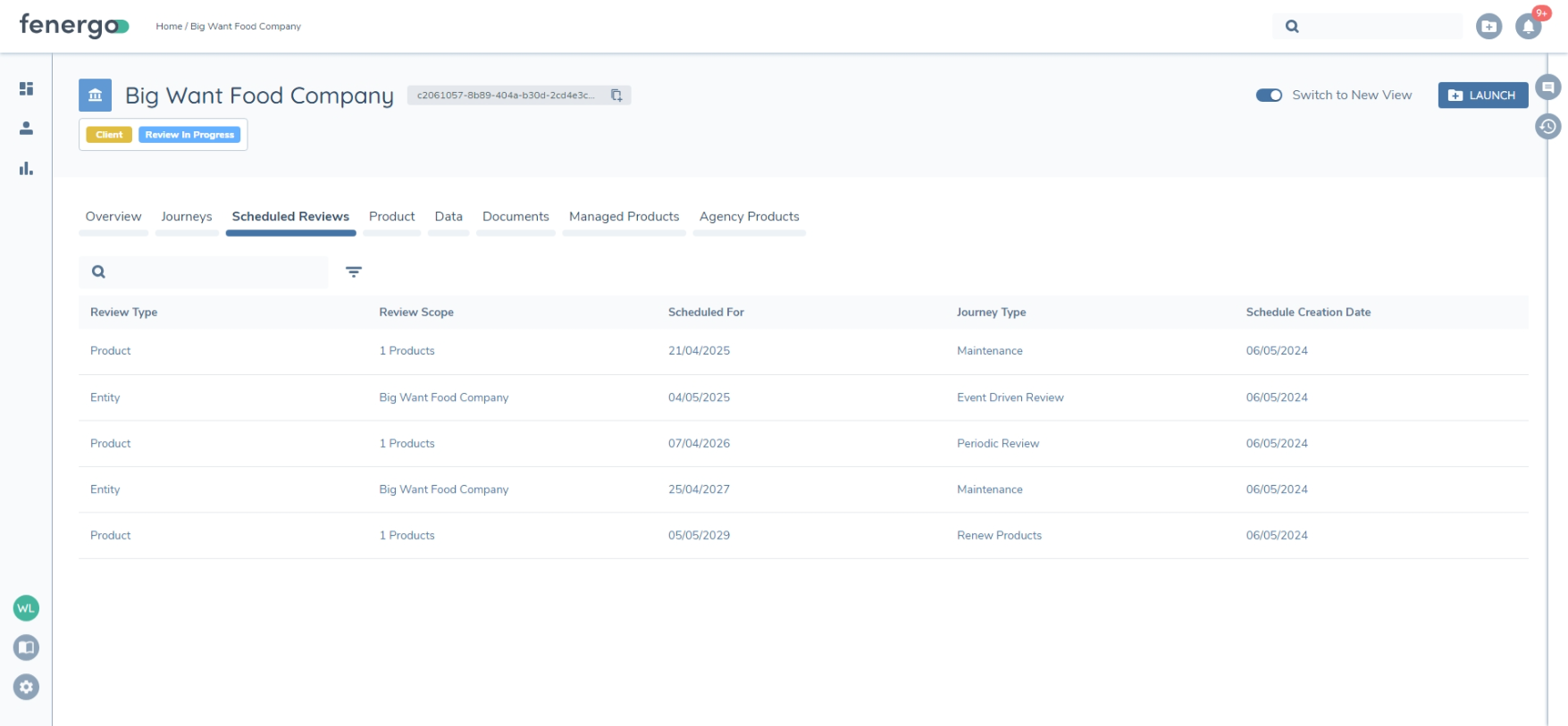
The Entity Profile page includes a tab to display an Entity's "Scheduled Reviews". The table will display all 'Pending' Scheduled Reviews for the Entity and it's Products (if using the Product Domain). Once a Scheduled Review is launched, it will be visible in it's generated Journey Instance(s) and will no longer be visible here.
Automatic Review Journey Launch
The Review Journey Scheduler will run daily the early morning (UTC). It will automatically launch journeys for entities with 'Pending' Scheduled Reviews with a 'launch date' that day. The system will launch journeys according to the scheduled 'Journey Type'. The scoping conditions of Journey Schemas with that type will determine which journeys are launched.
When a Scheduled Review results in one or more successfully launched journey instances, it will be updated to 'Launched' status.
Product Review Journeys - Product Filtering
When a Product Scheduled Review is launched, the products that qualified under the Product Scoping Rule are considered 'in-scope' for the review. When users access a Manage Products task within the launched journey, the system will filter to only display these 'in-scope' products, providing a clearer review context.
Product Filtering is also configurable via Product Scoping Rule selection for the Manage Products task. If a Product Scoping rule has been appled to the Manage Products task it will combine with the in-scope product filtering and may affect the displayed products.
Any products added within the task will be unaffected by filtering.
Configuration Exchange
Entity Scoping and Product Scoping rules configured in Review Journey Scheduling can be imported to higher tenants using Configuration Exchange. They are available for selection under the Journey domain with types 'Entity Review Schedule' and 'Product Review Schedule'. Users require the following permissions to successfully import:
- Review Journey Scheduling Access - required in the source tenant to access rules available for import
- Review Journey Scheduling Edit - required to import rules as as drafts in the target tenant
- Review Journey Scheduling Approve - required to publish imported rule drafts.
FAQ
Can I use this feature with Journey Schedules?
Review Journey Scheduling will eventually replace Journey Schedules. Customers using Journey Schedules in production should wait for the future release of a tool to migrate existing rules to Review Journey Scheduling before using this feature for Entity Reviews. The two features do the same thing but in very different ways. We don't recommend configuring any Journey Schedules if using Review Journey Scheduling. Customers who are not live yet can replace rules configured in Journey Schedules with Entity Scoping Rules in Review Journey Scheduling. Any customer using our Product feature can use Review Journey Scheduling to schedule Product Reviews.
A Journey Instance wasn't created for a Scheduled Review?
The Scheduled Review will launch journeys of the specified Review Type (Journey Type) and the entity will launch a Journey Instances for all Journey Schemas with qualifying scoping conditions (from 0 to many).
In the unlikely event that the specified 'Journey Type' doesn't result in any successfully launched journeys (i.e. the entity doesn't meet Journey Schema scoping conditions), the Scheduled Review will be updated to 'Failed' status.
Why are multiple journeys launched for this review?
The Scheduled Review will launch journeys of the specified Review Type (Journey Type) and the entity will launch a Journey Instances for all Journey Schemas with qualifying scoping conditions (from 0 to many).
Why aren't Product Reviews are being scheduled?
The entity needs to satisfy the conditions of an Entity Scoping rule that includes 'Product' in the Additional Reviews for Matching Entities field. If an Entity hasn't satisfied an Entity Scoping rule that triggers assessment of Product Scoping rules, then no product reviews will be scheduled, even if there are products that qualify for Product Scoping rules.
We centralise Entity Scoping so that configurators don't need to repeat Entity Scoping conditions in every Product Scoping rule.
I can't see any products in the Manage Products task of a Product Review Journey
The Manage Products task will present only products that are in-scope for the reivew (i.e. those that met the scoping conditions of the source Scoping rule). There must be at least 1 in-scope product for the journey to launch, so if there are no visible products, there may be a conflict with a "Product Scoping Rule" configured to apply to the Manage Products task in this Journey (refer to 'Filter Products Depending on Journey' section of the Product Enablement Configuration Guide).
How can I remove a Scheduled Review?
It is possible to use Review command APIs to delete a scheduled review. Otherwise they will persist until being launched or set to offboarded status.