Tenant Role and Data Isolation
Single Code Base Servicing Multiple Clients
The Fenergo SaaS platform is Multi-Tenanted. What this means is that multiple clients access the same deployed code base. The system offers an Individual experience to each client, and those multiple clients should not have any awareness of each other. When clients log on to the Fenergo UI or directly consume the APIs, the expectation is that they interact with :
- Their specific configuration.
- Their Data and Documents.
- Their Data Models and Process Flows.
To achieve this outcome, what is required is the implementation of a Tenant Isolation Strategy, which is the concept used to describe HOW one Tenants (clients) collection of data and config is kept securely separate from the data and config of another Tenant (client). As will be discussed within this document, there is no single strategic solution for implementing an Isolation strategy holistically across a modern SaaS platform, especially one built on cloud native services. What is required is a collection of best fit strategies which meet the requirements of clients and deliver the desired outcomes of protecting client PII (Personally Identifiable Information). Where any vendor will ultimately land, and Fenergo is no different, is with a blend of different Isolation Strategies implemented throughout the platform. We can begin by looking at the fundamental Isolation Strategies and then identify how and where they map within our platform.
Tenant Isolation Strategies
Implementing a Tenant Isolation Strategy touches upon Infrastructure, Data Storage & Network Level Access. A Cloud Based Multi-Tenant platform like ours, in particular one built upon cloud native services, requires Fenergo as a vendor to accommodate traditional isolation strategies but map them to the underlying storage / compute / and virtualized networking models offered as native cloud services. The are three main Tenant Isolation Strategies:
- Silo Model Full Separation of physical infrastructure with an instance of an application and fully isolated data layer allocated to each individual tenant.
- Bridge Model Where there exists some sharing of resources within an application stack and Isolation achieved using separate schemas or tables at the data layer.
- Pool Model Where full sharing of resources and client data is commingled in data stores, Isolation achieved using Tenant Identifiers.
In considering the above strategies, it is clear they fit neatly against self-hosted physical (or virtual) infrastructure, but less so against deconstructed micro services and native data services. Some creativity is required to map the appropriate approaches to the desired Isolation Outcomes, which is exactly what we have done with our SaaS solution.
Cloud Native SaaS Tenant Isolation Strategies
The Fenergo SaaS platform (as a single code base) appears at the surface to adopt a Pooling Strategy. By dynamically adopting a Tenant Specific Role at run time, which is governed by a fine grained security policy, the same code can execute with a specific tenant identity (per execution request) and achieve full Tenant Isolation whilst executing / running.
Governing access to resources inside the AWS Cloud is done using the IAM (Identity and Access Management) service. This service controls WHO? - can access - WHAT? inside AWS and you can read more about this service AWS Identity and Access Management. An IAM policy is a fine grained specific set of permissions which can be applied to Users or Roles and explicitly outlines what that User (or Role applied to the user) has permission to access. Using a role governed by a policy which contains the permissions of the calling Tenant is adopted by the code executing the request, allowing Fenergo as a SaaS vendor to achieve the Bridge Model isolation strategy where multiple tenants can be serviced by shared runtime code base but with secure tenant isolation applied to every request.
RunTime Role Adoption Pattern
Tenant Roles are created at the same time a Tenant is provisioned, and all required permissions are tied to only that tenants specific resources. It is common best practice for SaaS vendors to create and implement an Isolation Strategy for their solutions because especially cloud native and microservice architectures are comprised of a lot more separate moving parts compared to a traditional monolithic platform. The Runtime Role Adoption pattern allows fenergo to dynamically select tenant specific policies at run time. Post Authentication, once a tenant has been identified, the illustration below outlines how a combination of Up Front Provisioning and Run Time Selection based on tenant context, is used to select the right Role and generate an Access Token.
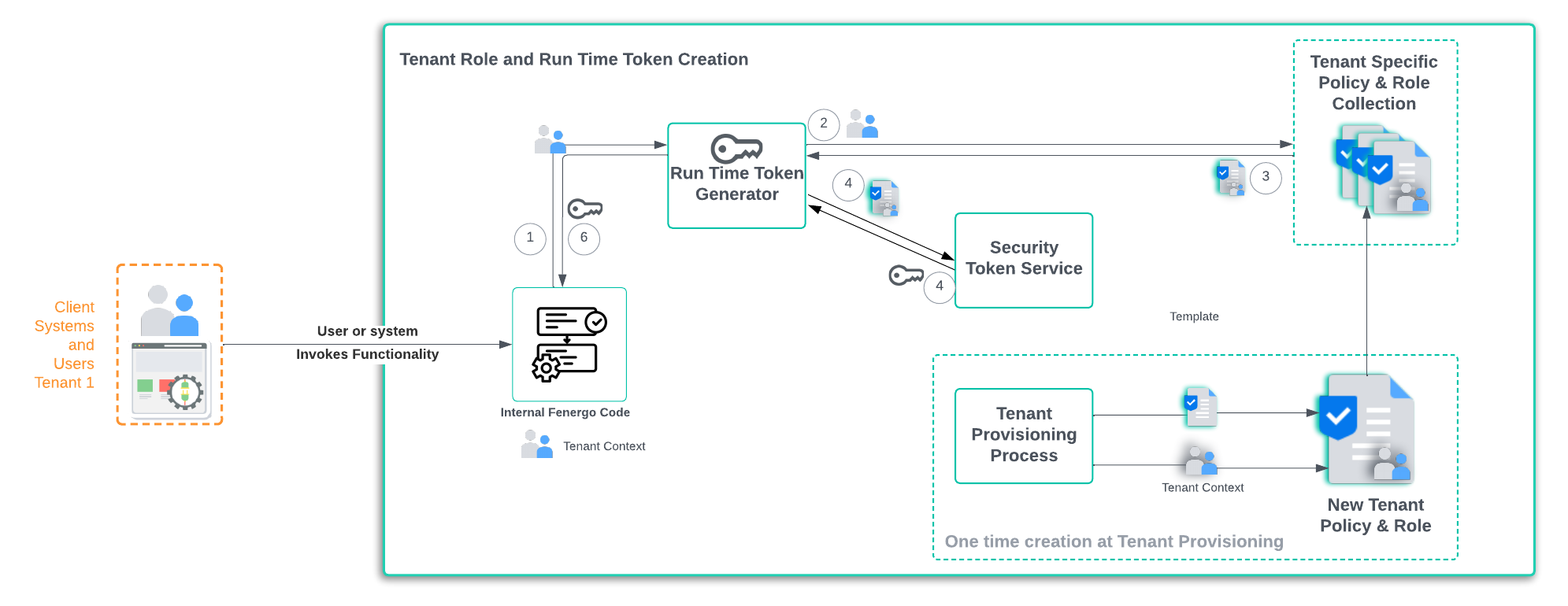
- Post User / Credential Authentication: Tenant context is passed to a Run Time Token Generator (Tenant Context is just an Id).
- Select Role: Using the Tenant Context the tenant role is Selected, it has the tenant policy assigned.
- Policy is Returned: The Role and Policy details for a specific tenant are returned.
- STS :Using the Role and Policy selected, a secure token is generated which can be used to access the tenants resources.
- Token Returned: The generated token is returned to the generator.
- Role Adopted: With the token in hand, the internal Fenergo code can adopt the Tenant Role.
Tenant Isolation at the Code / Runtime Layer
We have seen how a Tenant specific Role and Policy can be used to generate an Access Token with the correct level of isolated permissions . That token has has a Claim to a tenant and when the UI or API makes calls to the API Interfaces, it specifies the x-tenant-id in the headers.
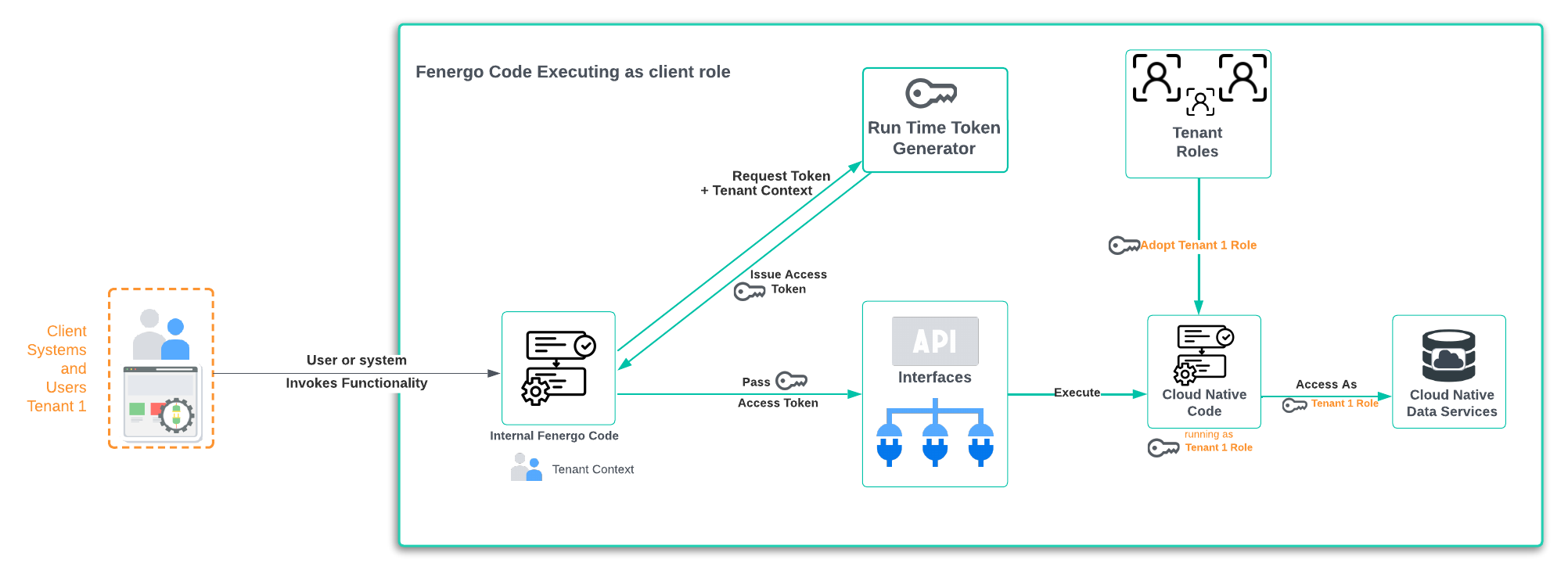
Behind the API Gateway interface & for almost all API Methods, the vast majority of our application, is built as a Cloud Native unit of executable logic. For each call, the token is validated, and the claim against the specified tenant id is validated. Assuming all is valid, the cloud native executable logic will then adopt the Role for that specific tenant. This means it will run and execute AS the tenant which has been specified in the header of the API call. This provides a number of benefits.
- The code can ONLY access resources explicitly permissioned to be accessible by that role.
- The code is executing as a tenant role, NOT the User or Credential who made the call. Those Users and Credentials also have their own explicit permissions of what they can do on the platform once the tenant role is adopted.
- The executing code / logic can NOT interact with resources for a different tenant, it is isolated (via permissions in the policy) only to its own resources.
- When a new Tenant is provisioned for a client, the data stores for PII (Personally Identifiable Information) are created with the permission for that specific tenant only. This cannot be changed after provisioning.
Tenant Isolation at the Data Layer
SaaS platforms using Cloud Native Data Services need to enact Tenant Isolation Strategies which operate within the boundaries of that service. For example, a Silo or Bridge Model for Isolation on a physical database can use two entirely separate Database instances for a Silo Model, or Separate Schemas on a single instance for a Bridge Model. There is NO concept of Instances or Schemas for a service like DynamoDB, instead DynamoDB users create Tables. Every separate Table inside a DynamoDB must be uniquely named so a less direct mapping to the traditional Isolation Models is needed.
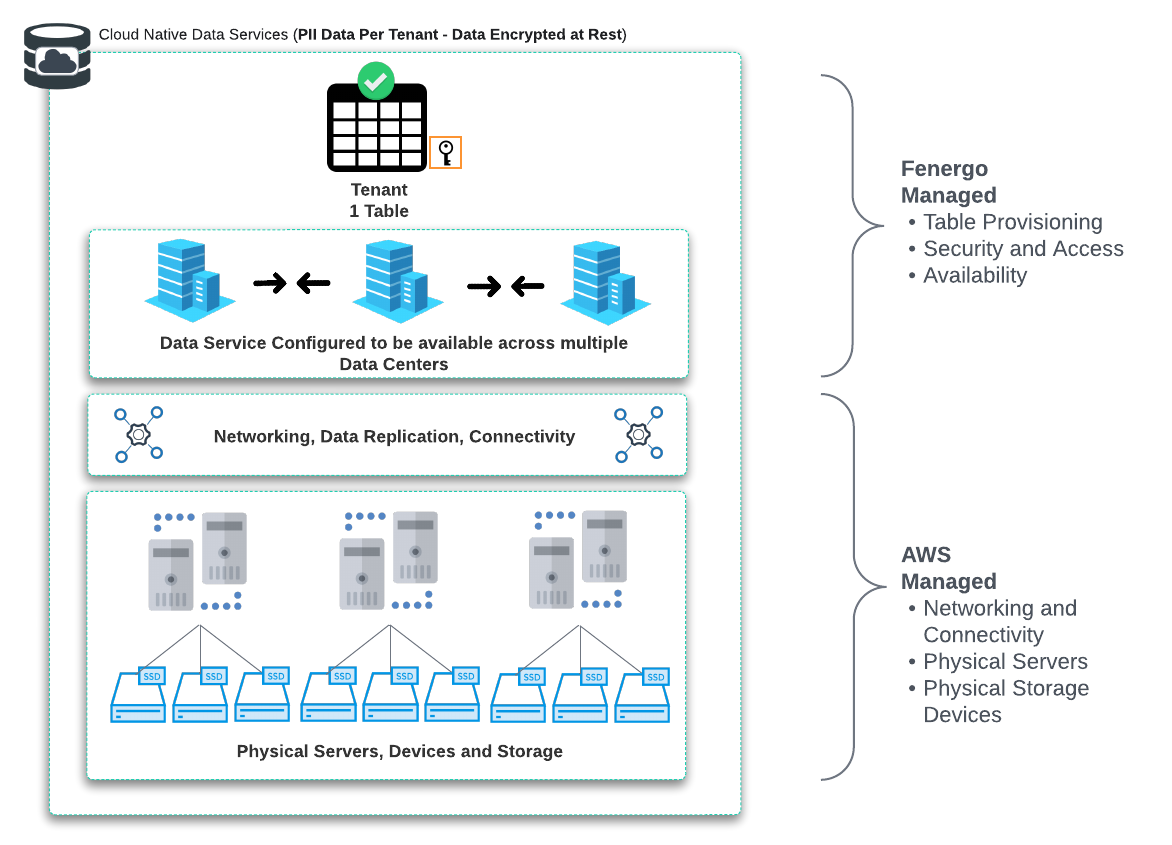
One of the benefits when choosing to employ cloud native services as part of a product offering is the reduced scope of responsibility for technical components like servers, networking and storage. In the below illustration, the Shared Responsibility model delineates what Fenergo manage and what AWS manage. There is no option (as per a pure Silo Model) to deploy a Dedicated Instance of a DynamoDB service. We can create globally (at the account level), uniquely named tables and manage the permissions, access control and encryption of that specific table.
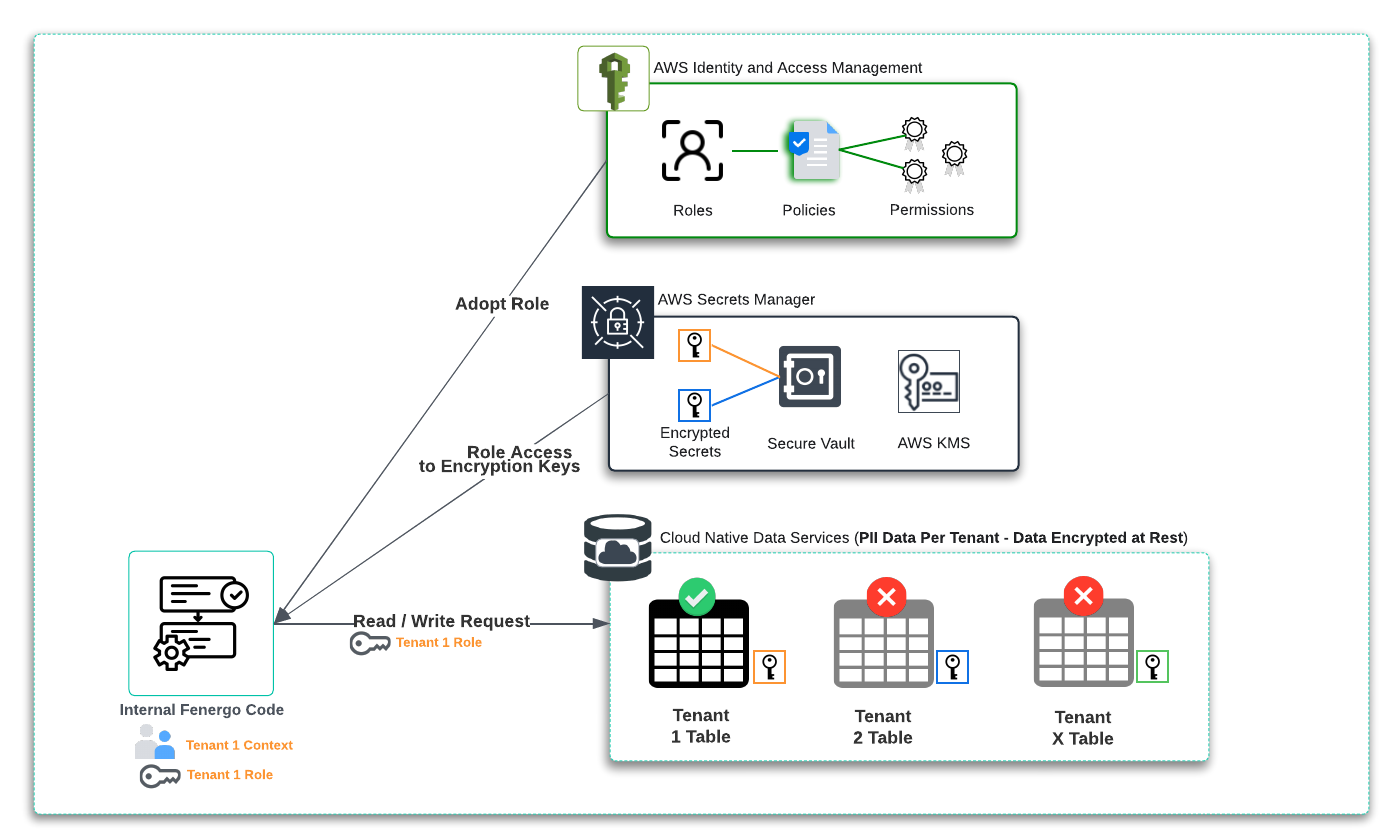
When code is requesting access to the DynamoDB Service, it must assume a role which has permission to access that data resource (for DynamoDB a table). The underlying data encrypted with a unique Tenant Encryption Key. This key can be Fenergo or Client Managed but is unique to the tenant and permission to access the key is tied to the tenant role. As illustrated below, the cloud native code component has AWS IAM and Secrets Manager Integration enabled as a feature of the service, so from a development / implementation perspective, requesting and adopting the role, then requesting and using the encryption key, are abstracted from the implementation as part of the Service offering. This results in a cleaner code implementation which is easier to manage and ensure that no poor practices such as embedding static configurations into code occurs.
Looking at a next level of detail and the separation of access controls between the management of cloud data services and the visibility of the data within is illustrated below. Our Fenergo SRE and pipelines need to be able to manage and monitor the resource. Whilst visibility of the metadata and performance statistics on a given table are required, access to the data itself is not. The data can not be explored from within the control plane because it is encrypted at-rest with a client key that neither our SRE team or ops processes have permission to access from KMS.
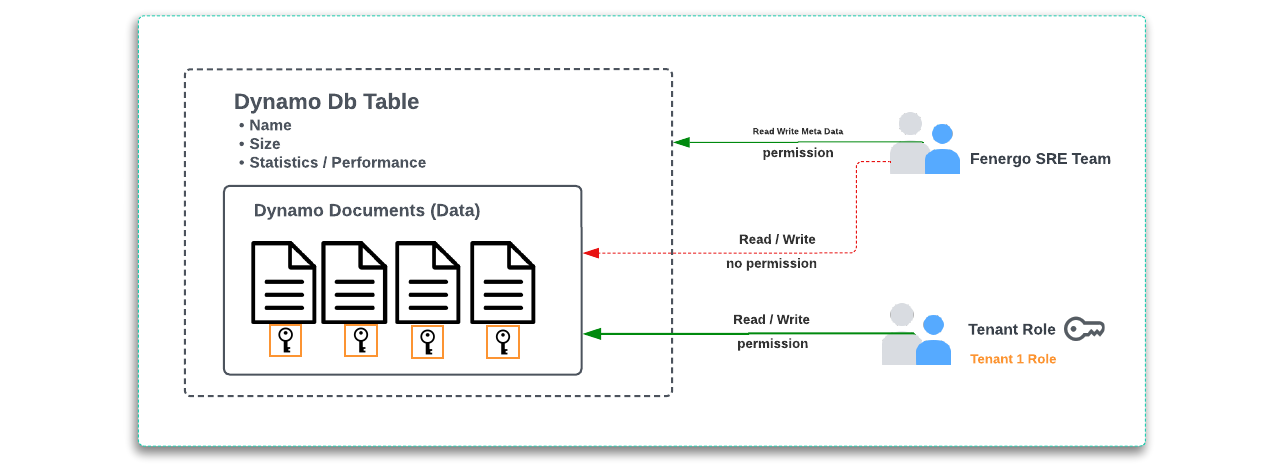
What is being examined above is using the DynamoDB Table feature to achieve isolation. Fenergo uses other Cloud Native data services and whilst concepts differ from service to service the Isolation Strategy driven by explicit permissions is used throughout.
Tenant Isolation for Non Cloud Native Components
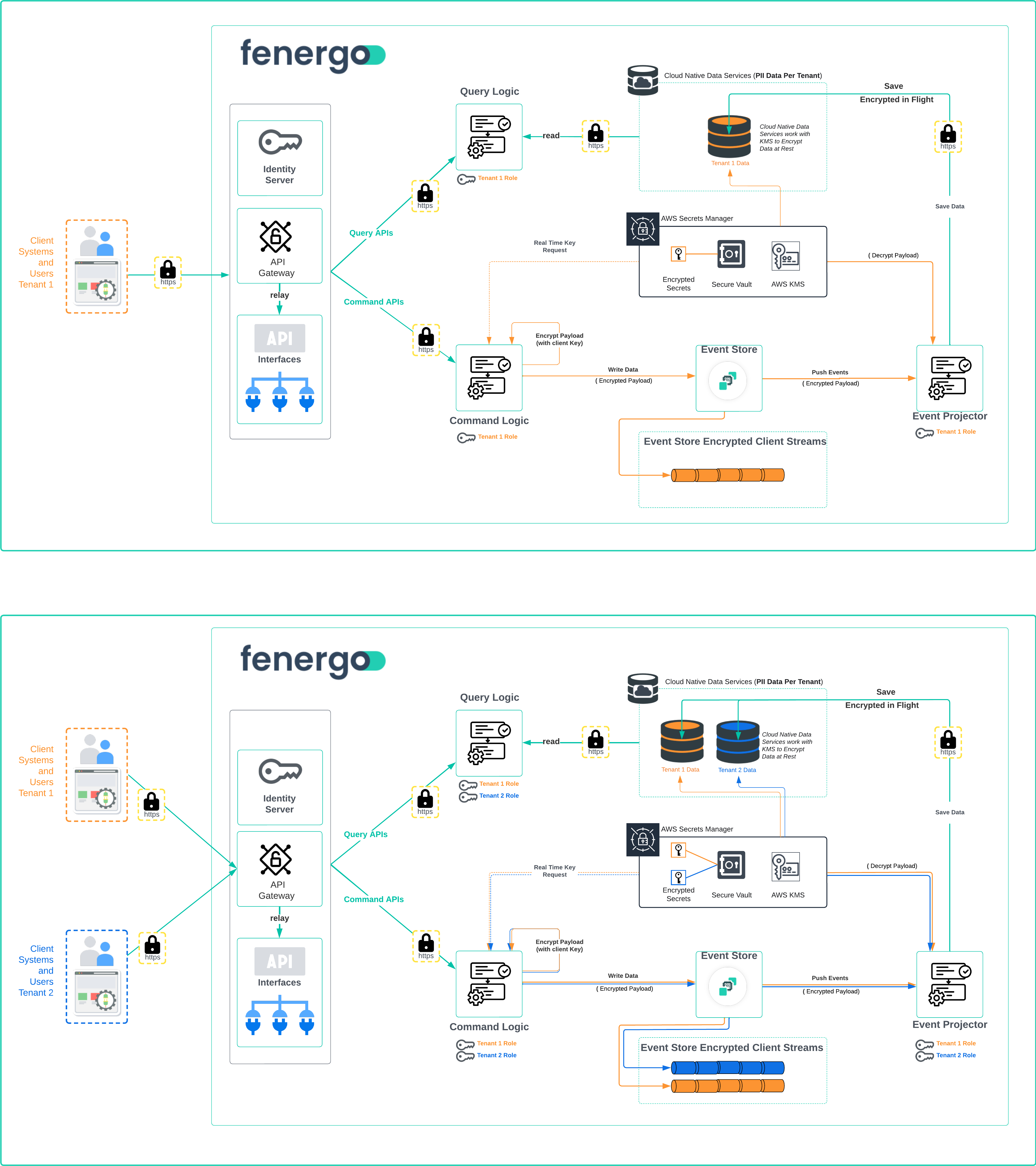
Not all components of the Fenergo SaaS platform use cloud native compute. We have employed the Event Sourcing Pattern, which stores data in an Append Only log. All Command API calls create new or change existing data (commits). Those calls come from numerous tenants for a given Fenergo SaaS deployment and that data is added to a dedicated client stream within the event store In Order of Arrival. These streams are not made up of structured data but data events. Those data events are then Projected to other domains within the platform and processed to achieve a business outcome. Once saved in the client stream, the data is projected to other units of business logic and saved to data store (cloud native as described above) to support Query API Read operations. Queries do not run against the event store. To learn more about event sourcing see Introduction to Event Sourcing Non Cloud Native services such as our Event Sourcing solution which is a commercial product, require a specific tactic to ensure tenant isolation within the client streams of the Append Only log. This is illustrated in the diagrams below covering what it looks like from a Single Tenant Perspective and then a Multi-Tenant View. The meta data of each incoming data event does not need to be encrypted (All data is encrypted in flight using HTTPS / TLS ) but as the log actually data at rest, the payloads of the messages submitted are encrypted using clients specific keys. Those keys are store in KMS and retrieved from AWS Secrets Manager when required.
Single and Multi Tenant View of the SaaS Platform
The below illustrations build on the ideas and concepts described above. The standard Command - Query Pattern where Command APIs receive Data Events (Commands) and Query Requests, has tenant isolation applied in all areas where clients submit and interact with PII data. This is how a single code base can support multiple tenants and protect from any crosstalk between tenant specific PII Data.
-
Authenticate: Each client must first be authenticated before any requests will be accepted by the platform. There is NO access to any inner components of the SaaS platform if the client is not Authenticated.
-
Valid Access Token: All requests must be accompanied by a valid access token and tenant identifier.
-
Role Adoption: The Command and Query Cloud Native functionality assumes the pre configured role of the calling tenant from the request. This restricts access to Only the resources that Tenants Role has permission to.
-
Encryption in Transit: All inter-process communication is secured using TLS (HTTPS).
-
Encryption at Rest: Where data is persisted, it is encrypted using the encryption key belonging to that tenant. (This can be a Fenergo issued or BYOK key).
- Cloud Native Encryption / Decryption: Have built in access to AWS components and can transparently interact with data stores (read and write) once they have adopted the tenant role.
- Non Cloud Native Encryption / Decryption: We explicitly encrypt the payload stored in the Event Store using the client key to protect data at rest. This encrypted payload is decrypted and serialized back into a data model for projection and use elsewhere in the applications functionality.
-
Secure Key Management: Fenergo issued and client provisioned Keys are managed by Amazon KMS and accessed via Secrets Manager. For more information on BYOK and Key management see Encryption and BYOK