Comments on Legal Entity and Journey
Using the APIs to Add, Read and Delete Comments on Journey and Legal Entity
The Fenergo UI has the ability for users to add and reply comments to a Journey or a Legal Entity. This functionality also allows for the tagging of other users within the platform which ties into the notification service that alerts users via email. This is especially helpful for engaging users who do not frequently interact with the UI and gives them a nudge via email. We also recognize the use case for API clients to interact with comments and this document explains the detail of the comments API.
| APIs Referenced | APIs Capabilities: |
|---|---|
| Comments Schema Reference | - Compare a Draft Record Against Current Verified Record - Resolve Conflicts on Draft by taking in Data from the Verified Record |
  AS an API consumer:

      GIVEN I wish to add, read or delete a comment on a Legal Entity or Journey

      AND I want to perform that action on behalf of an up or downstream system

  THEN I want to call an API to perform that function
This is deliberately a broad use case and we will look at all the scenarios possible to perform these actions against the comments functionality. The functional overview of comments can be reviewed User Guide. this guide will focus on how an API client can achieve those same outcomes.
The comments API has been implemented using Graph QL which is quite different from REST APIs. For an overview on GraphQL please review the documentation and plentiful examples across the internet.
This is a good starting point : https://graphql.org/
Endpoint and Security of the Comments API
Unlike the standard Command/Query APIs available across the Fenergo SaaS platform where the endpoint (depending on your region) will be some variation of https://{region}.api.fenergox.com the Comments API is available at a different URL pattern. Again depending on your region this will be a variation of https://comments.{region}.fenergox.com
From a security standpoint the same Access Token Pattern is supported. Api Clients typically use a Client Credential Grant Type to access the APIs and it will need the appropriate level of Scope to have permission to access the API. More details are available in the following document Working with Swagger and Postman
Working with GraphQL from Postman and in Code
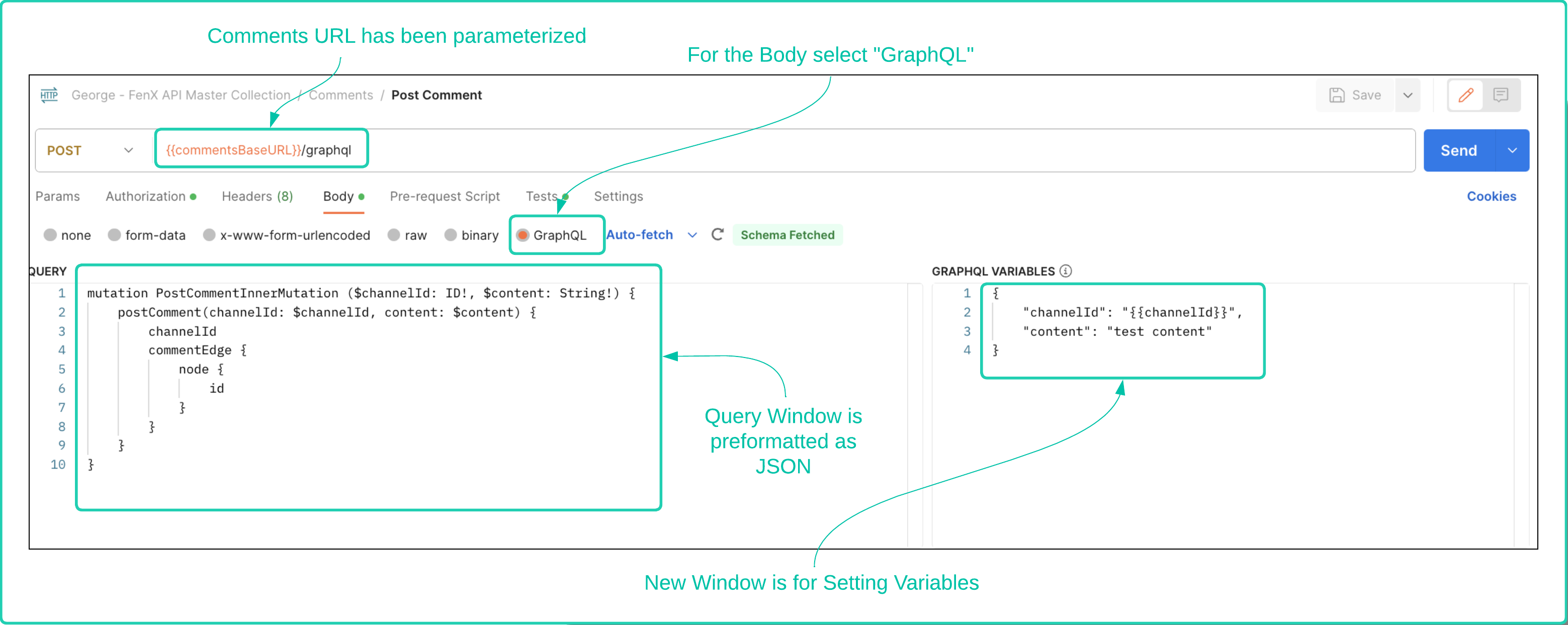
There are some differences when working with a GraphQL endpoint as opposed to a REST endpoint which may be unfamiliar to some people. Lets first take a look at a simple postman request and the differences, as they will be referred to throughout the document.
- Firstly the URL is going to be of the variation :
https://comments.{region}.fenergox.com. It has been parameterized in the diagram. - Next we see that the Body of the request is being set specifically to GraphQL
- The Query window is already formatting JSON
- There is a separate window in the Postman UI for setting variables.
Making a GraphQL call from C#
If you are following along in C# the following code will allow you to make a call to the Comments API instead of using Postman. Note the "variables" node within the JSON of StringContent. This is where we populate variables referenced in the "postComment" mutation.
var client = new HttpClient();
var request = new HttpRequestMessage(HttpMethod.Post, "https://comments.fenergox.com/graphql");
request.Headers.Add("Authorization", "Bearer Bearer exxxxxxxxxxxxxx{ REPLACE WITH YOUR ACCESS TOKEN}xxxxxxxxxxxxxxxxxx");
var content = new StringContent(
    @"{
        ""query"": ""mutation PostCommentInnerMutation ($channelId: ID!, $content: String!) {
            postComment(channelId: $channelId, content: $content) {
                channelId
                commentEdge {
                    node {
                        id
                    }
                }
            }
        }"",
        ""variables"": {
            ""channelId"": ""94c7c8b6-e309-4120-bcb4-4d6560940ba3"",
            ""content"": ""test content""
        }
    }",
    null,
    "application/json"
);
request.Content = content;
var response = await client.SendAsync(request);
response.EnsureSuccessStatusCode();
Console.WriteLine(await response.Content.ReadAsStringAsync());
Making a GraphQL call from Python
Same outcome as with C# but with Python
import requests

url = "https://comments.fenergox.com/graphql"
headers = {
    "Authorization": "Bearer Bearer exxxxxxxxxxxxxx{ REPLACE WITH YOUR ACCESS TOKEN}xxxxxxxxxxxxxxxxxx",
    "Content-Type": "application/json",
}

data = {
    "query": "mutation PostCommentInnerMutation ($channelId: ID!, $content: String!) {"
             "    postComment(channelId: $channelId, content: $content) {"
             "        channelId"
             "        commentEdge {"
             "            node {"
             "                id"
             "            }"
             "        }"
             "    }"
             "}",
    "variables": {
        "channelId": "94c7c8b6-e309-4120-bcb4-4d6560940ba3",
        "content": "test content"
    }
}

response = requests.post(url, headers=headers, json=data)

if response.status_code == 200:
    print(response.json())
else:
    printf("Request failed with status code: {response.status_code}")
Reading, Adding and Deleting Comments via the API
Now that we have looked at the differences between the GraphQL API interface compared to REST and how to work with it. We can examine the specific actions that are supported. There are some conventions to understand in terms of how the comments functionality works.
- The UI user guide mentions a Comments Thread as the root structure of a comment. Via the APIs, these are referred to as
"channels". - A Channel exists at either Legal Entity or Journey level. Each Channel can contain multiple comments.
- A comment has a character limit of 1100 characters.
- Replies to comments are only allowed to be 350 characters.
- A reply is only allowed against a comment, no replies to replies (aka - no nesting is supported).
Supported Actions on the Comments API
When working with GraphQL, users need to be aware that read and write methods work differently to REST APIs. Firstly, methods which retrieve information are referred to as Query Types and methods which change or update data are known as Mutations. For the purposes of demonstration, the examples below will focus on adding comments to Journey. The mechanics for adding comments to a Legal Entity are identical except the target of the methods will be a Legal Entity Instance and not a Journey Instance. The methods supported for API use by clients are as follows:
- Query Type
"getOrCreateChannel"- This retrieves the identifier for the channel or if one does not exist, creates one. - Query Type
"getCommentThread"- Gets the identifier for a Comment Thread - Mutation Type
"postComment"- Submits a comment to against a channel. - Mutation Type
"replyToComment"- Adds a reply to a comment. - Mutation Type
"deleteComment"- Deletes a comment from a channel by Id
Fenergo do NOT publish the full GraphQL Schema and we ONLY support the methods listed in this document. There are other capabilities we use for our own UI and we will release further details in the future if we choose to support those services for API clients.
Query Type - getOrCreateChannel Method
This request will retrieve or create a channel against the target. In this example the entityType is "Journey" and the Journey instance Id is "5ae5f040-d376-449e-9a57-36bf81a5d0a7". Send the following body to the GraphQL endpoint.
    query: "query CommentsChannelInnerQuery($entityType: String!, $entityId: String!) {
                getOrCreateChannel(entityType: $entityType, entityId: $entityId) {
                id
                }
            }"
    variables: "{
        "entityType": "Journey",
        "entityId": "2f87421d-f193-4bd5-b36e-f790033089dc"
    }"
{
    "data": {
        "getOrCreateChannel": {
            "id": "f9fd8796-4043-4b03-b20c-c969c6bd5f63"
        }
    }
}
In the above REQUEST, the "entityType" is set to Journey and then the identifier for that Journey is referred to as "entityId". This Should NOT be confused with a Legal Entity Id. It is referring to the identifier for the supplied entity, in this case Journey and the value relates to a Journey Instance Id.
Mutation Type - postComment Method
This request will add a comment to the retrieved Channel Identifier from the previous call.
    query: "mutation PostCommentInnerMutation ($channelId: ID!, $content: String!) {
        postComment(channelId: $channelId, content: $content) {
            channelId
            commentEdge {
                node {
                    id
                }
            }
        }
    }"
    variables: "{
        "channelId": "f9fd8796-4043-4b03-b20c-c969c6bd5f63",
        "content": "A comment from the Fenergo Developer Hub API Client Demonstrating adding a comment to a Journey"
    }"
    {
        "data": {
            "postComment": {
                "channelId": "f9fd8796-4043-4b03-b20c-c969c6bd5f63",
                "commentEdge": {
                    "node": {
                        "id": "f9ae8a61-7134-48c9-ac0c-ca6108a49621"
                    }
                }
            }
        }
    }
Understanding the Add Comment Response
What is of interest here is the Identifier for the added comment. If this was to be saved downstream as a correlation Id. This is within the commentEdge:node part of the response and is generically referred to as an id. "id":"f9ae8a61-7134-48c9-ac0c-ca6108a49621". The channelId is also returned in the response.
Mutation Type - replyToComment Method
We will now add a reply to the comment added earlier before reading back a Comment Thread and then finally deleting a comment.
    query: "mutation replyToCommentThreadInnerMutation(
            $channelId: ID!
            $commentId: ID!
            $content: String!
            ) {
            replyToComment(
                channelId: $channelId
                commentId: $commentId
                content: $content
            ) {
                commentThread {
                id
                content
                }
                replyEdge {
                node {
                    id
                }
                }
            }
            }"
    variables: "{
        "channelId": "f9fd8796-4043-4b03-b20c-c969c6bd5f63",
        "commentId": "f9ae8a61-7134-48c9-ac0c-ca6108a49621",
        "content": "A Reply to a Comment from the Fenergo Developer Hub API Client"
    }"
    {
        "data": {
            "replyToComment": {
                "commentThread": {
                    "id": "f9ae8a61-7134-48c9-ac0c-ca6108a49621",
                    "content": "A comment from the Fenergo Developer Hub API Client Demonstrating adding a comment to a Journey"
                },
                "replyEdge": {
                    "node": {
                        "id": "314a423f-237a-45e7-b5ca-dcd195163127"
                    }
                }
            }
        }
    }
Understanding the Add Reply Response
What is of interest here again is the Identifier for the added reply. If this was to be saved downstream as a correlation Id. This is within the replyEdge:node part of the response and is generically referred to as an id. "id":"314a423f-237a-45e7-b5ca-dcd195163127". The channelId is also returned in the response.
How this now looks on the UI
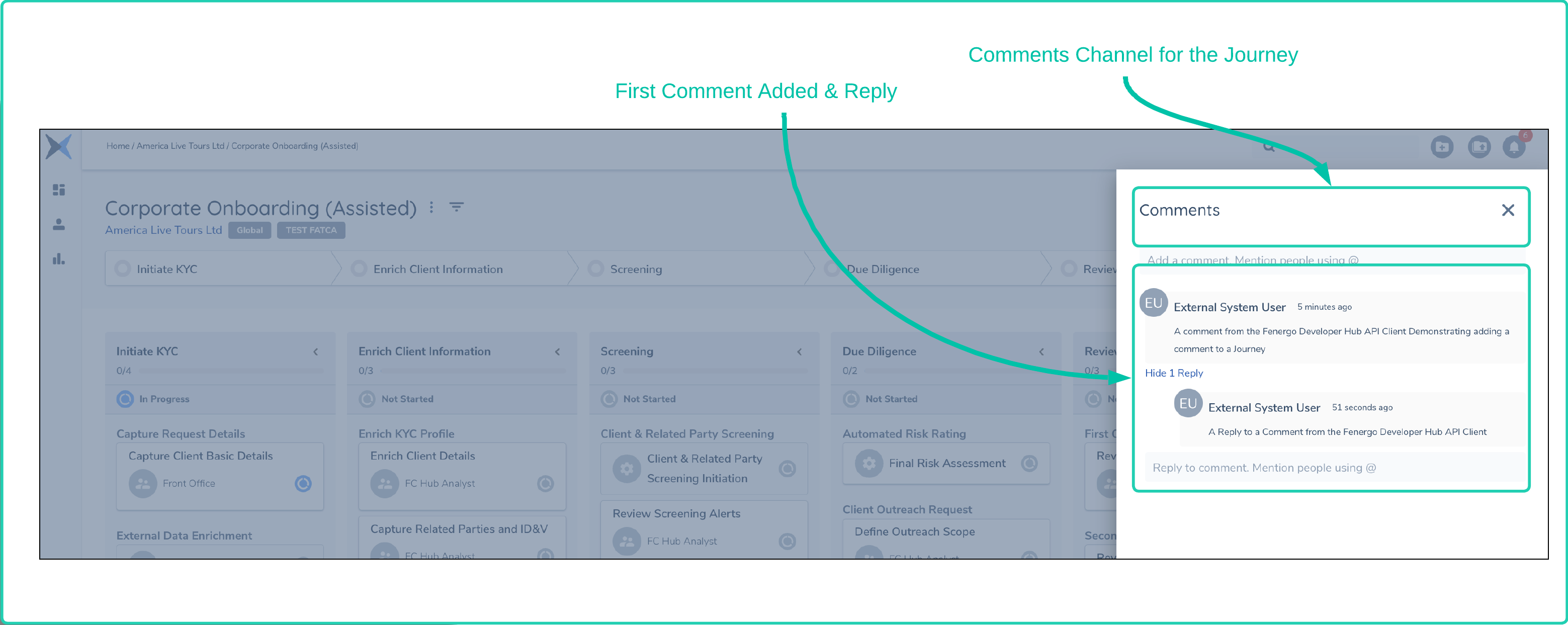
Within the Fenergo UI as these API calls have been made, the comments bar for the test Journey have been updated to reflect the content created as illustrated below:
Mutation Type - deleteComment Method
Given that we have created a comment and now we added a reply, Imagine we wish to delete that reply or the comment itself. Lets delete the reply.
    query: "mutation deleteCommentInnerMutation ($channelId: ID!, $commentId: ID!){
        deleteComment(channelId: $channelId, commentId: $commentId) {
            id
            content
        }
    }"
    variables: "{
        "channelId": "f9fd8796-4043-4b03-b20c-c969c6bd5f63",
        "commentId": "f9ae8a61-7134-48c9-ac0c-ca6108a49621"
    }"
    {
        "data": {
            "deleteComment": {
                "id": "f9ae8a61-7134-48c9-ac0c-ca6108a49621",
                "content": "Comment deleted"
            }
        }
    }
Query Type - getCommentThread Method
We have looked at all methods now except the "getCommentThread". A Comment Thread is the second level of the COmments Structure. A Channel is the top level container for ALL comments on an Legal Entity or a Journey. But a single comment and all of its reply's are known as a Comment Thread. This method allows us to retrieve just the data related to a single comment thread. For the example, a new comment and two reply's have been added to the Journey. The Comment Id is "91117d07-afdc-4821-aec1-6d76544befe8"
    query: "query GetCommentThreadInnerMutation($channelId: ID!, $commentId: ID!) {
    getCommentThread(channelId: $channelId, commentId: $commentId) {
        id
        content
        createdAt
        authorId
        numberOfReplies
        replies(first: 5) {
        edges {
            node {
            id
            content
            }
        }
        }
    }
    }"
    variables: "{
        "channelId": "f9fd8796-4043-4b03-b20c-c969c6bd5f63",
        "commentId": "91117d07-afdc-4821-aec1-6d76544befe8"
    }"
Understanding the Get Comment Thread Request
This document is not intended to be a lesson in the syntax of using GraphyQL and we are utilizing common concepts as can be seen in the request above such as "node" and "edges". These are common concepts when using GraphQL to do with connections to control the volume of data being returned from a server and you can read some more from an interesting article Explaining GraphQL Connections. But you can see that the query is requesting the first 5 replies in the response as well as a count of the "numberOfReplies". This can be used by clients to perform pagination of the data being returned.
    {
        "data": {
            "getCommentThread": {
                "id": "91117d07-afdc-4821-aec1-6d76544befe8",
                "content": "A Second comment from the Fenergo Developer Hub API Client Demonstrating adding a comment to a Journey",
                "createdAt": "2023-07-29T06:56:08.73Z",
                "authorId": null,
                "numberOfReplies": 3,
                "replies": {
                    "edges": [
                        {
                            "node": {
                                "id": "5e2775fc-a170-4d58-806c-76c96928317e",
                                "authorId": "9e70d877-f8fc-47d2-b7c2-9db999a2b1a3",
                                "content": "Reply to the comment from the User Interface"
                            }
                        },
                        {
                            "node": {
                                "id": "0eac5e10-bc53-4047-96ed-cb0450dadf1d",
                                "authorId": null,
                                "content": "A second Reply to a Comment from the Fenergo Developer Hub API Client"
                            }
                        },
                        {
                            "node": {
                                "id": "0373bc53-5b1a-4821-88f9-b761c409a72d",
                                "authorId": null,
                                "content": "A Reply to a Comment from the Fenergo Developer Hub API Client"
                            }
                        }
                    ]
                }
            }
        }
    }
Understanding the Get Comment Thread Response
The Query being sent in to the getCommentThread method is a little more detailed than others earlier in the document. This is more to do with the flexibility of GraphQL. Just worth mentioning that GraphyQL has the ability to let the consumer query for only the data they want to retrieve. "id":"314a423f-237a-45e7-b5ca-dcd195163127". The channelId is also returned in the response.
Author Value: As we are making our calls using a Client Credential to generate an access token and interact with the APIs there is NO identity associated with a client credential. For that reason, the "authorId": null" is the value recorded in the submitted comments that have been posted this way. The ID of the author is displayed for the comment that was posted through the User Interface because that user has an Identity as they were logged in to the UI when they posted it.
@ Mentions via the API
"@ mentions" are a great feature in the UI because when a user is tagged in a comment they will receive a notification in their UI and if they have subscribed will also get an email informing them of the notification. To perform "@ Metions" via an API client the comment sent needs to pass in a string as part of the comment in the format "@<{userid}>". SO if the below call is made to the postComment or replyToComment methods it will include a notification to the user with that Id.
    query: "mutation PostCommentInnerMutation ($channelId: ID!, $content: String!) {
        postComment(channelId: $channelId, content: $content) {
            channelId
            commentEdge {
                node {
                    id
                }
            }
        }
    }"
    variables: "{
        "channelId": "f9fd8796-4043-4b03-b20c-c969c6bd5f63",
        "content": "A comment from demonstrating a mention to user @<1111111-f8fc-47d2-b7c2-xxxxxxxxxx>"
    }"
The above API call will be rendered on the UI as follows and the user will be notified via the notification service without the API client needing to take any further actions.

One More Thing - Where do the User Ids come from?
All users on the Fenergo system have a unique userId GUID such as the one used in the @ mention example above. If an API client wants to look up users in real-time or sync a list of Users to UserIds downstream they can use the AuthorizationQuery API located here: {{baseURL}}/authorizationquery/api/user and retrieve a list of users and their Ids.
A sample of the response to get all users is below:
{
    "data": [
        {
            "id": "xxxxxxxxxx-1111-df44-1111-xxxxxxxxxxxx",
            "username": "test.user1@fenergo.com",
            "email": "test.user1@fenergo.com"
        },
        {
            "id": "xxxxxxxxxx-2222-df44-1111-xxxxxxxxxxxx",
            "username": "test.user2@fenergo.com",
            "email": "test.user2@fenergo.com"
        },
        {
            "id": "xxxxxxxxxx-3333-df44-1111-xxxxxxxxxxxx",
            "username": "test.user3@fenergo.com",
            "email": "test.user3@fenergo.com"
        },
        .
        .
        .
        .   {More users }
        .
        .
        .
    ]
}