Polling API Walkthrough
Using the APIs to Poll for Notifications
When Polling, clients can call an API to retrieve events in a schedule which they design to match their business requirements. Some consideration should be given to what decisions / actions polled notifications will drive downstream as scenarios can exist where real-time processing make more sense. The events are delivered in a FIFO (First In First Out) pattern so once all messages are processed, the downstream system / data store will be correct. It is advisable that clients strongly consider what patterns make most sense for their requirements.
| APIs Referenced |
|---|
| Event Notifications Polling |
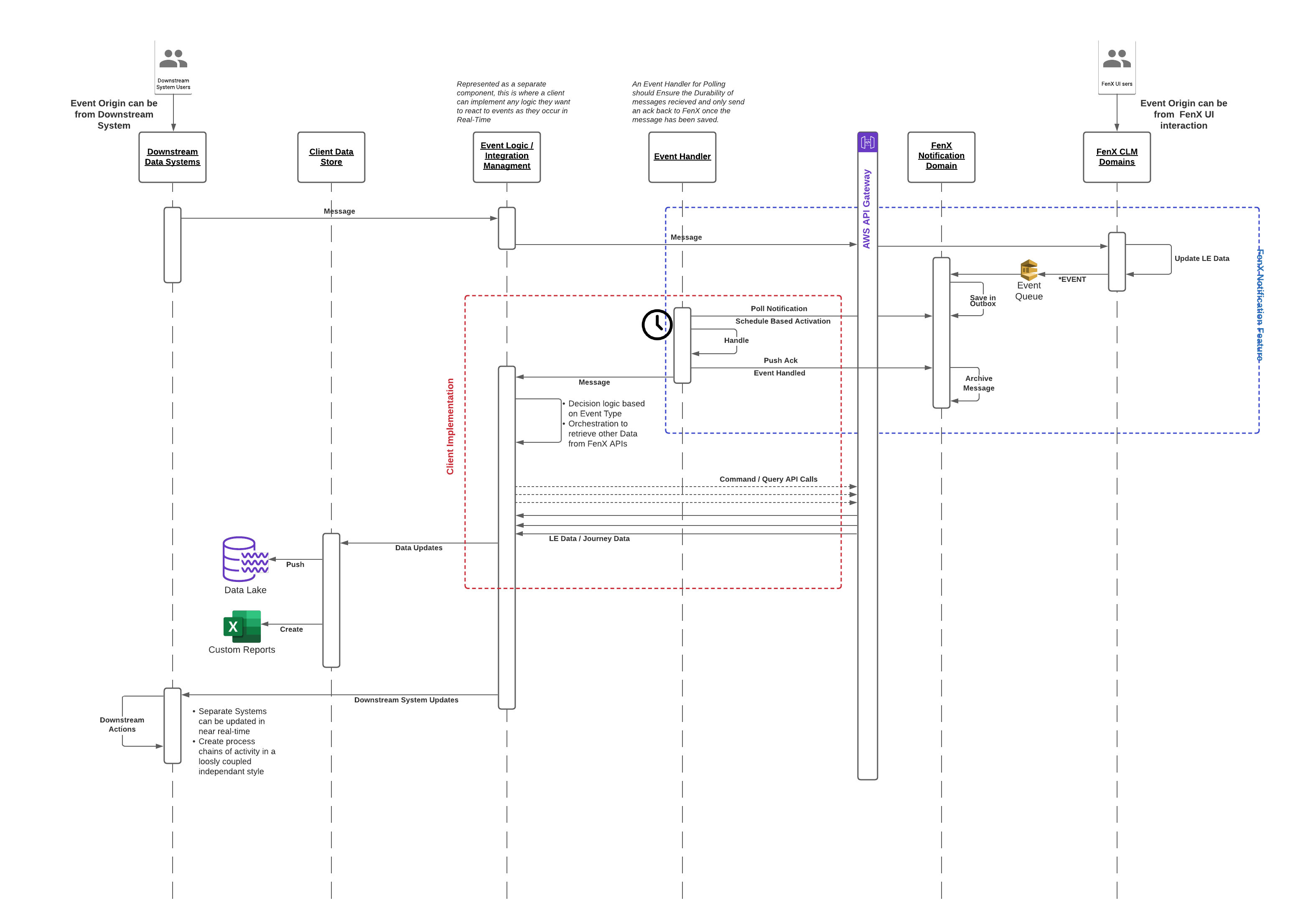
Sample Use Case to Poll for Events
As an API consumer:

      GIVEN:I have downstream activities I want to update based on Activity on the Fenergo SaaS Platform.

      AND: I have built the capability to handle those events

      WHEN:  I call the Polling API for the Feed

 THEN:  I want to receive a batch of events that I can process.
Getting a Batch of Events for a Specific Feed
The available feeds from the polling API are as follows:
- journey
- entitydata
- document
- screening
- digitalidv
- association
The available event types for each Feed are listed in detail within the Event Registry.
  HTTP GET URL :
  ================
  {{baseURL}}/eventnotifications/v2/{feedId}/next

  HTTP GET URL:
  {{baseURL}}/eventnotifications/v2/journey/next
If Notifications exist for the specific Field, they will be returned as part of the above GET Request. If not a 'HTTP 204 NO CONTENT' response will be sent.
Unlike Webhook Notifications, where specific Event Types can be selected, a polling Feed will contain ALL the Event Types in FIFO order and clients will need to iterate through the batch to identify specific types they are interested in.
HTTP RESPONSE:
===============

{
    "batchId": "1642925639481",
    "notifications": [
        {
            "id": "25faa70a-5b09-5ad8-a427-a034f31a5dd6",
            "eventType": "journey:taskcompleted",
            "when": "2022-01-23T08:13:56.8404437+00:00",
            "tenantId": "bded51d4-598e-4079-9cf6-43e74144b415",
            "causationId": "62fb805f-8386-40fb-8811-b104b08694c2",
            "correlationId": "7995c851-45f6-45d7-bdfd-189d395cb929",
            "relativeUrl": "journeyquery/api/journey-instance/165dcd7a-0912-4577-81d6-dbad57dd8d9a/task/91841917-de23-4d64-9dbc-2d0eaab2efbf",
            "payload": {
                "TaskId": "91841917-de23-4d64-9dbc-2d0eaab2efbf",
                "TaskName": "Resolve Pre-Screening Matches",
                "TaskType": "ScreeningMatchResolutionTask"
            }
        },
        {
          ......... {Other Event in Batch}
        },
        {
          ......... {Other Event in Batch}
        }
    ],
    "moreAvailable": true
}
The Notifications Array in the response contains all the Event Details for that Batch. Batches are filled depending on the volume of traffic and number of notifications being created and a batch can contain between 1... to ... 10 Events.
The call for the notification details includes a batchId which uniquely identifies this collection of notifications. Repeated calls against the Polling Feed will continue to return the same response immutably until the client marks the batch as complete. As a convenience indicator, there is a field called moreAvailable at the bottom of a batch, which clients can use to determine if more events for that feed are available.
It is a clients responsibility to handle all the events within a batch in a durable, resilient manner. Once a batch is marked as complete the events can no longer be retrieved.
Marking a Batch as Complete
When a client has saved / processed the events in a batch, they need to mark that batch as complete in order to move onto the next batch. To mark a batch as complete use the following API call.
  HTTP POST REQUEST FORMAT:
  =========================
  {{baseURL}}/eventnotifications/v2/{feedId}/{batchId}/complete

  HTTP POST REQUEST:
  ====================
  {{baseURL}}/eventnotifications/v2/journey/1642925639481/complete

  SUCCESS RESPONSE:
  ====================
  HTTP 200 OK
Errors Calling Complete Batch
FeedID's are "Case Sensitive" and must be populated in the URL as listed. If written incorrectly the API will return an Error. Likewise if an attempt is made
  =========================

  {{baseURL}}/eventnotifications/v2/Journey/1642925639481/complete

  HTTP 404 ERROR RESPONSE:
  ========================

  {
      "type": "https://tools.ietf.org/html/rfc7231#section-6.5.4",
      "title": "Not Found",
      "status": 404,
      "traceId": "|85de4cb9-4f927c81b52e03ff."
  }
Clearing a Polling Feed Queue
From time to time, it may be necessary to empty a Polling Feed. Either during a change control window or because a feed has not been utilized before and is coming into scope.
Once a feed is cleared the events in the Queue are all moved into the archive and cannot be retrieved, Only perform this action under well governed scenarios where the outcome is clearly understood. If there has been no polling against a particular feed for a long time there will be a delay in getting the response, and it may timeout. The call can be retried if this is the case. Then to verify the queue is empty simply call the GET against the feed and ensure it is empty - it will return a HTTP 204 No Content.
  HTTP PUT REQUEST FORMAT:
  =========================
  {{baseURL}}/eventnotifications/v2/{FeedId}/discardAll

  HTTP PUT REQUEST:
  ====================
  {{baseURL}}/eventnotifications/v2/journey/discardAll

  SUCCESS RESPONSE:
  ====================
  HTTP 200 OK