Legacy Events
The original Event Ingress events CreateEntity and UpdateEntity are no longer being enhanced. Any existing integrations using these legacy events will continue to be supported, but we recommend using the new DataImport Event Type on any future integrations.
Business Processes, Event Types & Sub Types
It is important to understand the composition of an Ingress Message and how it uses Business Process, Event Types and Sub Types. Clients can choose to use System Defined Event Types or can add their own to map any type of Operation to a custom defined Journey on Fenergo. Event Triggers which are configured within the Fenergo Journey Builder let clients define what process Fenergo will orchestrate when an Ingress Message of a specified Type and Sub-Type are received.
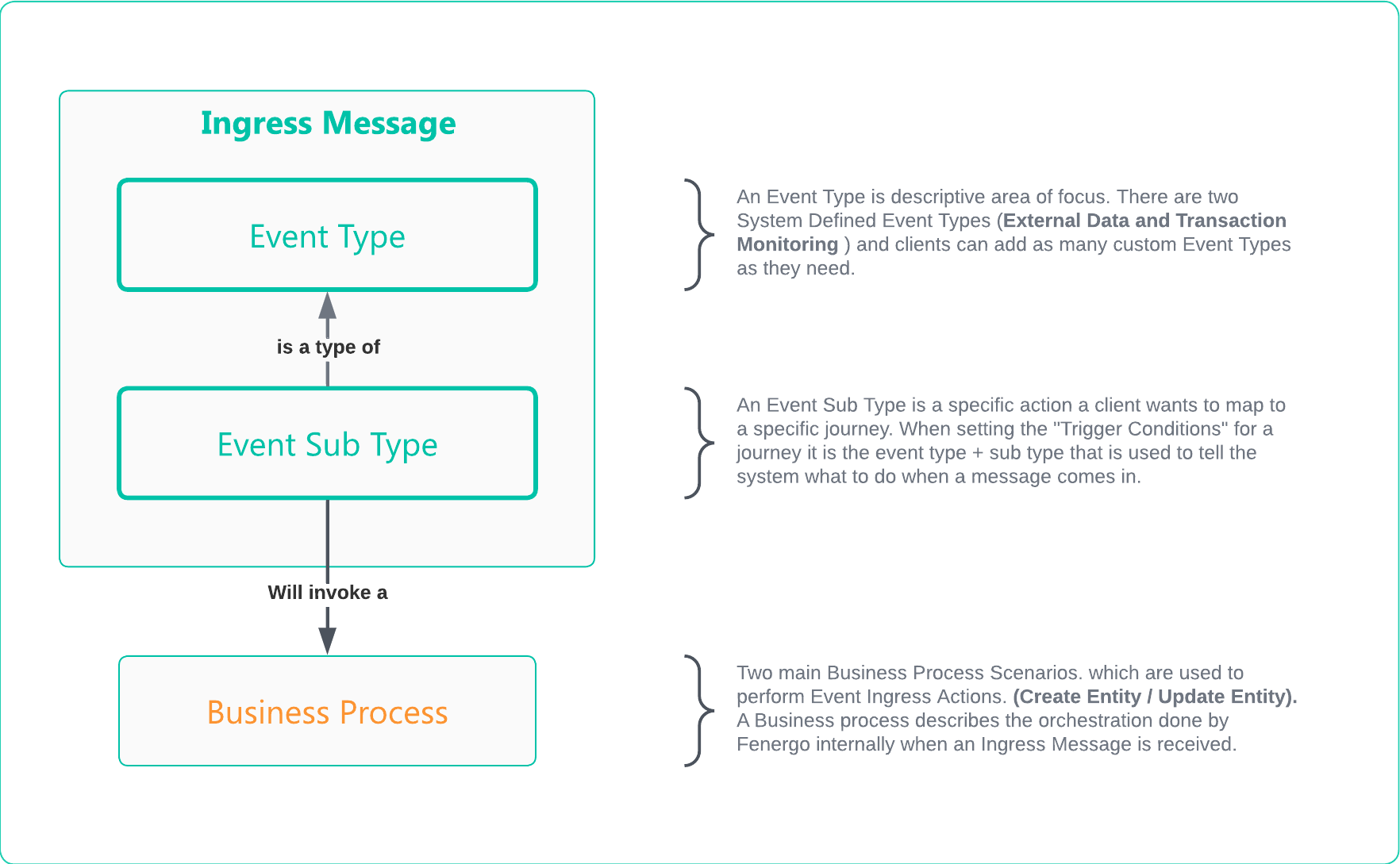
Event Ingress Journey Configuration
The Journeys required for Event Ingress need to be created separately from other Journeys on the system (such as those launched via Direct APIs or through the Fenergo UI). Journeys created for Event Ingress need to have Event Triggers configured and these are used by the Business Logic to identify which Journeys to Launch for Create and Update Events received via the ingress API. You can see Event Triggers Below:
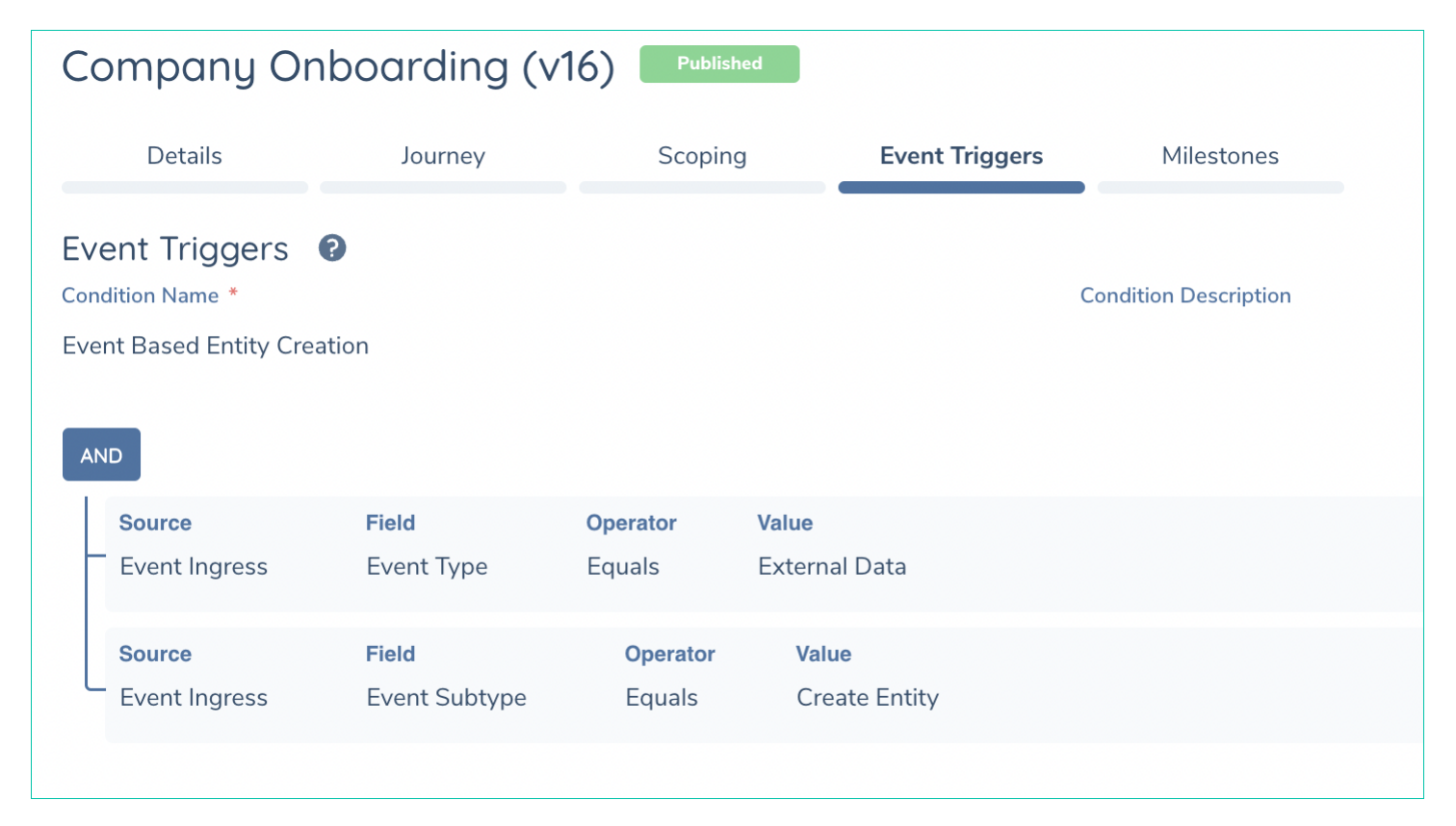
Ingress Journeys must be separate Journeys. The same journeys used through the UI or direct APIs cannot have Event Triggers. As soon as Event Triggers are added to a Journey it will ONLY be available to the Event Ingress Functionally. If a client wishes to use the same Journey for Ingress and the main application, it can be cloned and have one for the UI / Direct APIs and one for Event Ingress.
Event Ingress API Overview
The Event Ingress API is offered as a standard REST endpoint. It is not a Command / Query implementation as this pattern does not suit the functionality. It is intended to allow clients configure custom event types and then perform a Fire and Forget interaction and have Fenergo perform all the required internal orchestration.
| APIs Referenced |
|---|
| Event Ingress API |
Sample Use Case for Event Ingress
As an Fenergo consumer:

      GIVEN: Our organization has events occur across other platforms within our technical landscape.

      AND: I want to notify the Fenergo SaaS Platform of those events

      WHEN: I send a message specifying the event type, sub type and relevant data payload

THEN: Fenergo should accept that message & perform a business process without requiring any further interaction from the Client.
The Event Ingress API Methods
There are six methods on the Ingress API.
HTTP GET - ListBusinessProcessTypes: Returns a list of the supported Internal Orchestrated Processes.HTTP POST - sendEvent: The API interface where clients SEND their messages.HTTP GET - ListEventTypes: Returns a list of all the System and Custom Event TypesHTTP POST - AddEventType: API Interface that allows clients to ADD a new Event Type and SubTypes.HTTP PUT - UpdateEventType: API Interface that allows clients to Update existing Event Type and SubTypes.HTTP DELETE - DeleteEventType: API Interface that allows clients to Delete an existing Event Type and SubTypes.
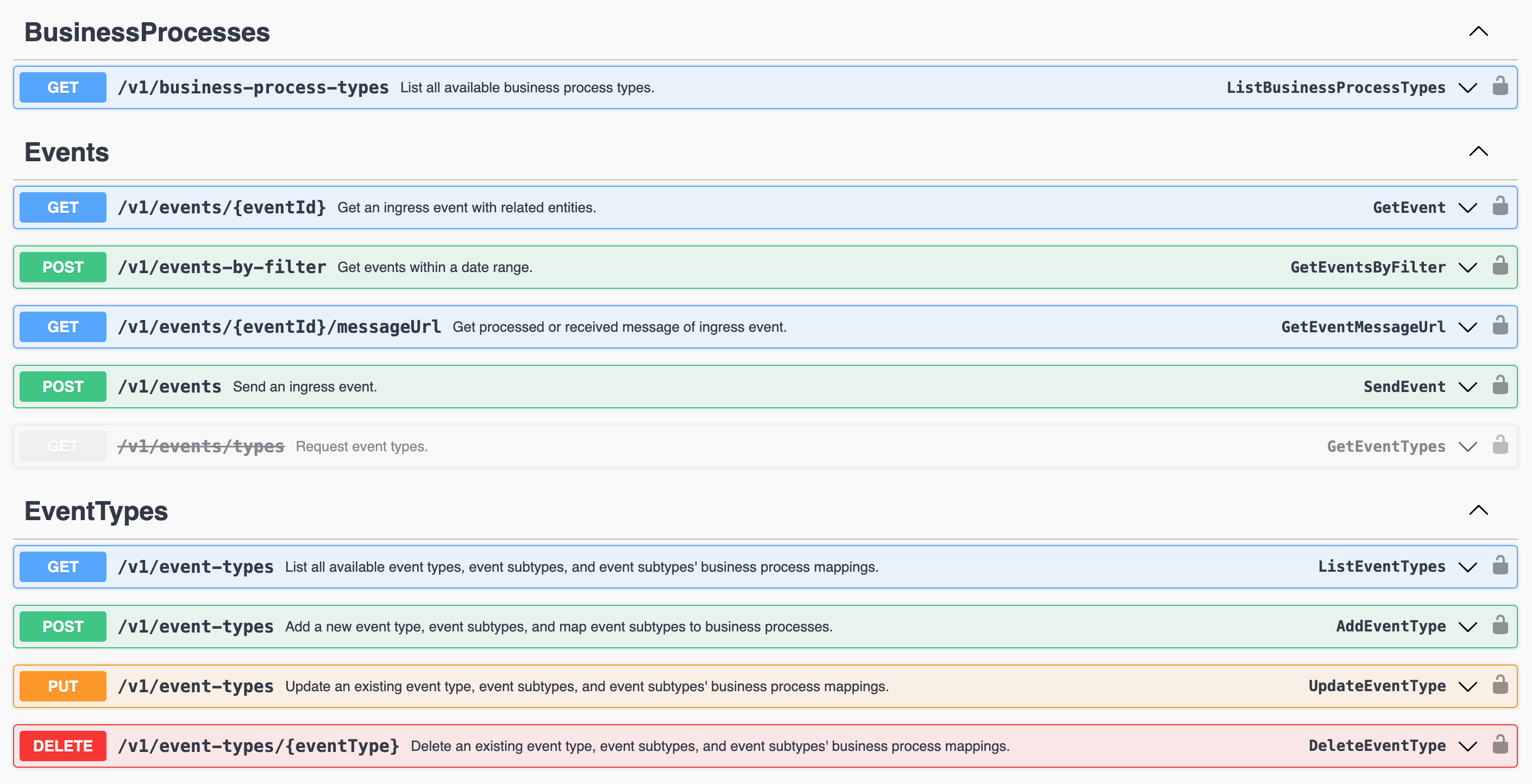
Event Ingress Admin APIs
List Business Processes
Using the following url {{baseURL}}/eventingress/v1/business-process-types a GET API call will return list of available Business Process Types. OOTB Fenergo supports Two main Business Process Types. One which orchestrates the Creation of a new Legal Entity and one which orchestrates Updating an Existing Legal Entity.
{
    "data": [
        {
            "key": "createentity",
            "displayName": "Create Entity"
        },
        {
            "key": "updateentity",
            "displayName": "Update Entity"
        }
    ],
    "messages": null
}
As can be seen above, there are two Business Process Types, the "key" is the name of the supported Business Process. There is also a "displayname" which is just a description of the Business Process.
Currently, Create Entity and Update Entity and the ONLY two supported business processes. These can be used for any number of Use Cases. Each one will either create or update an Entity and trigger a configured journey.
List all Event Types
Using this URL {{baseURL}}/eventingress/v1/business-process-types a GET API call will return list of available Event Types. OOTB Fenergo supports Two Event Types and associated Sub-Types. "externaldata" and "transactionmonitoring". These have been pre-configured and will be what is returned the first time this API call is made.
{
    "data": [
        {
            "key": "externaldata",
            "displayName": "External Data",
            "isSystemDefined": true,
            "eventSubtypes": [
                {
                    "key": "createentity",
                    "displayName": "Create Entity",
                    "businessProcessType": "createentity"
                },
                {
                    "key": "offboarding",
                    "displayName": "Offboarding",
                    "businessProcessType": "updateentity"
                },
                {
                    "key": "updateentity",
                    "displayName": "Update Entity",
                    "businessProcessType": "updateentity"
                }
            ]
        },
        {
            "key": "transactionmonitoring",
            "displayName": "Transaction Monitoring",
            "isSystemDefined": true,
            "eventSubtypes": [
                {
                    "key": "confirmedalert",
                    "displayName": "Confirmed Alert",
                    "businessProcessType": "updateentity"
                },
                {
                    "key": "kycreview",
                    "displayName": "KYC Review",
                    "businessProcessType": "updateentity"
                }
            ]
        }
    ],
    "messages": null
}
As can be seen above, there are two Event Types, the "key" is the name of the supported Event Type and the "eventSubtypes" is a collection of the available Sub Types within the event. Within each "eventSubType" the specific "businessProcessType" is defined, either createentity or updateentity.
Add a New Event Type and Sub Types
Using the URL {{baseURL}}/eventingress/v1/event-types a POST API call allows Fenergo clients to add a new Event Type and Sub Types to their tenant. Once added, these can be used to target specific configured Journeys which will then be invoked and started as a response to receiving an Ingress Message of the specified type.
{
  "key": "internalclinetmaintenance",
  "displayName": "Internal Clinet Maintenance",
  "eventSubtypes": [
    {
      "key": "addnewaccount",
      "displayName": "Add New Account",
      "businessProcessType": "updateentity"
    },
    {
      "key": "removeexistingaccount",
      "displayName": "Remove Existing Account",
      "businessProcessType": "updateentity"
    },
    {
      "key": "editexistingaccount",
      "displayName": "Edit Existing Account",
      "businessProcessType": "updateentity"
    },
    {
      "key": "performkycrefresh",
      "displayName": "Perform KYC Refresh",
      "businessProcessType": "updateentity"
    }
  ]
}
The API call will return a HTTP 200 OK response once the format of the request is correctly formed. The "key" values supplied must be in lowercase and the "businessProcessType" must also be one of the two supported business processes.
As per the example illustrated above, a new Event Type of "internalclinetmaintenance" along with some Sub Types that might map the operational processes a client might be attempting to model.
Update an Existing Custom Event Type and Sub Types
Using the URL {{baseURL}}/eventingress/v1/event-types a PUT API call allows Fenergo clients to update existing Custom Event Types and Sub Types to their tenant. You cannot update the OOTB Event Types. The Request body is the same as the Create
{
  "key": "internalclinetmaintenance",
  "displayName": "Internal Clinet Maintenance",
  "eventSubtypes": [
    {
      "key": "addnewaccount",
      "displayName": "Add New Account",
      "businessProcessType": "updateentity"
    },
    {
      "key": "removeexistingaccount",
      "displayName": "Remove Existing Account",
      "businessProcessType": "updateentity"
    },
    {
      "key": "performmonthlykycrefresh",
      "displayName": "Perform KYC Refresh",
      "businessProcessType": "updateentity"
    }
  ]
}
There are no Identifiers used to update the event types, there are specifically referenced using the spelling, so ensure the correct lowercase spelling is passed for the Event Type "key" and this will update the custom type.
Delete an Existing Custom Event Type and Sub Types
Using the URL {{baseURL}}/eventingress/v1/event-types/{{eventTypeName}} a DELETE API call allows Fenergo clients to remove existing Custom Event Types and Sub Types on their tenant. You cannot delete the OOTB Event Types. There is no request body.
If you attempt to delete one of the "isSystemDefined" Event Types the following message will be returned.
{
    "data": null,
    "messages": [
        {
            "message": "System-defined event type cannot be deleted.",
            "type": "Error",
            "errorCode": ""
        }
    ]
}
Messages to the Event Ingress API Endpoint
The SendEvent method on the Ingress API is generic and provides a single interface for consumers to send messages. The correct business process will be selected internally based on the parameters passed in for the Event Type and Sub Type body parameters.
Send Ingress Message API
Using the URL {{baseURL}}/eventingress/v1/events a POST API endpoint will return a HTTP 202 Accepted message along with an Event Id. This Event Id is generated synchronously but the business process execution is asynchronous. The Event Id will be referenced in the notification that updates consumers on the status of the business process invoked.
{
    "data": {
        "eventId": "f83fece9-f964-46fd-b115-3652284fcbee",
        "timeStamp": "2023-02-09T17:11:29.5888302+00:00"
    },
    "messages": null
}
In the response above, the "eventId" and "timeStamp" are returned once a message is called. Above is just the API Endpoint and Response from a call. The request bodies are different depending on the targeted business process and these are detailed below.
The Event Id from the response above "eventId": "f83fece9-f964-46fd-b115-3652284fcbee" will be used as the CausationId and will be referenced in the final Ingress Event Message.
Create Entity Business Process
Using the OOTB External Data Event to Create LE
The JSON message structure for the Request to the Ingress Service to execute the business process behind the Event Type "externaldata" and Sub-Type of "createentity" is detailed below. (The Payload is handled further down)
{
  "eventType": "externaldata",
  "eventSubtype": "createentity",
  "correlationId": "7f237150-a6f1-11ed-8456-eebc170ac203",
  "source": "Test Message Source",
  "payload": {
    .
    .
    . . . { Create Payload } . .
    .
    .
  }
}
- The
"eventType"parameter specifies the top level ingress activity. - The
"subType"parameter specifies the specific business process to call. - The
"correlationId"parameter is a free text string the calling system can pass into the Ingress Message. It will be used internally and then referenced in the notification to indicate that the business process has completed. This does not need to be unique, clients can decide how best to use this field. - The
"source"parameter is another Free text field to allow the calling application to pass some identity of the system making the call.
External Data - Create Entity Ingress Message Payload
The content of the Payload for the Create Entity Ingress messages is the same as the content used to send an API call to the Entity Data HTTP POST command for Creating a New Entity. This is covered here Create a New Legal Entity. As illustrated below. If you remove the wrapping "data" container commented below and use that content inside the "payload" tag of the Ingress message above, this will make a valid request to the Create Entity Ingress API.
The "policyJurisdictions" element is NOT required and can be removed. Within Entity Data this is used to define the policy's in scope of an Entity and the data properties for a specific policy can only be passed once the correct policyJurisdictions is set. This is not required for Ingress.
//Below is the Create Entity Request body to the Entity Data API

{
    "data": {    //  <<-- FROM INSIDE THIS OPENING BRACKET
     "type": "Company",
        "policyJurisdictions": [ //  <<-- This element is NOT required
            "Global"
        ],
        "properties": {
            "legalEntityName": {
                "type": "Single",
                "value": "Acme Finance Group"
            },
            "companyType": {
                "type": "Single",
                "value": "Bank"
            },
            "category": {
                "type": "Single",
                "value": "Corporation"
            },
            "countryOfIncorporation": {
                "type": "Single",
                "value": "Ireland"
            },
            "dateOfIncorporation": {
                "type": "Single",
                "value": "2021-12-31"
            }
        },
        "accessLayers": {
            "businessRelated": [
                "Enterprise"
            ],
            "geographic": [
                "Global"
            ]
        }
    }  //  <<-- TO INSIDE THIS CLOSING BRACKET
}
Putting this all together, a sample Request Body for a message to the Create Entity Ingress API would be as follows:
{
    "eventType": "externaldata",
    "eventSubtype": "createentity",
    "correlationId": "7f237150-a6f1-11ed-8456-eebc170ac203",
    "source": "Test Organization",
    "payload": {
        "type": "Company",
            "properties": {
                "legalEntityName": {
                    "type": "Single",
                    "value": "Acme Finance Group"
                },
                "companyType": {
                    "type": "Single",
                    "value": "Bank"
                },
                "category": {
                    "type": "Single",
                    "value": "Corporation"
                },
                "countryOfIncorporation": {
                    "type": "Single",
                    "value": "Ireland"
                },
                "dateOfIncorporation": {
                    "type": "Single",
                    "value": "2021-12-31"
                }
            },
            "accessLayers": {
                "businessRelated": [
                    "Enterprise"
                ],
                "geographic": [
                    "Global"
                ]
            }
    }
}
Update Entity Business Process
Using the OOTB External Data Event to Update LE
The JSON message structure for the Request to the Ingress Service to execute the business process behind the Event Type "externaldata" and Sub-Type of "updateentity" is detailed below. (The Payload is handled further down)
{
  "eventType": "externaldata",
  "eventSubtype": "updateentity",
  "entityId": "afa349d8-3dcd-4468-87db-020bdd4450b4",
  "correlationId": "7f237150-a6f1-11ed-8456-eebc170ac203",
  "source": "Test Message Source",
    "payload": {
        .
        .
        . . . { Update Payload } . .
        .
        .
    }
}
"eventType"parameter is where the main type is specified."subType"specifies which business process. In this case its"updateentity""entityId"Is the Fenergo Entity ID of the entity being updated. This entity must exist on Fenergo.."correlationId"Is a free text string the calling system can pass into the Ingress Message. It will be used internally and then referenced in the notification to indicate that the business process has completed. This does not need to be unique, clients can decide how best to use this field."source"is a free text field allow the calling application to pass some identity of the system making the call.
External Data - Update Entity Ingress Message Payload
The content of the "payload" for the Update Entity Ingress messages is the same as the content used to send an API call to the Entity Data HTTP PUT command for Updating an Draft Entity. This is covered here Updating Entity Data and Advancing Journeys in Step-5: Saving Data to a Draft Record. As illustrated below. If you remove the wrapping "data" container below and use the content inside the Payload tag, this will make up a valid request to the Update Entity Ingress API.
//Below is the Update Draft Entity Request body from the Entity Data API
{
    "data": {    //  <<-- FROM INSIDE THIS OPENING BRACKET
       "entityType": "Company",
          "properties": {
              "legalEntityName": {
                  "type": "Single",
                  "value": "Acme Finance Group"
              },
              "country": {
                  "type": "Single",
                  "value": "Ireland"
              },
              "dateOfIncorporation": {
                  "type": "Single",
                  "value": "2021-12-31"
              },
              "category": {
                  "type": "Single",
                  "value": "Corporation"
              },
              "companyType": {
                  "type": "Single",
                  "value": "Bank"
              },
              "countyInIreland": {
                  "type": "Single",
                  "value": "Galway"
              }
          },
          "jurisdictions": [  //  <<-- THIS ELEMENT IS NOT REQUIRED
              {
                  "jurisdiction": "Global",
                  "versionId": "d8319029-0a83-43cc-b104-8f7f8526e94a"
              }
          ],
          "category": [ //  <<-- THIS ELEMENT IS NOT REQUIRED
              "Basic Details",
              "Booking Details"
          ],
          "version": 0,
          "targetEntity": "Client"
    } //  <<-- TO INSIDE THIS OPENING BRACKET
}
The Business Process behind the Update Entity follows the same pattern as the standard Entity Data APIs. Your update will NOT be saved to the verified version of the record, instead a new journey will be created to manage the change, then a draft copy of the verified data will bre created and the update applied to the draft record.
{
  "eventType": "externaldata",
  "eventSubtype": "updateentity",
  "entityId": "afa349d8-3dcd-4468-87db-020bdd4450b4",
  "correlationId": "7f237150-a6f1-11ed-8456-eebc170ac203",
  "source": "Test Message Source",
    "payload": {
       "entityType": "Company",
          "properties": {
              "legalEntityName": {
                  "type": "Single",
                  "value": "Acme Finance Group"
              },
              "country": {
                  "type": "Single",
                  "value": "Ireland"
              },
              "dateOfIncorporation": {
                  "type": "Single",
                  "value": "2021-12-31"
              },
              "category": {
                  "type": "Single",
                  "value": "Corporation"
              },
              "companyType": {
                  "type": "Single",
                  "value": "Bank"
              },
              "countyInIreland": {
                  "type": "Single",
                  "value": "Galway"
              }
          },
          "version": 0,
          "targetEntity": "Client"
    }
}
CorrelationIds and CausationIds
When creating and sending Ingress messages, API Consumers can populate the CorrelationId parameter to monitor the progress of a specific Ingress Request or collection of Requests as they are processed by the underlying business logic. When a client sends a request to an Ingress, Fenergo will Generate a number of Events which can be sent to webhook endpoints (or polled for).
Working with Payloads
In the samples above, there are some basic payloads used which have been illustrated elsewhere in this documentation. Client policy's (Data Models) are always going to differ as will the volume of data clients might want to send to create or update entities. If you are having difficulty creating a valid payload, inspect the Entity Data messages being sent on your tenant for your own configuration and use those samples as payloads as a way to ensure the messages you are sending are valid.
Event Ingress Throttling
To ensure a consistent and stable performance of Ingress functionality for all our clients, we have implemented request throttling at the API Gateway. The purpose of this API request throttling is to prevent Fen-X from processing massive and erroneous strayed API request calls initiated by tenants. This limits the permitted requests for a tenant in a second. The default rules for Multi-TimeWindow API request throttling for all tenants are as follows:
- 2 requests per second per tenant
- 25 requests per minute per tenant
- 150 requests per hour per tenant
On each request from Tenant, a request counter is incremented and the key composed of TenantId is saved. The request counter is compared with the Tenant's RateLimit, if the request counter is smaller than the RateLimit within the TimeWindow then the request is considered as within the API rate limit and the request processed by Event Ingress. Once the request is processed, and the response is ready to be sent to the client then the X-Rate-Limit-Remaining and X-Rate-Limit-Reset are added to the response header. X-Rate-Limit-Remaining shows the number of requests remaining in the time window before sending HTTP 429 status code, and the X-Rate-Limit-Reset shows the time remaining in the current time-window in UTC format.
If these limits pose a challenge to your intended use of the service please reach out to your CSM, PS Team or the Cloud Business Office and we can discuss increasing the limits.