DataImport Overview
DataImport is a new event subtype that acts as a standardized pipeline (business service) for consuming entity data and orchestrates the update within Fenergo.
Some of the key differences between it and previous Legacy Events (CreateEntity and UpdateEntity) are
-
Stateless Integrations - Calling system does not need to know an Entity's state in Fenergo. Previously the calling system needed to know if the Entity exists in Fenergo and invoke the appropriate event (create vs update) but now they can provide a unique identifier (e.g. centralized MDM) if available
-
Multiple Entities per event and additional datasets - DataImport allows for multiple entities per message and adds support for Associations and Products data. Support GroupAssociations is planned in a future release.
-
Message Simplicity - External Systems need only provide incoming datakey and value. Fenergo will use internal policy configuration to determine data types and validations
-
Additional Integration Patterns - Support for External Events or responding to CLM-inititated Events where there is already a journey in-progress waiting for an update from an external system. In addition DataImport events include event configuration which allow for controlling import behavior and tailoring the event for different integration scenarios
Data Import Flow
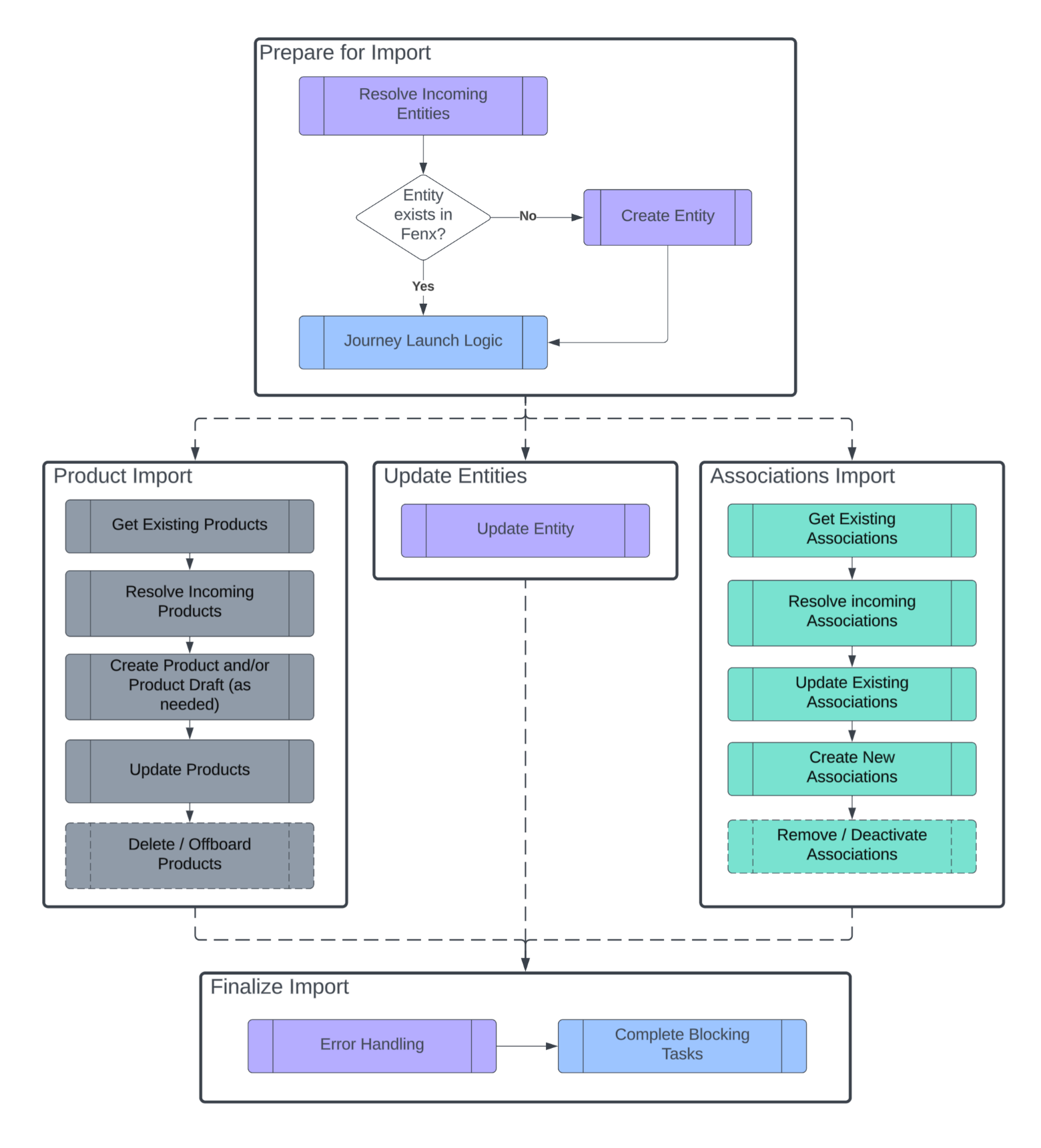
The diagram below shows a simplified view of the Data Import Process. The Prepare for Import stage runs against each incoming entity sequentially to set up any Journeys/EntityDrafts required. The following phases run in parallel to Update Entities, Manage Products, and Associations (Entity and Group Associations). Once all data has been processed we review the import message for failures, merge the import outcome into each Journey/EntityDraft, and complete all blocking tasks in the journeys.
Resolver Rules
All incoming Data Domain records need to be resolved for uniqueness to determine if we should create a new record or update an existing record. Individual events may or may not be rerunnable based on the Integration Use Case & Journey that is triggered (e.g. duplicate journeys triggered with each run), but we should never risk creating duplicate Entity / Product / Association data in the application.
| Data Domain | Uniqueness Rules |
|---|---|
| Entities | - The Fenergo Entity Id, or - Entity Resolver: A single datakey configured as a search indexable field in policy config (externalDatakey == externalSystemId). The field value must be unique across the tenant or else a duplicate entity error will occur |
| Entity / Group Associations | - The Association Id, or - Source / Target / AssociationType together make a combined key |
| Products | - The Fenergo Product Id, or - Product Resolver - DataImport will search for existing products linked to the Entity that have a unique field (externalDatakey == externalSystemId) |
Journey Launch Logic
All incoming changes require a Journey to manage the update. Journeys cannot be shared by Entities (e.g. Client and Related Parties) - each entity requires it's own journey to manage the change.
The JourneyLogic Processor follows this process:
-
Does the incoming Entity require a Journey? The following conditions determine if an entity requires a journey:
- Entity includes Single / CollectionProperties
- Entity referenced as Lead Entity for incoming Association Hierarchy (e.g. EntityAssociation[].EntityId or GroupAssociation[].EntityId)
- Entity referenced by incoming Product changes (i.e. Products[].EntityId)
-
Does the Entity already have a journey inflight?
- Entity identified as RootEntity in EventResponseParams
-
What journey should be triggered?
DataImport Event Configuration allows events to be designed with specific journey launch rules per event (integration). These rules identify which journey to trigger under different scenarios.
Factor Description EntityType Company, Individual, Entity Group, Other IsExistingEntity Boolean - True / False based on Entity Resolver rules above TargetEntity Client or RelatedParty
This can be specified within the message if it's known by the upstream integration (Entities[].TargetEntity)
If not specified in the message and the Entity exists in Fenergo we read this from the Entity Role, or else the field defaults to null.Lifecycle OnboardingInProgress, Compliant, MaintenanceInProgress, ReviewInProgress, PendingOffboarding, ClientOffboarded
These are states managed in Fenergo based on open / completed journeys. For existing Entities we read this from the Entity.Lifecycle property
If multiple JourneyLogic match then DataImport will select the first matching node. Try to put your most specific configuration at the top of the list, and your more general ones (e.g. match on a single factor) at the end
Offboarding / Reonboarding Journeys
Offboarding and Reoboarding -type Journeys allow entities to be Fully or Partially Offboarding/Reonboarded. A list of jurisdictions must be provided when triggering the journey. This can be provided in Event Config to globally apply to all entities in the event (EntityProcessingRules.OffboardingJurisdictions and ReonboardingJurisdictions), or specified per-Entity (Entity[].Jurisdiction).
Offboarding: The Offboarding Journey will launch with the intersection of Jurisdictions specified in the Event and the Evaluated Jurisdictions of the Entity.
When no jurisdictions are specified the default behaviour will be to launch the journey with Global Jurisdiction for Full Offboarding.
| Incoming Jurisdictions from Event | Evaluated Jurisdictions on Entity in FenX | Offboarding Journey Jurisdictions |
|---|---|---|
| Canada, US, Spain | Global, Canada, US, Singapore | Canada, US |
| Canada, US | Global, Singapore | Ingress Error – Could not find any matching jurisdictions to offboard from provided list: {} |
| Canada, US, Global | 1 or more Jurisdictions | Global Ingress Warning - Global cannot be combined with other jurisdictions |
| None | 1 or more Jurisdictions | Global |
| Any or None | No Evaluated Jurisdictions remain, or Entity already Offboarded | Ingress Error – Cannot create offboarding journey for entity that is already offboarded |
Reonboarding: The Reonboarding Journey will launch with the intersection of Jurisdictions specified in the Event and the Offboarded Jurisdictions of the Entity.
When no jurisdictions are specified the default behaviour will be to launch the journey with all offboarded jurisdictions for Full Reonboarding.
| Incoming Jurisdictions from Event | Offboarded Jurisdictions on Entity in Fenergo | Reonboarding Journey Jurisdictions |
|---|---|---|
| Canada, US | Canada, US, Singapore | Canada, US |
| Canada, US, Spain | Canada, US, Singapore | Canada, US Warning – Incoming jurisdictions not available for reonboarding (Spain) |
| Ireland | Ireland, Global | Global, Ireland Global will be automatically included when offboarded |
| None | Any | All offboarded jurisdictions |
| Any | None or no matching | Error - Could not find any offboarded jurisdictions to reonboard |
Mapping Data
DataImport uses Policy Configuration in Fen-X to map the incoming data to datakeys defined in Policy.
DataImport supports the following field data types:
- Text Field
- Number
- Date
- Select Dropdown
- Multiple Select Dropdown
- Data Group
Entities
The Policy mapped via EventConfiguration.EntityConfiguration properties entityCreateJurisdictions and entityUpdateCategories. With these two collection properties you can provide the Policy categories that will be used when Creating and Updating your entity.
DataImport only merges data into the Entity Draft once. If your policy includes conditional fields triggered based on incoming data these attributes will not be updated if they are not initially "in scope". As a workaround you can configure a separate policy category used only by DataImport (your integration) and remove the conditional triggers so that all datakeys are in scope and populated by the incoming update
Products
Products differ from Entities as they are first created blank and only updated with details. The incoming data is mapped back to Product Requirement Sets (Policy) according to EventConfiguration.ProductProcessingRules ProductCategories.
Policy data mapping runs in a loop, merging matching policy fields to Single/Collection properties specified in the event. It supports conditionally-scoped fields and checking for new fields/jurisdictions until no new requirements are triggered (or all incoming data fields has been mapped).
Error Handling
Errors while processing incoming DataImport events are handled according to the different domain records being processed. All errors will be merged into a DataGroup defined in policy and referenced in the Event Configuration.
| Domain Record | Error Details |
|---|---|
| Entity and Product Errors | Errors that occur while processing individual Entity / Products are written to the given Entity. Data Validation issues are logged as a warning unless the field is marked as mandatory in the policy config in which case it will have a severity of Error. |
| Association Errors | EntityAssociation and GroupAssociation Errors are written to the lead entity (e.g. EntityAssociation.EntityId or ExternalEntityId) Any errors/warnings against individual entities referenced by the association hierarchy is replicated to the lead entity. |
EventResponseParams / Root Entity
If the event identifies a Root Entity then all errors are also aggregated to that Root Entity / Journey so it is visible from the journey that triggered the integration (CLM-initiated Event Integration Pattern).
External Logs
Event Ingress events are typically part of a larger integration and we need to be aware of upstream failures so that they can be reported back to a user who may be waiting in the application for that integration to complete. The Data Import message schema includes a section for External Logs where clients can provide details of any upstream failure and status to be reported to the Users in Fenergo.
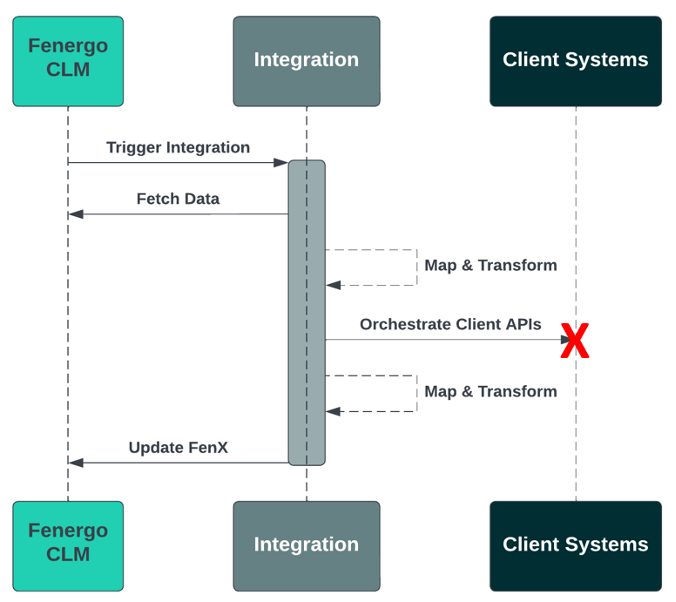
External Logs are only relevant in CLM-initiated Event patterns where an Application User is waiting on an integration outcome in a running journey. Therefore, any provided external logs are only reported against the Root Entity identified in EventResponseParams. Any upstream errors that occur in an External Event patterned integrations are expected to be handed in that upstream integration.
Integration Status
The IntegrationStatus field reflects the overall outcome of the integration (Success or Failure). It will be merged to a datakey identified in event configuration and can be referenced in Journeys to define custom paths / tasks.
If any errors are detected while processing each incoming record in the message then the individual Entity's ImportStatus will be set to "Failure", unless an external IntegrationStatus has been specified in the message's IntegrationStatus field (e.g. Client System Unavailable).
Like individual errors, the IntegrationStatus value will be reported up to parent entities.
This means an event can partially succeed - all entities will be created and some lower-level entities can successfully be updated while others failed. This is why Record Resolving Rules are enforced to prevent duplicate records from getting created.
Entity Batch Size
Events have a 15 minute maximum processing limit
It's difficult to say exactly how many entities can be processed per message as it can be impacted by a number of factors:
- Create vs Update Entity/Product operations
- How many Journeys are involved, and whether they are completing tasks or not
- Aggregating errors up to the Root Entity
- Domain-specific rate limits
- etc.
Events have a maximum processing time of 15 minutes. Our guidance is to start with 200 entities and gauge how long it takes based on your use case. Aim to keep below 12 minutes to allow for outside delays.