CreateAlert Overview
CreateAlert is a new event that allows clients to create a Transaction Monitoring Alert within Fenergo.
This event allows creating two types of Alerts: WithTransations and WithoutTransactions
Usage
In order to create an Alert with Transactions in Fenergo you need to use this combination of EventType and EventSubtype: transactionmonitoring:createalert.
In Swagger doc for Event Ingress there's a helpful example of the payload needed for CreateAlert event.
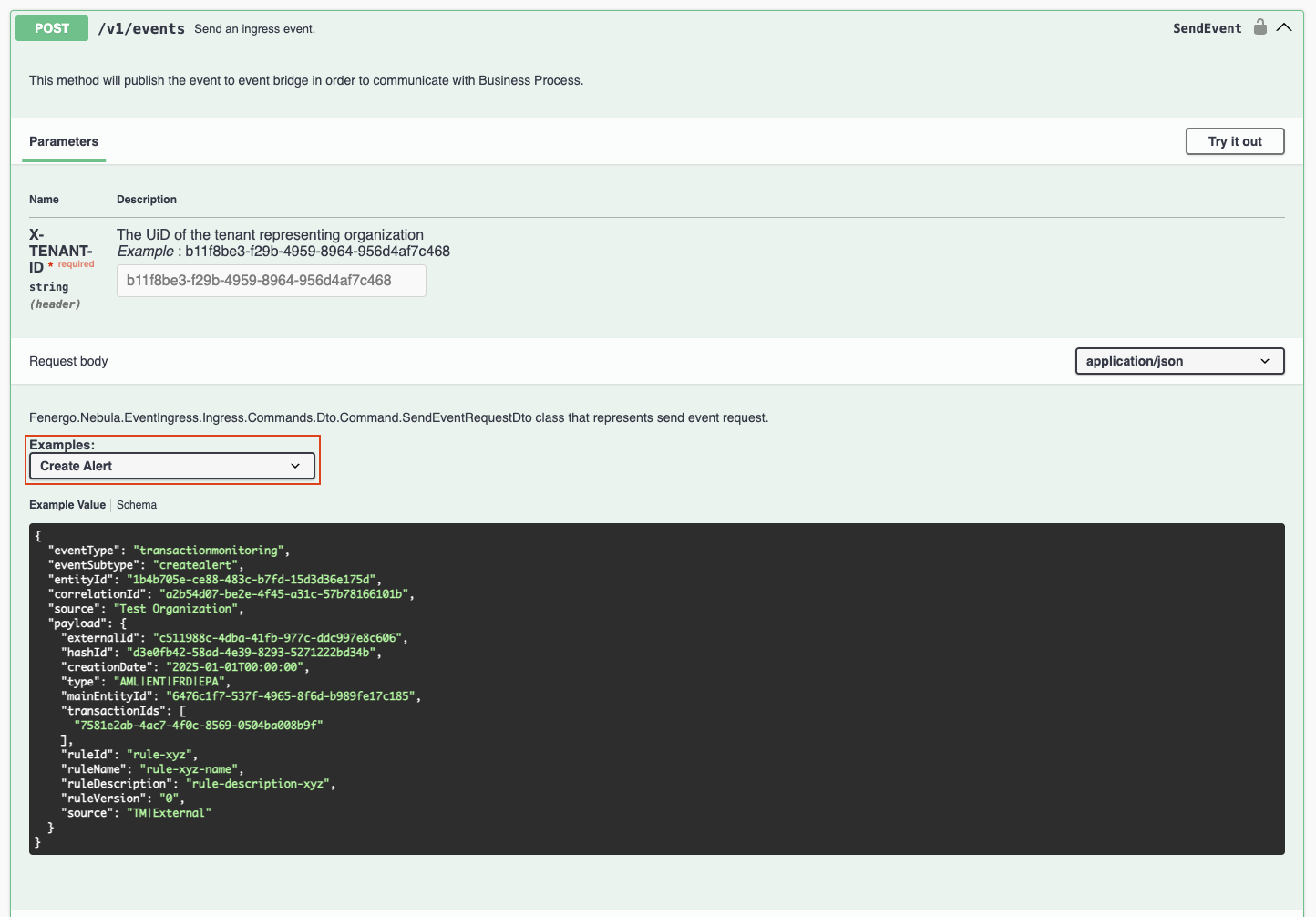
The types for the payload are as follows:
public record CreateAlertDto(
    Guid ExternalId,
    string? HashId,
    DateTime CreationDate,
    AlertType Type,
    Guid MainEntityId,
    List<Guid>? TransactionIds,
    string RuleId,
    string? RuleName,
    string RuleDescription,
    int RuleVersion,
    AlertSource Source,
    int? AlertScore
);
Main Entity Id
Important notice - this value needs to match the entityId on the top.
Alert Types
Available Alert Types are as follows:
- AML
- ENT
- FRD
- EPA
AlertSource
Available Alert Sources are as follows:
- TM
- External
Important notice - be aware that Alerts coming from Transaction Monitoring Integrated workflow uses the same mechanism. When creating your custom Alerts, use AlertSource of External when possible. This will allow you to better distinguish them from the TM Integrated workflow Alerts.
TransactionsIds
Alerts with Transcations
In order to create Alert with Transactions you need to put a valid TransactionIds that exist in TransactionMonitoring system. Whitelist evaluation that happens during the creation of an Alert requires valid TransactionIds. If invalid TransactionIds are passed, your event will be denied.
Alerts without Transactions
In order to create Alert without Transactions you need to pass empty array as an argument for TransactionIds
transactionsIds: []
In this scenario Whitelists are not evaluated.
Journey integration
As part of creation of an Alert we're creating a Journey Instance of type Alert Assessment. Only one Alert Assessment Journey will be evaluated, but clients can use Scoping conditions to fine tune their desired outcome.
More information on the Alert Journey configuration here: Alert Journey Configuration